Published
A technical SEO audit checks whether search engines can crawl, index and render your pages. Run it as five gates in dependency order — access, indexation, architecture, page experience, rendering — because a failure at gate one makes every measurement after it meaningless. Below: 41 checks, the tool for each, and how to triage what comes back.
That ordering is the whole point. A crawler will happily report Core Web Vitals for a section that robots.txt has been blocking since March, and the numbers will look fine, because no real user ever waited for those pages. Fix the block first and the “fine” numbers change. Sequence is not a stylistic preference in an audit; it decides which of your findings are true.
How this checklist was built. The 41 checks below are the sequence we run, ordered by dependency. The ordering claim is measured: of the ten pages Google ranked for this query in the United States on 2 August 2026, the published lists ran from 6 items to over 50, and every one of them grouped checks by category — crawling, speed, on-page — rather than by what has to be true before the next check means anything.
What a technical SEO audit checks, and what it deliberately ignores
A technical SEO audit answers one question: can a search engine reach, keep, understand and serve this page? Everything outside that question belongs to a different piece of work, and mixing them is how audits turn into 90-page documents nobody actions.
- Not a content audit. It never asks whether the page answers the query well. A perfectly crawlable page about nothing stays a page about nothing.
- Not a backlink audit. It looks at internal links — the ones you control — and says nothing about who links to you from outside.
- Not a speed test. Page experience is one gate of five. The slowest page on the internet still ranks when it is the only page that answers the question.
Keeping the scope this tight is what makes the audit finishable. It also makes the handover honest: at the end you can say which of the three reasons a page is not ranking you have actually ruled out.
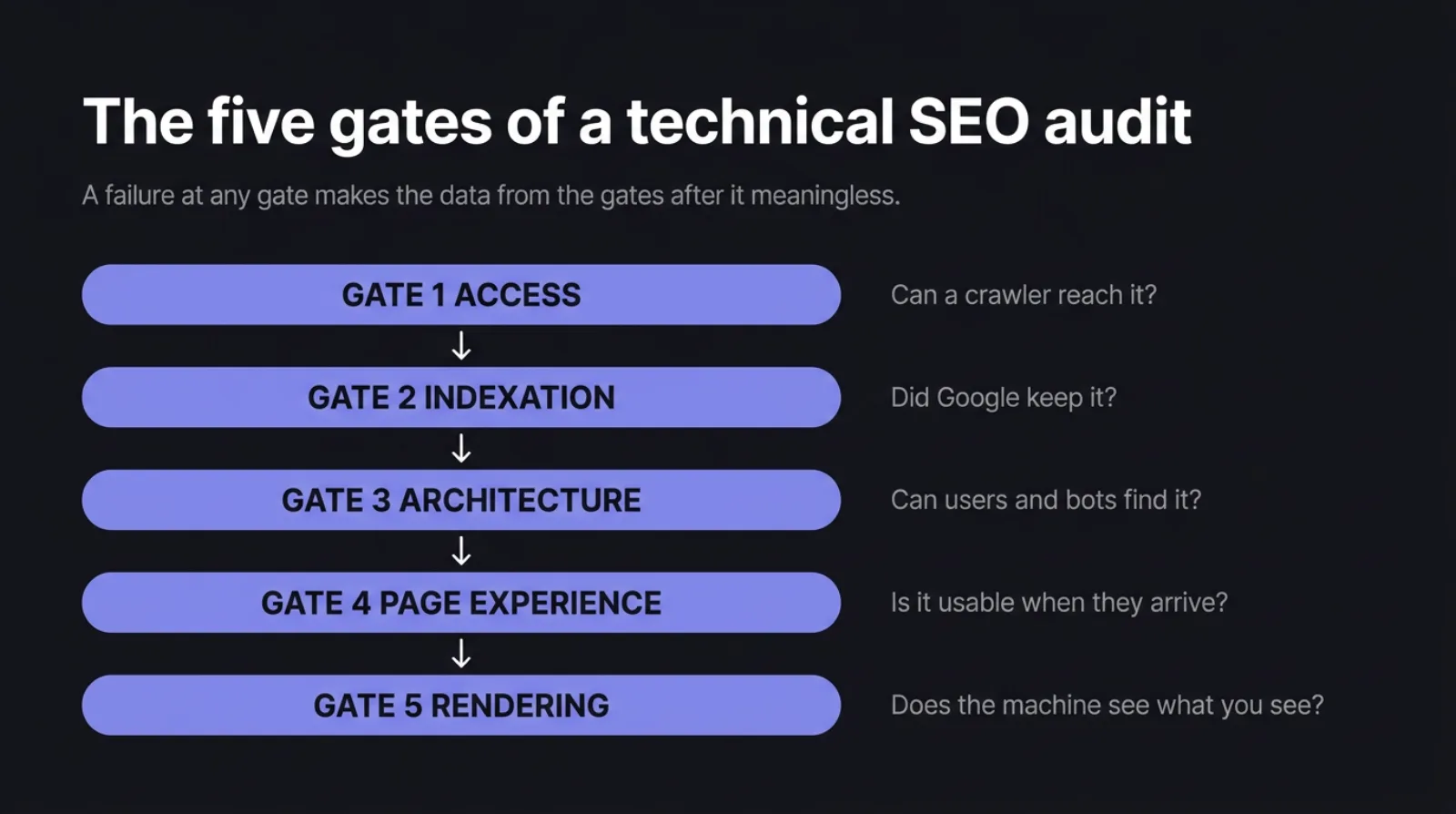
The five gates of a technical SEO audit, in dependency order
Each gate answers a question that has to be settled before the next one produces trustworthy data.
| Gate | Question it settles | Why it comes first |
|---|---|---|
| 1. Access | Can a crawler reach the site at all? | Everything below is measured on pages that were never fetched otherwise |
| 2. Indexation | Did the search engine keep the page and pick the right URL? | Architecture work on a de-duplicated URL set is work on the wrong URLs |
| 3. Architecture | Can bots and users find the pages that matter? | Optimising the speed of a page nothing links to changes nothing |
| 4. Page experience | Is the page usable once someone arrives? | Only meaningful for pages that are reachable, indexed and linked |
| 5. Rendering | Does the machine see what a human sees? | Catches the failures the first four gates report as clean |
The practical rule: do not open the next gate while the previous one has an unresolved blocking finding. Not because the checks are hard, but because their output is unreliable until the gate above is closed.
Gate 1 checklist: can search engines reach the site at all
Seven checks. All of them are cheap, and any one of them failing invalidates the rest of the audit.
robots.txtreturns 200 and does notDisallowany section that is meant to earn traffic. Read it line by line rather than trusting a summary.- The site resolves on exactly one hostname.
wwwand non-www,httpandhttpsshould collapse to a single version with 301s, not all answer 200. - HTTPS is valid across every template, with no mixed-content requests and no certificate that expires inside the next 30 days.
- No 5xx responses or timeouts under crawl load. Crawl at a realistic rate and watch whether the server degrades — intermittent 503s look like nothing in a browser.
- CDN, firewall and bot-management rules do not block search crawlers. Test with the crawler user-agent, not your own; edge rules routinely challenge bots the origin would have served.
- Staging and development environments are not crawlable or indexed. Search the index for your staging hostname; it is one of the most common duplicate-content sources.
- The XML sitemap returns 200, is referenced in
robots.txt, and lists only canonical, indexable, 200-status URLs. A sitemap full of redirects trains crawlers to trust it less.
Gate 2 checklist: indexation and duplicate signals
Nine checks. This gate decides which URLs the rest of the audit is even about.
- Read the Page indexing report by reason, not by total. “Discovered — currently not indexed” and “Crawled — currently not indexed” mean different things and usually cluster on one template.
- No accidental
noindexon templates that are supposed to rank. Check the rendered response header as well as the meta tag. - Canonicals are self-referencing on canonical pages and point at a real 200 URL everywhere else. Site-wide canonicals aimed at the homepage are a classic template bug.
- Parameter URLs are contained. Filters, sorting, session IDs and tracking tags should not be generating an open-ended set of near-identical URLs.
- Pagination is handled on purpose. Page 2 and beyond should be either indexable or canonicalised deliberately — not accidentally collapsed into page 1.
- Title tags and meta descriptions are unique across templates, not just across hand-written pages.
- Templated variants are not thin duplicates. Location and service pages generated from the same paragraph with the city swapped are the usual offender.
hreflangpairs return 200 and reciprocate, if the site is multilingual. A one-way annotation is ignored.- Trailing slash, uppercase and index-file variants resolve to one URL. Test
/page,/page/,/Page/and/page/index.htmlby hand.
Gate 3 checklist: site architecture and internal links
Eight checks. This is where most of the audit’s actual working time goes on a mid-size site.
- Money pages sit within three clicks of the homepage. Measure click depth from a crawl, not from the navigation design.
- Orphan pages are identified by cross-referencing, not by crawling. A crawler starts from your links, so a page nothing links to is invisible to it by definition — see the next section.
- Internal links point at final URLs, not at redirects. Every hop dilutes the signal and wastes crawl budget on a page that already exists elsewhere.
- No redirect chains or loops. One hop is acceptable; three is a maintenance bug that will outlive whoever created it.
- Anchor text describes the destination. “Read more” and “click here” tell a search engine nothing about the page they point to.
- Navigation and footer links are real
<a href>elements, not JavaScript click handlers. If the link only exists after a click event, it does not exist for a crawler. - Faceted navigation is not a crawl trap. Multi-select filters can generate more URLs than the site has products.
- Breadcrumbs exist and match the URL hierarchy they claim to describe.
Which tools to run at each gate, and what each one cannot see
The most expensive mistake in a technical audit is treating one tool’s output as the full picture. Every tool has a blind spot, and the blind spots are structural rather than fixable.
| Gate | What to run | What it structurally cannot see |
|---|---|---|
| 1. Access | Header and status checks, robots.txt tester, uptime and error logs | Whether the crawler was served the same response you were — edge rules vary by user-agent |
| 2. Indexation | Search Console Page indexing report and URL Inspection | URLs Google has never discovered; they simply do not appear in any report |
| 3. Architecture | A full site crawler | Orphan pages — it can only follow links that exist |
| 4. Page experience | Field data from Core Web Vitals; a lab tool for diagnosis | A lab score is one simulated device; it never tells you what real visitors experienced |
| 5. Rendering | URL Inspection’s rendered HTML, a JavaScript-off fetch, a structured data validator | Whether the version Google indexed weeks ago matches what it renders today |
The gap between two of those tools is where the worst findings live. A crawler knows the URLs you link to. Search Console knows the URLs Google has encountered. Neither set contains the other, and the difference is diagnostic:
- In the crawl, absent from Search Console — pages Google has never discovered, or has discovered and discarded.
- In Search Console, absent from the crawl — orphan pages, which are earning impressions with no internal support whatsoever, and are usually the cheapest wins in the entire audit.
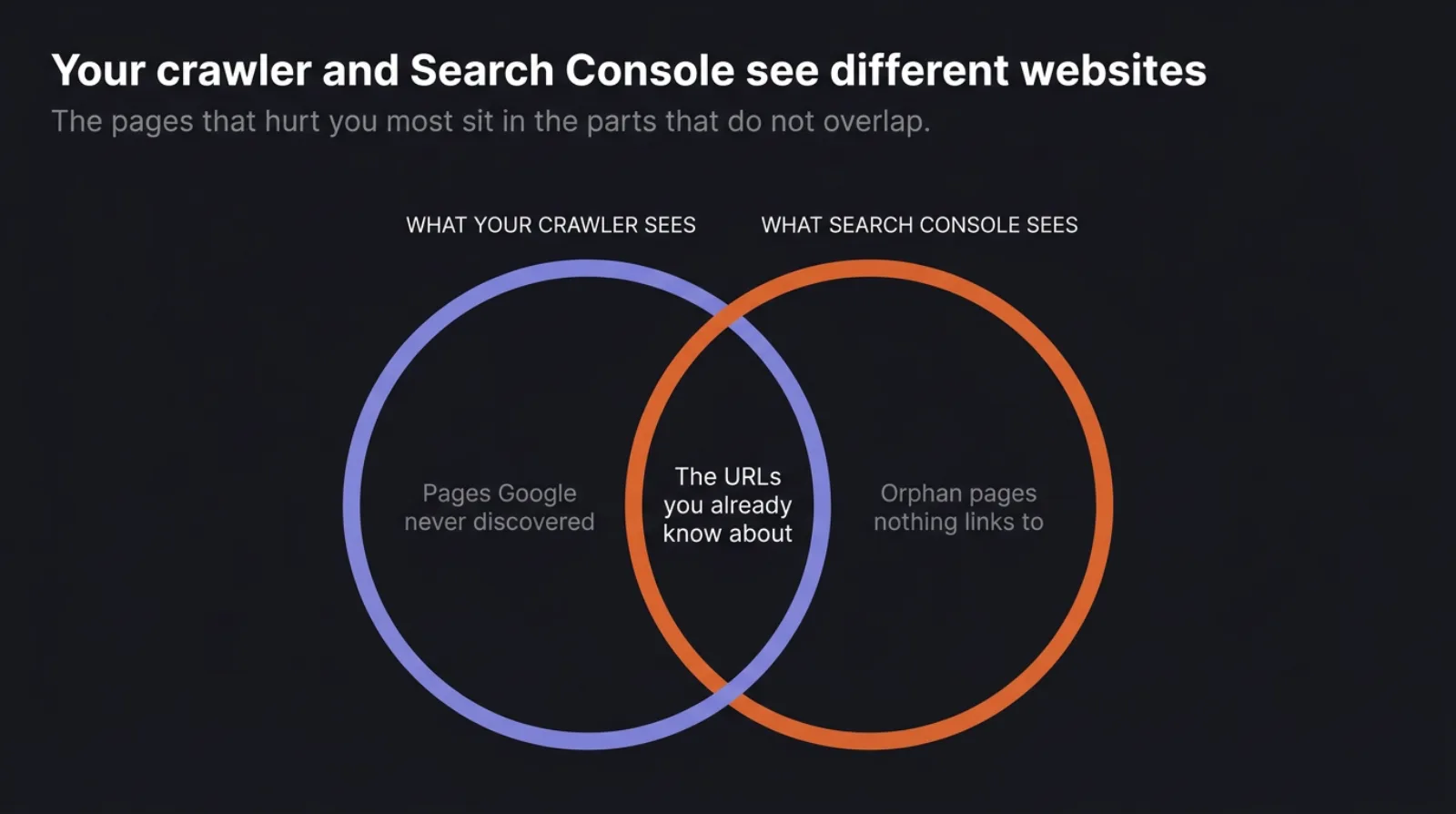
Export both lists and diff them. It takes ten minutes and it is the single check most published checklists omit entirely, because it is the one thing no single tool can hand you as a report.
Gate 4 checklist: page experience and Core Web Vitals
Eight checks. Read all of them per template, never as a site-wide average.
- Core Web Vitals pass rate comes from field data, grouped by URL pattern. A site-wide “needs improvement” usually means one template is failing badly and the rest are fine.
- The LCP element is identified for each major template. You cannot improve it until you know whether it is a hero image, a web font or a server response.
- Layout shift sources are traced to specific elements — images without dimensions, late-loading banners, fonts swapping in.
- Interaction responsiveness is measured on the templates that have interactions, not on the homepage where nothing happens.
- Mobile rendering has no horizontal scroll, text is readable without zoom, and tap targets are not stacked on top of each other.
- Render-blocking resources are inventoried. Unused CSS and JavaScript shipped on every page is the most common single cause of a slow first paint.
- The LCP image is not lazy-loaded. Lazy-loading the largest above-the-fold image is a self-inflicted wound that tools rarely flag as severe.
- No intrusive interstitial covers the content on mobile entry. Cookie walls and full-screen promos count.
Gate 5 checklist: rendering, structured data and machine readability
Nine checks. This gate exists because the first four can all report clean on a page a search engine cannot actually read.
- Compare raw HTML against rendered HTML. Main content, internal links and metadata should exist before JavaScript runs.
- Structured data validates and describes only what is visible. Marking up content the visitor cannot see is a manual-action risk, not a clever shortcut.
- Every template has one
H1and a unique<title>, generated server-side. - Canonical, title and robots directives are not injected by client-side JavaScript, where they may be evaluated too late or not at all.
- The 404 page returns a 404 status. A soft 404 that answers 200 quietly invites thousands of dead URLs into the index.
lastmodin the sitemap reflects real content changes, not the timestamp of the last build.- Crawl stats show the crawler spending its budget on templates that matter, rather than on parameters, filters and pagination.
- AI crawler rules are a decision, not a default. Whether you allow or block the assistant crawlers, that line in
robots.txtshould be there because someone chose it. - Content is not gated behind a consent banner for bots. If the page body only appears after a cookie choice, the crawler sees the banner.
How to read technical SEO audit findings without chasing false positives
A crawl of a normal 500-page site returns several thousand “issues”. Perhaps thirty matter. Tool severity scores rank by how confidently the tool detected something, which is not the same as how much it costs you, so re-sort every export by consequence into three tiers.
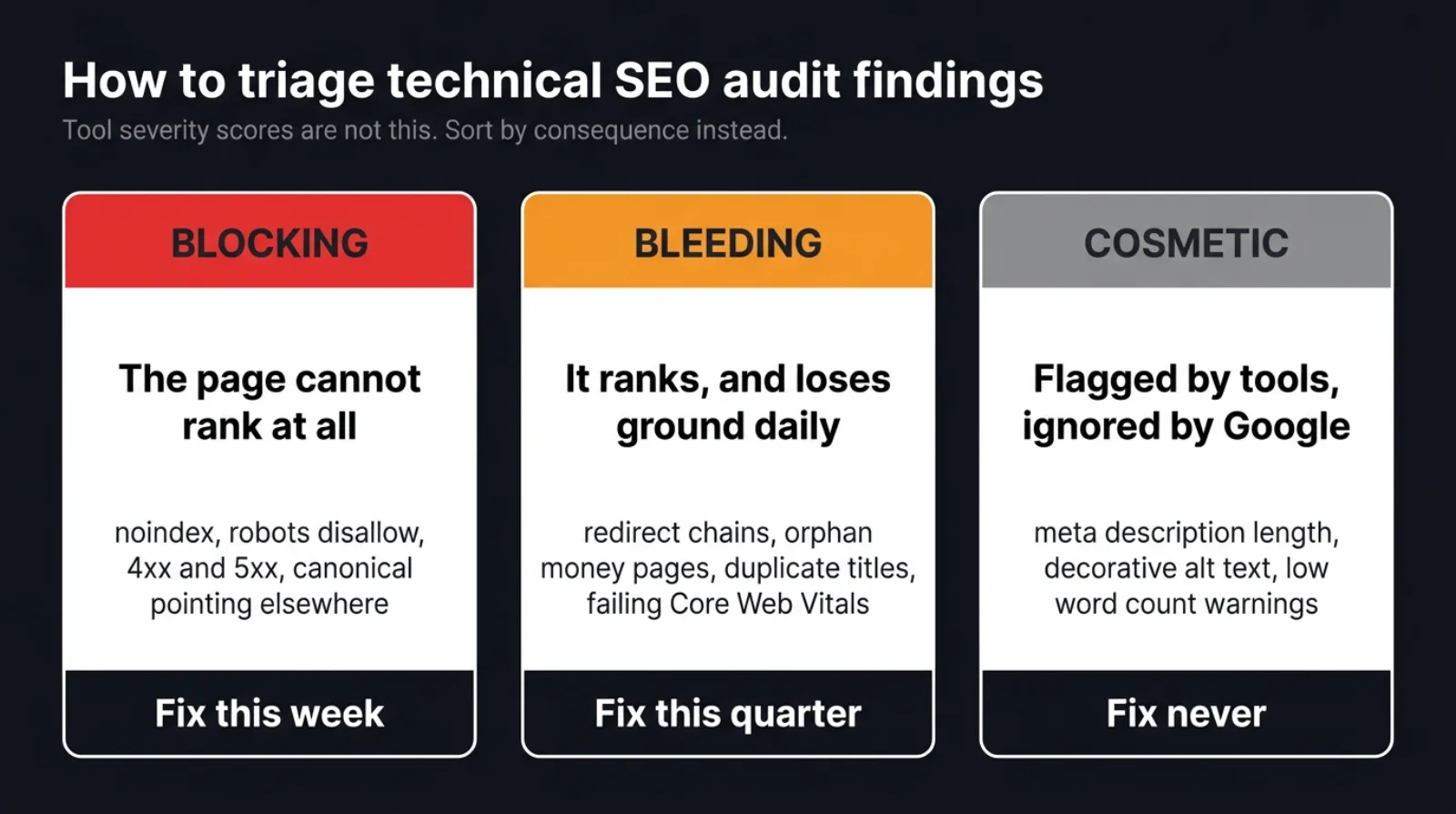
- Blocking — the page cannot rank at all.
noindex, arobots.txtdisallow, a 4xx or 5xx, a canonical pointing somewhere else, or content that never renders. Fix this week; nothing downstream is trustworthy until it is gone. - Bleeding — it ranks and loses ground continuously. Redirect chains, orphan money pages, duplicate titles across a template, Core Web Vitals failing on the highest-traffic layout. Fix this quarter, in order of the traffic each page already earns.
- Cosmetic — flagged by tools, ignored by search engines. Never a project of their own. Fix them when someone is already editing that template for another reason.
The recurring false positives are worth naming, because each one can absorb a day:
- Meta description length warnings. Descriptions get rewritten in the results page most of the time anyway.
- “Duplicate content” on paginated or filtered URLs that are already correctly canonicalised.
- “Low word count” on a page that answers its question in 200 words and has nothing else to say.
- Broken external links that return 403 to a crawler and 200 in a browser.
- Missing alt text on decorative and spacer images, where empty alt is the correct answer.
- A single-page lab performance score treated as a grade for the whole site.
How long a technical SEO audit takes by site size
These are the working ranges we plan a first pass against — our own estimating bands, not a quote, and they assume the site is reachable and a crawl can complete.
| Site size | First full pass | Where the time actually goes |
|---|---|---|
| Under 100 pages | 2–4 hours | Gates 1 and 2; the crawl itself finishes in minutes |
| 100–1,000 pages | 1–2 days | Gate 3 — untangling internal links, redirects and orphans |
| 1,000–10,000 pages | 3–5 days | Gate 2 — classifying why thousands of URLs are not indexed, by template |
| Over 10,000 pages | 1–2 weeks, plus log files | Crawl budget and faceted navigation; sampling replaces exhaustive checking |
Two things stretch these ranges more than page count does. The first is the number of templates rather than the number of pages: a 5,000-page site built from four templates audits faster than a 400-page site where every page was hand-built. The second is access — waiting for Search Console permissions or server logs routinely costs more calendar time than the analysis.
What to fix first when the technical SEO audit is done
Ship the blocking findings as one batch, in one deploy, and re-crawl before touching anything else. Split them across three sprints and you will never know which change moved which number.
Then work the bleeding tier in traffic order: the template earning the most impressions today gets fixed first, because a percentage improvement there outweighs a complete fix on a page nobody reaches. Leave the cosmetic tier in the document as evidence that it was considered and consciously deprioritised.
Re-run gates 1 and 2 four weeks after the fixes ship, against the same crawl settings. Indexation moves slowly, and a re-crawl with different settings produces a different number that has nothing to do with your work. The audit is only finished when that second pass exists — everything before it is a hypothesis. We run this sequence as the opening phase of every engagement, which is why the first month of our SEO services is diagnosis rather than deliverables; the owners run those audits themselves, which is also why we cap how many we take at once.
12 / Reader questions
Frequently asked questions
01What is a technical SEO audit?
A technical SEO audit is a systematic check of whether search engines can crawl, index and render your site, and whether the pages you care about are actually being served. It covers infrastructure — robots rules, status codes, canonicals, internal links, rendering and page speed — rather than the quality of the writing.
02How often should you run a technical SEO audit?
Run a full technical SEO audit once or twice a year, with a short monitoring pass monthly. The monthly pass is really three numbers: indexed page count, new crawl errors, and Core Web Vitals status. Any migration, replatform or template change resets the clock and needs its own audit regardless of the calendar.
03What is the difference between a technical SEO audit and an SEO audit?
A technical SEO audit covers only what decides whether a page can be crawled, indexed and rendered. A full SEO audit adds two layers on top: content, which decides whether the page deserves to rank for the query, and off-page authority, which decides whether search engines trust the domain enough to rank it.
04Can you do a technical SEO audit for free?
Yes, on a small site. Search Console, a browser's built-in Lighthouse panel and the free tier of a desktop crawler cover the first four gates on sites under a few hundred pages. Paid crawlers earn their keep on scale and scheduled re-crawls, not on capability, so cost is rarely the reason an audit does not happen.
05How long does a technical SEO audit take?
A first full pass takes two to four hours on a site under 100 pages, one to two days at 100–1,000 pages, and up to two weeks above 10,000 pages where log files and crawl-budget analysis become necessary. Most of that time goes into interpreting findings, not running the crawl.
06What are the most common technical SEO issues?
The findings that recur most often are duplicate or missing title tags, internal links pointing at redirects instead of final URLs, orphan pages no navigation reaches, parameter URLs multiplying into thousands of near-duplicates, and Core Web Vitals failing on one heavy template rather than across the whole site.