
Published
Google Ad Grants gives eligible 501(c)(3) nonprofits up to $10,000 a month in free Google advertising. The real limit is $329 a day. Accounts not running exclusively Smart Campaigns must hold a 5% click-through rate every month, and two consecutive months below that can switch the account off.
Those numbers are not independent. They pull against each other, and the tension between them is why most grant accounts spend a fraction of the headline figure and why some lose the grant entirely. The pages ranking for this query explain what the program is and how to apply for it. Almost none of them explain what it costs you to keep.
How this was checked. Every rule below is taken from Google’s own help documentation and read on 9 August 2026, with the source page named at each point so you can re-check it after the next policy revision. This matters more here than on most topics. The Ad Grants rules were rewritten in January 2018, tightened again in April 2019, and the program has since gained a campaign type it did not have — so a large share of the guidance still circulating describes a version that no longer exists. Where a figure is ours rather than Google’s — the click and impression arithmetic in particular — it is labelled as a calculation, with the inputs shown.
Why $10,000 a month is really $329 a day
Google’s own budgeting page for Ad Grants states the limit twice, in two units: accounts are “limited to a monthly budget of $10,000 USD, which equates to a daily budget of $329 USD” (Understanding budgets and bidding, read 9 August 2026). The daily figure is the one that binds.
Multiply it out. In a 30-day month, $329 × 30 is $9,870 — the monthly ceiling is unreachable by $130 before you have done anything wrong. In a 31-day month the daily cap would allow $10,199, so the monthly cap takes over and clips you back to $10,000. In a 28-day February you top out at $9,212, and $9,541 in a leap year.
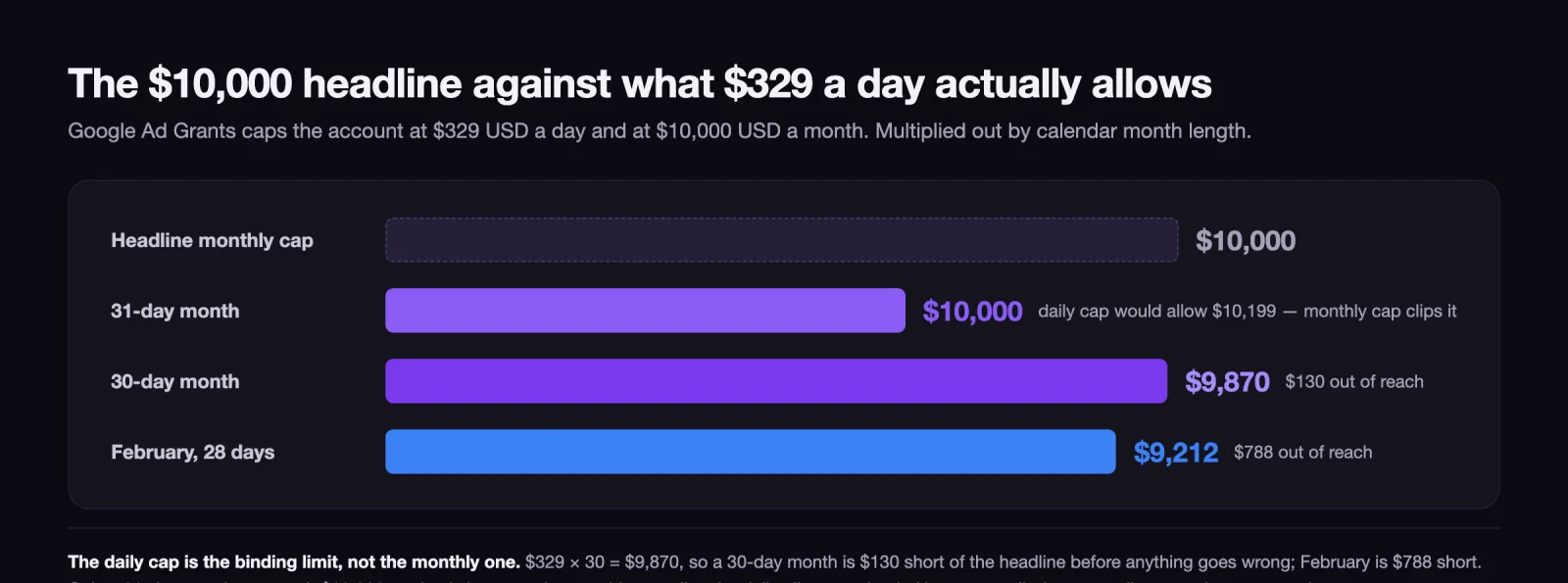
That is the best case, and it assumes every single day clears its full allowance. No account does. A day with low search volume for your cause simply does not spend, and unspent credit does not carry forward — the balance resets, it does not accumulate. There is no mechanism in the program that lets a quiet Tuesday fund a busy Saturday.
So the first correction to make is to stop treating $10,000 as a budget. It is an upper bound on a daily allowance, and the practical question is not how to spend it but how much of it your cause’s search demand can physically absorb.
The daily cap needs volume, the 5% CTR floor forbids it
Here is the mechanism nobody states plainly. Two of the program’s hard limits work against each other, and satisfying one makes the other harder.
The spending side wants clicks. To use $329 in a day you need a number of clicks equal to $329 divided by what you actually pay per click — 165 clicks a day even in the impossible case where every click charged the full $2.00 program maximum, and proportionally more as your real cost per click falls below it, which it always does.
The compliance side rations impressions. Ad Grants accounts “(who are not exclusively using Smart Campaigns) must maintain a 5% click-through rate (CTR) each month” (Account management policy, read 9 August 2026), and failing that for two consecutive months “can result in temporary account deactivation” (Ad Grants policy compliance guide, read 9 August 2026).
Now put the two together, because at exactly 5% they collapse into a single number:
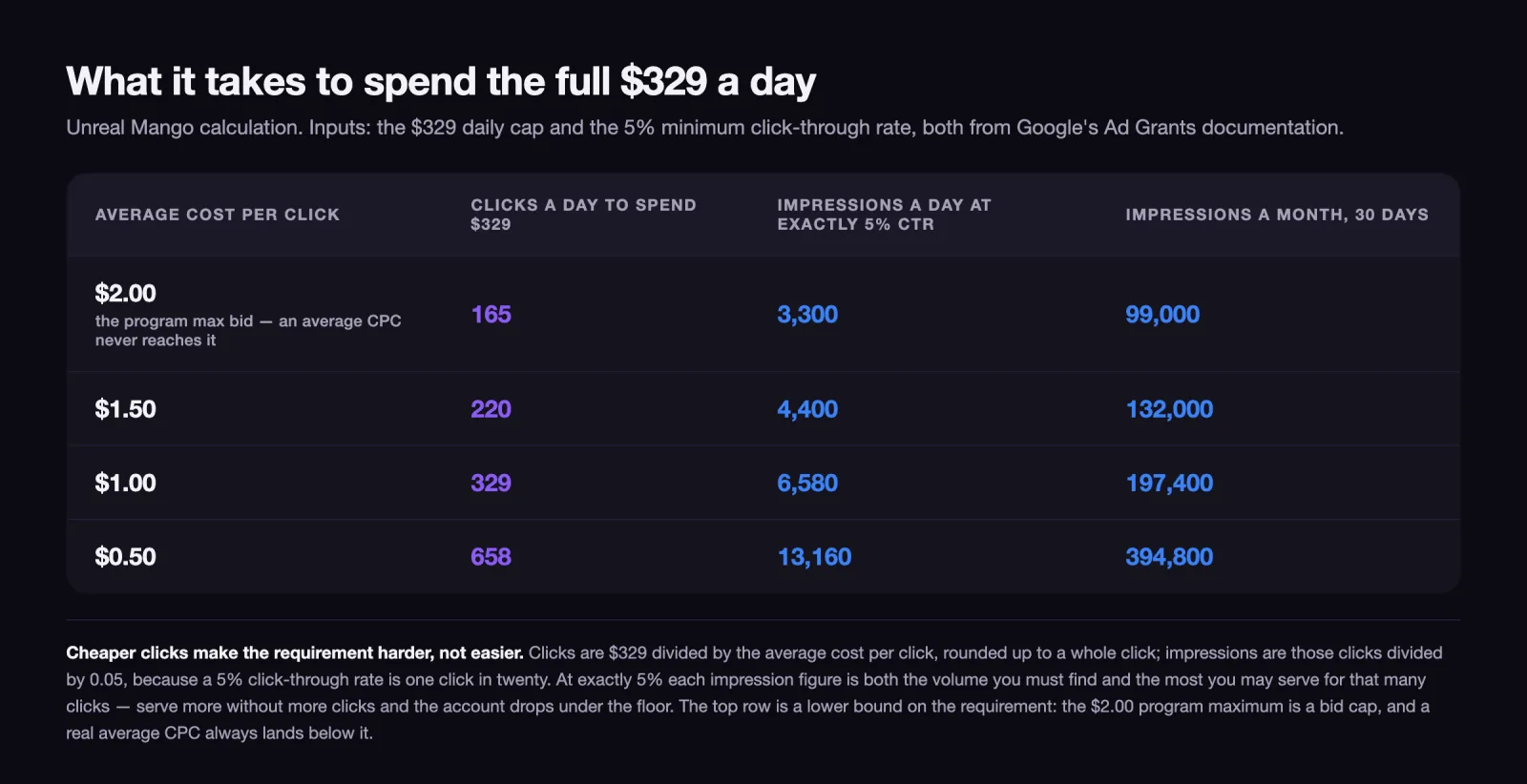
Take the top row. To spend the allowance you need 165 clicks; at a 5% click-through rate those clicks arrive with 3,300 impressions. And 3,300 is simultaneously the most impressions you are allowed to serve for 165 clicks — one more impression without one more click and the account is under the floor. The same figure is both the volume you must find and the ceiling you must not exceed. That is the vise, and it is why an Ad Grants account cannot be rescued by simply buying more reach.
Read the bottom row too, because it is the counterintuitive part. Cheap clicks make the problem worse. At an average cost per click of $0.50 you need four times as many clicks as the top row, so you need four times as many impressions — nearly 395,000 a month — and every one of them still has to convert at 5%. The obvious way to find that many impressions is to widen the keyword set, and a wider keyword set is exactly what pushes click-through rate under the line.
Two structural facts make the impression side harder still. Ad Grants Search campaigns must have “Include Google search partners” and “Include Google Display Network” deselected, because they are “only eligible for eligible Search inventory” (Create an Ad Grants campaign, read 9 August 2026) — so there is no cheap syndicated inventory to pad with. And geotargeting is mandatory, which narrows the pool further by design.
Performance Max is the one other campaign type available to grant accounts, and Google flags that it “may not be eligible to serve on all inventory” from an Ad Grant. It is worth testing, but it is not the volume escape hatch a normal paid account would have.
What actually switches a Google Ad Grants account off
The deactivation triggers are a short, specific list, and they are enforced. Google’s account management policy is blunt about the process: “Any account found in violation of program policies is subject to automatic suspension without notification.”
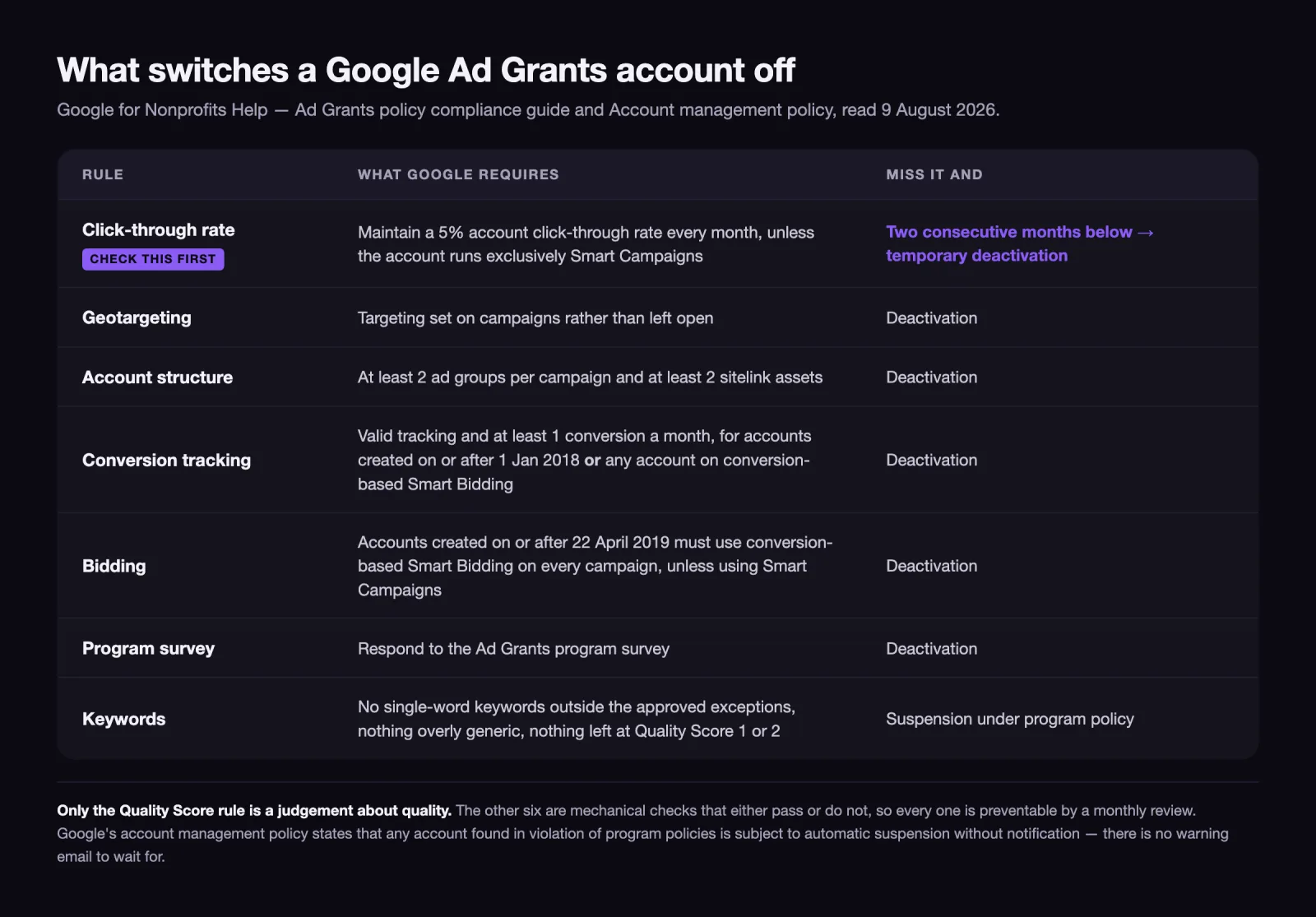
Three things are worth noticing about that list.
The first is that only one of them is a judgement about quality — the Quality Score rule, which is Google’s own rating of expected click-through rate, ad relevance and landing page experience. The other six are mechanical checks that either pass or do not, which means they are preventable by a monthly review that takes under an hour.
The second is the two-month grace on click-through rate. One bad month is survivable. What kills accounts is nobody looking during the second bad month, because there is no invoice arriving to prompt anyone to look. A paid account announces its own decline through the bank statement; a grant account decays silently.
The third is the survey. Failing to respond to the program survey is a deactivation trigger, and it is the one most likely to hit an organisation where the person who set up the account has since left. Whoever owns the login owns the survey.
Reinstatement exists. The route is to fix the underlying violation and then request reinstatement through Google’s process — but the ads are off in the meantime, and there is no back-credit for the weeks the account sat dark.
The single-word keyword ban, and the generic terms that trigger it
Ad Grants accounts are not allowed to bid on single-word keywords. The policy compliance guide allows exceptions for an organisation’s own brand keywords, approved medical conditions and, in Google’s phrasing, some other cases — the list is deliberately not closed, so a term you believe qualifies is worth checking rather than assuming.
Alongside that sits a separate and vaguer rule against overly generic keywords, with Google’s own examples being terms like “free videos”, “e-books” and “today’s news”. The test being applied is whether a searcher typing that term could plausibly want you. A food bank bidding on “donate” fails it; the same food bank bidding on “donate food bank denver” does not.
Then the quality gate: keywords with a Quality Score of 1 or 2 must be paused or removed. Keywords whose Quality Score displays as a dash rather than a number are exempt, which in practice means very low-volume terms are left alone.
Read together, these three rules are not really about keywords. They are the program’s mechanism for protecting the 5% floor on Google’s side of the deal. Single words and generic terms are precisely the keywords that generate impressions without clicks, and an account full of them would sink below the floor within a month anyway. The keyword policy removes the temptation before it becomes a deactivation.
The practical consequence for a small nonprofit is uncomfortable and worth saying directly: the terms with the volume to spend your daily allowance are usually the terms you are not allowed to buy.
Conversion tracking is the rule most grant accounts fail quietly
Ad Grants requires that “valid conversion tracking must be set up as described in the Ad Grants Conversion Tracking Guide and accrue at least 1 conversion per month”. The requirement reaches accounts created on or after 1 January 2018 or any account using a conversion-based Smart Bidding strategy — an either/or, not a both, so almost no live account sits outside it.
“At least one conversion a month” sounds trivially easy until you look at what most nonprofit sites count. If the only tracked conversion is a completed donation, a small organisation can genuinely go a month without one and lose the grant on a technicality while doing nothing wrong.
The fix is to define conversions that reflect the whole set of actions the site is actually for: newsletter signups, volunteer form submissions, event registrations, contact form completions, resource downloads. These are real outcomes for a nonprofit, not padding, and defining them properly is also what makes the required bidding strategies work at all.
There is a second-order benefit here that has nothing to do with compliance. An account with several honest conversion types tells you which appeals move people and which do not, which is the same input you would use to judge whether repeat supporters are coming back at all. That measurement question deserves its own treatment and gets one separately.
Who is eligible for Google Ad Grants, and who is quietly excluded
Eligibility runs through Google for Nonprofits, and the requirement is registration as a charitable organisation plus verification by Google’s validation partner (Google for Nonprofits eligibility, read 9 August 2026). Note the partner name: Goodstack. A great deal of the material still ranking for this topic names TechSoup, which was the validator under an earlier arrangement. If a guide tells you to start at TechSoup, it is describing a version of this program that no longer exists.
In the United States the underlying status requirement is IRS recognition as exempt under Section 501(c)(3), or group exempt status with proven affiliation to a central nonprofit that holds 501(c)(3).
The exclusions are the part organisations discover late:
- Government entities and organisations are not eligible, and unlike the two categories below there is no affiliated-arm route back in.
- Hospitals and health care organisations are not eligible, though affiliated charitable foundations may apply.
- Schools, academic institutions and universities are not eligible, though the philanthropic arms of educational organisations are.
- Fiscally sponsored organisations without their own 501(c)(3) are currently not eligible — a real obstacle for young projects operating under a sponsor’s umbrella, which is exactly the population that most needs free advertising.
That last one catches people. Operating under a fiscal sponsor is a normal, sensible arrangement for an early-stage cause, and it disqualifies you from this program until you obtain your own status.
Google Ad Grants for churches: automatically exempt, still not listed
Churches are the clearest illustration of how a paperwork gap becomes an eligibility gap.
The IRS position is explicit: churches “that meet the requirements of section 501(c)(3) of the Internal Revenue Code are automatically considered tax exempt and are not required to apply for and obtain recognition of exempt status from the IRS” (IRS, Churches, integrated auxiliaries and conventions or associations of churches, read 9 August 2026). Many churches, quite reasonably, have therefore never filed.
Google’s position points the other way. Its page on US tax exempt organisations acknowledges that some organisations, “such as churches”, are automatically exempt without applying — and then states that organisations must obtain IRS recognition of 501(c)(3) status, and that organisations “not registered with the IRS and not listed in the IRS’s online publication of tax exempt organisations aren’t eligible for Google for Nonprofits” (Tax exempt organizations (United States), read 9 August 2026).
So a church can be genuinely, lawfully tax exempt and still be invisible to the verification step, because the verification looks for a listing that automatic exemption never creates.
There are two ways out, and the cheaper one is worth checking first. Many congregations are covered by their denomination’s IRS group ruling, which supplies exactly the affiliation the group-exemption route accepts — ask the denominational office for the group exemption number before assuming you need to file. Only a genuinely independent congregation with no parent body has to seek its own recognition, and that is a process to start well before you plan to advertise.
Why Smart Bidding is mandatory, and what it does to the $2.00 cap
The $2.00 cap is the number most often described as the program’s defining limit. Two things about it are usually wrong.
The first is that it is not the ceiling over a manual-bidding account, because for most accounts manual bidding is not permitted at all. Google’s policy is unambiguous: “Ad Grants requires that accounts created on or after April 22, 2019 must use conversion-based Smart bidding for all campaigns, unless using Smart campaigns”, and “each campaign must use either Maximize conversions, Maximize conversion values, Target CPA, or Target ROAS bidding”. If your organisation set up its grant account any time in the last seven years, conversion-based bidding is a compliance requirement, not a tactic.
The second is that the cap is not absolute. Google states the exception directly: “In Ad Grants, using Maximize conversions, Target CPA, or Target ROAS bidding strategies allows the system to bid over the program-level $2.00 USD max bid if your account’s performance merits” (Tips for success with Google Ad Grants, read 9 August 2026).
Put those together and the sequence is fixed rather than optional. The required bidding strategies are conversion-based, so they only function once conversion tracking is real and recording enough events for the system to learn from. An account with no meaningful conversions is simultaneously in breach of the tracking rule, unable to satisfy the bidding rule properly, and pinned under $2.00 in auctions where the volume sits above it. Every one of those is the same root cause.
So conversion definitions are not the housekeeping item they look like on a checklist. They are the thing the whole account hangs from.
What a Google Ad Grant is worth once you price the work
The grant is free. Running it is not.
That distinction is the whole budgeting question, and it is easier to see next to a paid account. In a paid Google Ads account the media is the dominant line and management sits on top of it — we set out the full structure of that bill in what Google Ads actually cost. In a grant account the media line is zero and the management line is the entire cost. Every hour spent on keyword hygiene, conversion setup, ad copy and the monthly compliance check is an hour not spent on programme work or fundraising.
So the honest valuation is not “$10,000 a month of free advertising”. It is: the traffic your cause’s searchable demand can actually absorb inside the program’s constraints, minus the cost of the person maintaining compliance. For an organisation whose beneficiaries search for what it does — a legal aid clinic, an animal shelter, a disease-specific patient charity — that arithmetic is strongly positive. For an organisation whose cause nobody types into a search box, it is a monthly maintenance task that produces almost nothing, and the free credit does not change that.
Worth saying plainly: the constraint is demand, not credit. Free money against zero search volume is still zero.
The first 30 days of a new Ad Grants account, in order
- Confirm status before anything else. Check that your organisation appears in the IRS publication of tax exempt organisations, directly or through a parent’s group exemption. If it does not — including because you are an independent church that never filed, or a project under a fiscal sponsor — resolve that first, because nothing downstream will work.
- Verify through Goodstack, not TechSoup. Follow the current Google for Nonprofits flow rather than an older guide.
- Set conversion tracking before launching a single campaign. Define four or five real actions, not one. This is both a compliance requirement and the thing the required bidding strategies need in order to work.
- Build to the structure rules from day one: geotargeting set, at least two ad groups per campaign, at least two sitelink assets, and conversion-based Smart Bidding on every campaign. Retrofitting these after a suspension is slower than building them correctly.
- Write the keyword list under the ban, not around it. No single words outside the approved exceptions, nothing generic, and a plan for pausing anything that lands at Quality Score 1 or 2.
- Put a monthly calendar reminder on the account. Check CTR against the 5% floor, check that at least one conversion recorded, check for any survey request. Fifteen minutes a month is the entire cost of not being switched off.
If you would rather that monthly check sat with someone else, that is the kind of ongoing work our nonprofit and impact team picks up — but the checklist above is deliberately complete enough to run yourself.
11 / Reader questions
Frequently asked questions
01What is the Google grant of $10,000?
It is Google Ad Grants: up to $10,000 USD a month of free Google advertising for verified charitable organisations. It is a spending ceiling in ad credit, not a cash grant and not a transfer. Google caps the account at $329 a day, unspent credit does not roll over, and the credit only works inside an Ad Grants account.
02Do nonprofits get free Google Ads?
Verified nonprofits get free advertising through Ad Grants, not the full Google Ads product. Ad Grants accounts can run Search campaigns and Performance Max campaigns, and Google notes that Performance Max in a grant account may not be eligible to serve on all inventory. Search campaigns must have Google search partners and the Display Network switched off.
03Who is eligible for Google Ad Grants?
In the United States you need IRS recognition as a 501(c)(3) organisation and a listing in the IRS publication of tax exempt organisations, plus verification by Google's validation partner Goodstack. Government entities, hospitals and health care organisations, and schools, academic institutions and universities are excluded. Charitable arms of healthcare organisations and philanthropic arms of educational institutions can apply separately; government entities have no such route.
04Do Google Ad Grants work?
They work for organisations with searchable demand and a page worth landing on, and they fail quietly for everyone else. The grant bids in the same auctions as paid advertisers, on multi-word keywords, in a geography you set. If nobody searches your cause in words you are allowed to bid on, no amount of free credit produces clicks.
05Can a church get a Google Ad Grant?
Yes, though not always immediately. The IRS treats qualifying churches as automatically tax exempt without filing, so many have never obtained recognition of their own. Google requires organisations to hold IRS recognition of 501(c)(3) status and to appear in the IRS online publication, so a church needs either its own recognition or coverage under its denomination's IRS group ruling.
06Why was my Google Ad Grants account deactivated?
Check the click-through rate first: accounts not running exclusively Smart Campaigns must hold 5% each month, and two consecutive months below it can deactivate the account. The other triggers are missing geotargeting, fewer than two ad groups per campaign or fewer than two sitelink assets, invalid conversion tracking or under one conversion a month, not using conversion-based Smart Bidding where it is required, non-compliant keywords, and an unanswered program survey.
07How much of the $10,000 does a nonprofit actually spend?
Far less than the headline, and the daily cap is the reason. At $329 a day, a 30-day month tops out at $9,870 even if every dollar clears. Reaching that needs at least 165 clicks a day, and at a 5% click-through rate those clicks come from roughly 99,000 search impressions a month — which most single-cause nonprofits simply do not have.