Published
A content calendar is a schedule that assigns every planned piece a topic, a target keyword, a funnel stage, a channel, an owner and a publish date. The file takes twenty minutes to build. The reason most of them stop being opened inside six weeks has nothing to do with the file.
How this was checked. On 2 August 2026 we pulled the ten organic results Google ranks in the United States for “content calendar”. Six are product pages or template galleries, one is a gated download, one is a glossary definition, one is a university guide and one is a Reddit thread. Every one of them hands you a container. Not one of them tells you how many rows your team can actually fill in a week, which is the number that decides whether the calendar is still open in month three.
What a content calendar is, and what it is not
A content calendar is one table where every planned piece has a row, and every row carries enough information for someone else to produce it without asking you a question. That is the whole definition. The calendar is not the strategy, and it is not the work.
Three things it gets confused with:
- Not an editorial calendar. These are the same thing under two names. The distinction publishers used to draw — editorial for articles, content for everything — has collapsed, and the two search results pages largely overlap. Pick one word for your team and stop translating.
- Not a social media calendar. A social media calendar is one channel column of a content calendar, filtered. If your only output is Instagram posts, you need the smaller thing, and most of this article will be overhead.
- Not a content strategy. Strategy decides which audience you are trying to reach and which of their problems you own. The calendar schedules the output of that decision. A calendar built without the decision produces a tidy grid of posts that move nothing, and that is the failure we see most often in otherwise well-run calendars.
The nine columns a content calendar needs
Every column below earns its place by preventing a specific failure. Anything past these nine needs a reason before it goes in.
| # | Column | The question it answers | What breaks without it |
|---|---|---|---|
| 1 | Publish date | When does this go live | Nothing is scheduled, only listed |
| 2 | Topic or working title | What is this piece about | Two people write the same thing |
| 3 | Target keyword or question | What search or question does it answer | You publish a second page against your own first one |
| 4 | Funnel stage | Who is this for and how ready are they to buy | Everything drifts to top of funnel, nothing converts |
| 5 | Channel | Where does it go first | The same piece gets rewritten three times for three places |
| 6 | Format | Article, post, video, email, carousel | Hours are estimated wrong and the week overruns |
| 7 | Owner | Whose name is on it | The row exists and nobody moves it |
| 8 | Draft due | When must the draft exist | Everything is late on the same day |
| 9 | Repeat rule | One-off, series, or refresh on a date | Good pages decay quietly and nobody notices |
Three more columns earn their reason for most teams and are worth adding second, not first: status (idea, briefed, drafting, review, scheduled, live), link to the finished piece, and notes. A fourth appears later in this article — a single metric field, added to anchor rows only. None of the four is load-bearing the way an owner column is: a calendar without a status column still works, while a calendar without a name against each row does not.
Why funnel stage and repeat rule are the two that get left out
Of the template galleries in the top ten we pulled, almost all cover columns one, two, five, six and seven. Funnel stage and repeat rule are the two that go missing, and they are the two that decide whether the calendar produces revenue or just output.
Funnel stage stops the slow drift to the top. Top-of-funnel content is easier to think of, easier to write and easier to get engagement on, so a calendar left alone fills up with it. Tag each row top, middle or bottom, then check the ratio once a month. Apply the split to your anchor pieces rather than to every social row, because derivatives inherit the stage of the piece they came from. A workable split for a small business selling a considered service is roughly 50 / 30 / 20 — half the anchors attracting people who do not know you, three in ten helping them compare, a fifth aimed at people ready to talk. If none of your anchor pieces this year targets a buying query, you have a blog rather than a marketing channel.
Repeat rule is the column that turns a calendar into an asset instead of a treadmill. Three values cover it: one-off, series (part of a recurring slot), and refresh on
The keyword column deserves one warning. Before you assign a keyword to a slot, check whether one of your own pages already ranks for it — two pages aimed at the same query split the signal and both lose. That check is the duplicate-signal gate in our technical SEO audit checklist, and it takes about two minutes per term.
Content calendar examples: three filled rows
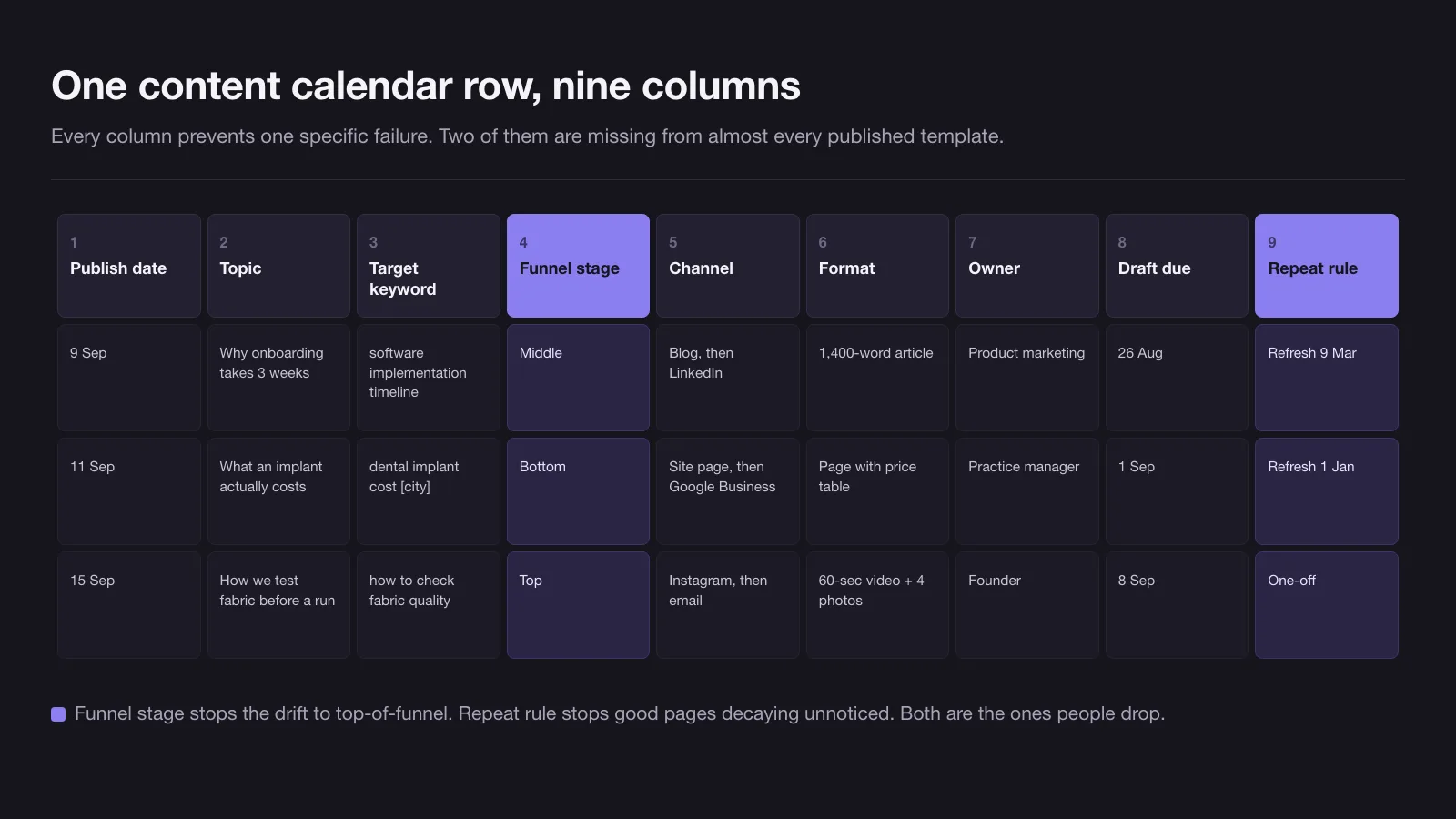
An empty template teaches nothing. Here is what one row looks like for three different businesses, with every one of the nine columns populated.
| Column | B2B software, 12 staff | Local dental practice | Ecommerce, single product line |
|---|---|---|---|
| Publish date | 9 Sep | 11 Sep | 15 Sep |
| Topic | Why our onboarding takes 3 weeks, not 3 days | What an implant actually costs here | How we test fabric before a run |
| Target keyword | “software implementation timeline” | “dental implant cost [city]” | “how to check fabric quality” |
| Funnel stage | Middle | Bottom | Top |
| Channel | Blog, then LinkedIn | Website page, then the Google Business Profile | Instagram, then email |
| Format | 1,400-word article | Page with a price table | 60-second video plus 4 photos |
| Owner | Head of product marketing | Practice manager | Founder |
| Draft due | 26 Aug | 1 Sep | 25 Aug |
| Repeat rule | Refresh on 9 Mar | Refresh on 1 Jan (prices) | One-off |
Notice what the rows have in common: the topic is specific enough to write from, the keyword is a real phrase somebody types, and the draft deadline sits far enough ahead of publication to match the format — one to two weeks for the written pieces, three weeks for the one that needs a shoot. Notice also that the dental row targets a bottom-of-funnel query with a price on the page. That single row is worth more than a quarter’s worth of top-of-funnel posts, and it is the row that a template with no funnel column will never prompt you to write.
How to build a content calendar in 90 minutes
Do it in this order. The order matters, because counting hours before counting slots is what stops the calendar being fiction. Ninety minutes covers a solo owner or a single marketer; a team of ten runs the same seven steps as a half-day session, because every number in it scales.
- Count available hours (10 minutes). How many hours per week does your team actually have for content, after client work, meetings and everything else? Write the number down. In the audits we run it is routinely half of what the team assumed.
- List ideas, no dates (25 minutes). Dump every topic you can think of into a list. Aim for three times the number of slots you expect to fill in a month. Sources that produce ideas fastest: questions sales gets asked, the last twenty support tickets, the search terms already bringing people to your site, and the objections that show up in lost deals.
- Tag each idea with a funnel stage (10 minutes). Top, middle or bottom. You will immediately see the imbalance.
- Pick anchors, then derivatives (15 minutes). Choose the substantial pieces first — the articles, videos or original research. Everything smaller is derived from them. A calendar built the other way round produces posts that point at nothing.
- Assign owners and formats (10 minutes). Every row gets a name. Rows without a name are ideas, not plans.
- Work backwards to draft dates (15 minutes). Take each publish date and subtract the lead time for that format. That subtraction is the step people skip, and skipping it is why everything is due on the same Friday.
- Stop at four weeks (5 minutes). Detail one month. Leave the rest of the quarter as an outline of anchors only.
How often to publish, by the size of your team
Publishing frequency is not a strategic choice. It is an arithmetic result of the hours you have, and the calendars that survive are the ones built from the hours upwards.
These are the hours we budget at Unreal Mango when we plan production, measured on the work we produce ourselves. They assume the piece arrives already specified — the hours below cover making the thing, not deciding what it should be, which is what a design brief does for anything visual. Where two or more people sign off on a piece, add 30 to 50 per cent for review rounds.
| Asset | Hours we budget | What that covers |
|---|---|---|
| Social post from an existing asset | 0.5–1 | Crop, caption, schedule |
| Newsletter built from published content | 2–3 | Assembly, subject lines, send test |
| Short-form video from existing footage | 2–4 | Cut, subtitles, thumbnail |
| Article, 1,200–1,800 words, researched | 6–10 | Keyword check, draft, edit, images |
| Original photo or video shoot | 8–16 per batch day | Brief, shoot, selects, edit; yields 6–20 derivative pieces |
Now turn that into a cadence. The hours column below is all-in — production plus planning, review, distribution and replies — which in our own scheduling runs 60 to 70 per cent above raw production time. That gap is the single most common reason a cadence set on paper is missed in practice.
| Team | Content hours per week | Anchor pieces per month | Derivative posts per week | Channels to run |
|---|---|---|---|---|
| Owner doing it alone | 5–7 | 1 | 2–3 | 1 |
| One marketer, content is half the job | 12–18 | 2 | 4–6 | 2 |
| Team of three | 25–40 | 4 | 8–12 | 3 |
| Team of ten | 90–160 | 8–12 | 15–25 | 4–5 |
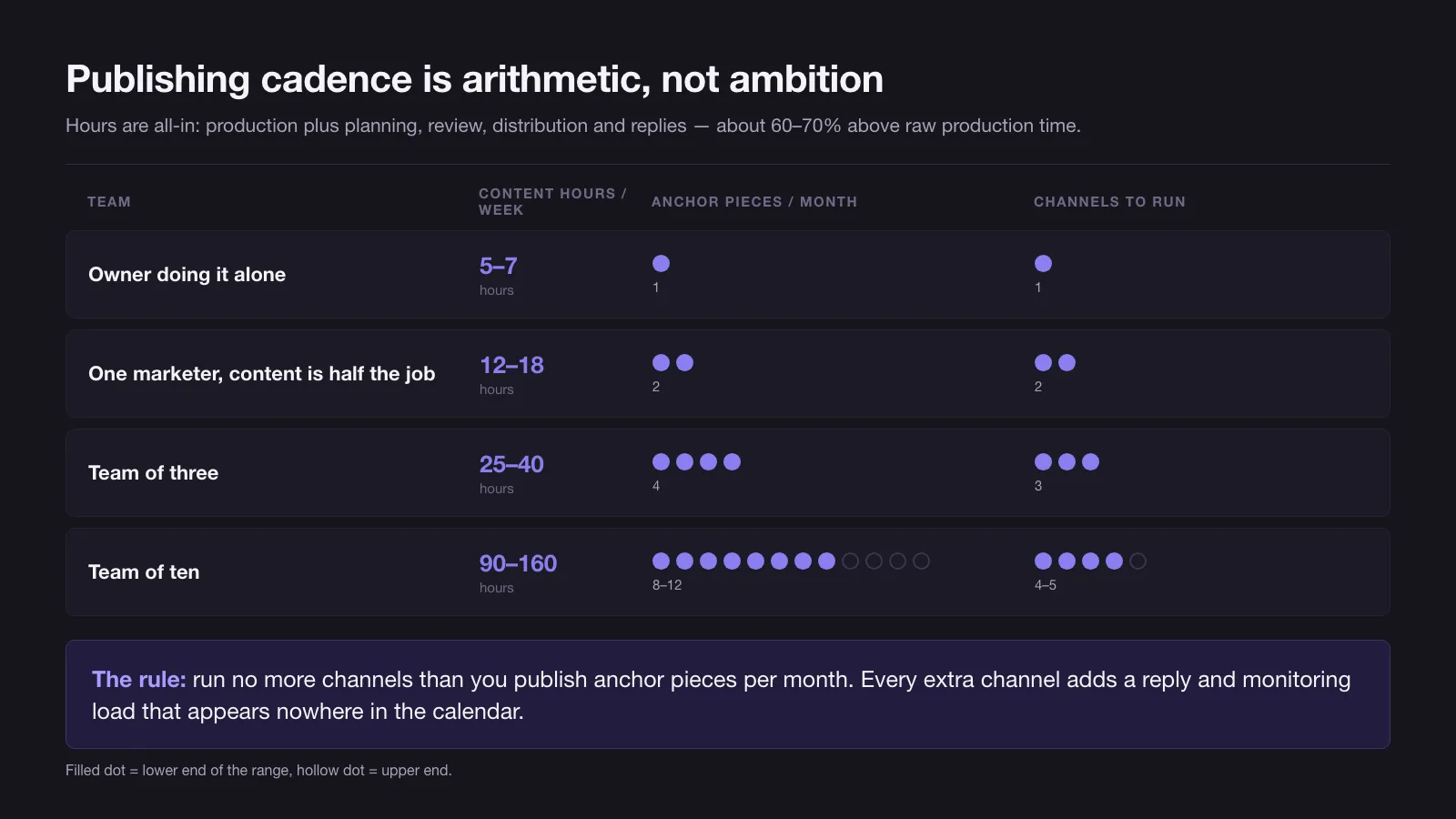
The rule that comes out of this: run no more channels than you publish anchor pieces per month. One anchor a month buys one channel. Four anchors buy three. Every additional channel adds not just the reformatting work but a reply and monitoring load that never appears anywhere in the calendar, and it is that invisible load that tips a team over.
Here is the arithmetic that kills most solo calendars. Three social posts a week at 45 minutes each is 2.25 hours. Add one article a month at eight hours, which is another 1.85 hours a week. That is just over four hours of production before a single reply, brief, revision or idea — which is why the solo row above tops out at seven hours all-in. An owner who budgeted “an hour or two a week” is already two to four times over in week one, and will find out in week six.
Why the content calendar dies in week six
Week six is not folklore. It is where the first batch runs out. In our experience a first planning sitting fills four to six weeks — that is as far as one session gets before the ideas stop — and week six is therefore the first week the calendar asks the team to do the thing it was built to avoid: think of something, today, under time pressure. Three failures show up at exactly that moment.
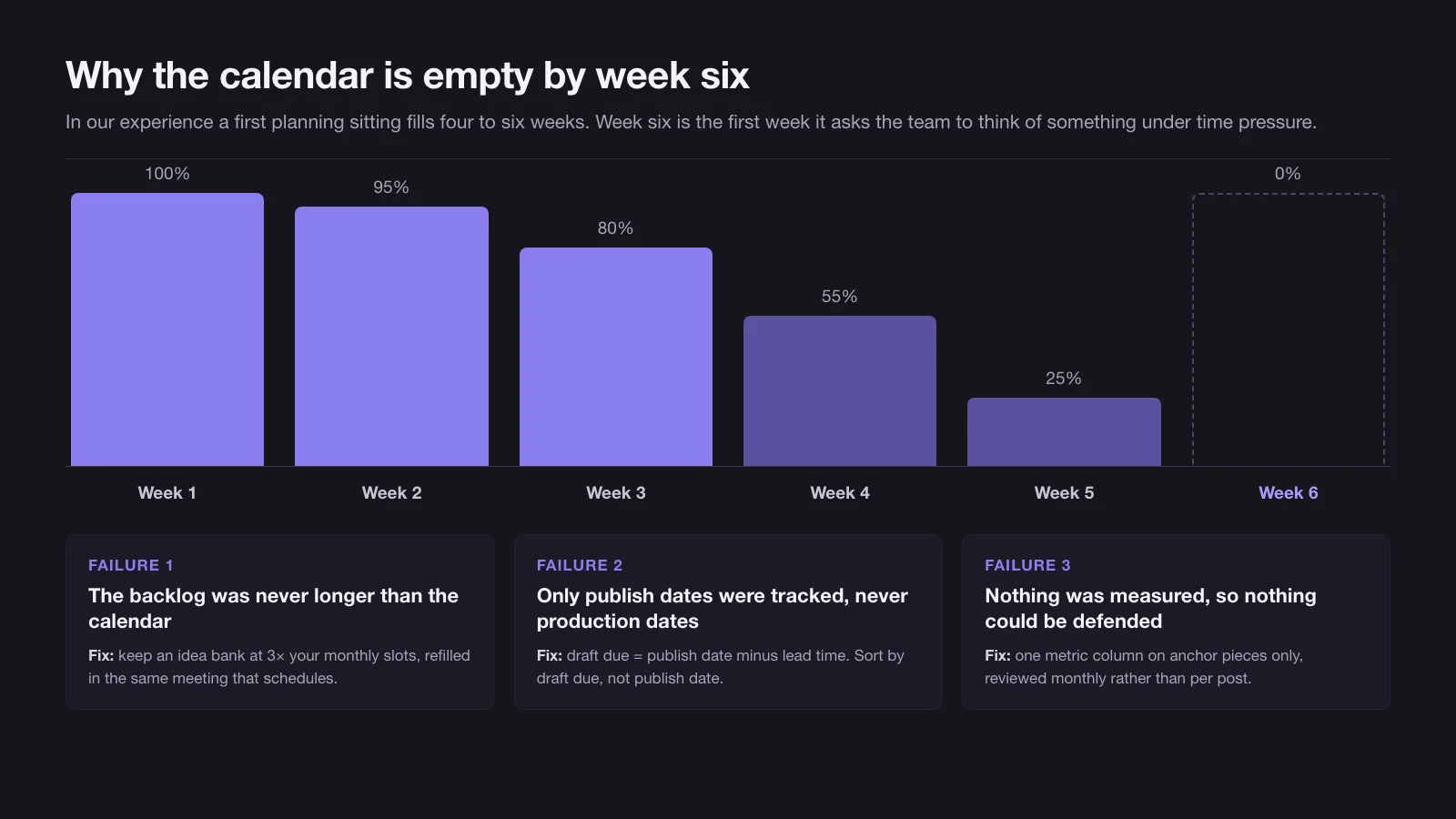
1. The backlog was never longer than the calendar. People fill the calendar and consider the job done, so the idea list and the schedule run out on the same day. The fix is a rule, not a habit: keep an idea bank at three times your monthly slot count, and refill it in the same meeting where you schedule. Never leave a planning session with the calendar full and the backlog empty.
2. The calendar tracks publish dates, not production dates. A row that says “publish 12 September” and nothing else hides all the work. The first real disruption — a launch, a sick week, a client emergency — shifts everything at once, and the calendar becomes visibly wrong, which is the point at which people stop opening it. The fix is column eight, and lead times that match the format:
| Format | Lead time from draft due to publish |
|---|---|
| Social post from an existing asset | 2 days |
| Newsletter | 5 days |
| Article | 10–14 days |
| Video needing a shoot | 15–21 days |
| Anything requiring client or legal approval | Add 7 days |
Then sort the calendar by draft due, not by publish date. The publish date is the outcome; the draft date is the work.
3. Nothing is measured, so nothing is defended. By week six the calendar has cost real hours and produced no number anyone can point at. The first busy week, it loses to billable work, and it never comes back. The fix is deliberately small: one extra field on anchor rows only, naming the metric that piece is supposed to move, checked monthly rather than per post. Match the metric to the funnel stage — impressions or new visitors for top, time on page or email sign-ups for middle, enquiries for bottom. One number per anchor piece is enough to defend the time. Twelve dashboards are not, because nobody reads them.
Where to build the content calendar: spreadsheet, workspace app or scheduling tool
The tool question comes up first and matters least. Every option below holds the nine columns. They differ in what breaks.
| Option | Setup time | Cost | Holds 100+ rows | Publishes for you | Survives a handover | What breaks first |
|---|---|---|---|---|---|---|
| Google Sheets or Excel | 20 min | Free | Yes | No | Yes | No field validation, no reminders, and the structure drifts once more than two people edit |
| Notion or Airtable | 1–3 h | Free to about $20–45 per user per month | Yes | No | Partly | The timeline gets hidden behind views nobody opens |
| Scheduling tool (Buffer, Later, Metricool, Hootsuite) | 1–2 h | Free to about $100+ per month depending on channels and seats | Within its own channels | Yes | Yes | Only covers the channels it supports; the blog lives elsewhere |
| Project tool (Asana, Trello, ClickUp) | 2–4 h | Free to about $25 per user per month | Yes | Only through third-party automation | Yes | Content rows compete with every other task in the workspace |
Prices above are typical published list ranges rather than quotes, and every vendor moves them. Start in a spreadsheet regardless: it costs nothing and holds every column above. Move only when you can name the thing that broke — “the columns mean something different to each of us by Monday” is a reason to move to a workspace app; “I want it to look nicer” is not. Teams that pick a tool before they have a filled month usually end up with a well-configured empty calendar, which is a more expensive failure than a messy full one.
What the monthly calendar review checks
Thirty minutes, once a month, five questions. This meeting is the difference between a calendar that lasts a quarter and one that lasts a year.
- Did last month ship? Count rows published against rows planned. Under 70 per cent means the cadence is wrong, not the team.
- What is the funnel split? If bottom-of-funnel is under 15 per cent of anchor pieces — three-quarters of the fifth you were aiming at — fix it this month.
- Is the backlog still three times the slots? If not, the next thirty minutes are an idea session, not a scheduling session.
- Which anchor pieces moved their metric? One number each. Repeat what worked before inventing something new.
- What is due for refresh? Pull every row whose repeat rule date falls in the next month, and schedule the update as a real slot with real hours.
A calendar that passes those five questions every month does not need a better template. If yours keeps failing them because nobody owns the meeting, that is a capacity problem rather than a planning one — and it is the point where an outside team running content marketing end to end costs less than the third abandoned calendar.
09 / Reader questions
Frequently asked questions
01What is a content calendar?
A content calendar is a schedule that assigns every planned piece of content a topic, a target keyword or question, a funnel stage, a channel, an owner, a draft deadline and a publish date. It is one table, and it exists so that publishing decisions get made once a month instead of every morning.
02How do you create a simple content calendar?
Open a spreadsheet, add nine columns — publish date, topic, target keyword, funnel stage, channel, format, owner, draft due and repeat rule — then fill four weeks of rows from an idea list before you touch dates. Ninety minutes is enough for a first month if you count your available hours before you count slots.
03What is the difference between a content calendar and an editorial calendar?
Nothing meaningful in 2026 — the two terms are used interchangeably and the two search results pages largely overlap. Historically an editorial calendar belonged to publishers and tracked articles and issues, while a content calendar covered every channel including social and email. Pick one word and use it consistently inside your team.
04What is the best free content calendar?
A blank Google Sheet, for almost every team under ten people. It costs nothing, holds every column you need, sorts and filters, and survives being handed to a new person. Free templates from tool vendors are usually the same spreadsheet with a sign-up form in front of it.
05What app is best for a content calendar?
A spreadsheet for almost everyone, until you can name what broke — then match the tool to the break. Spreadsheets drift structurally once more than two people edit them; workspace apps like Notion or Airtable fix that but bury the timeline; scheduling tools publish for you, but only to the channels they support.
06How far in advance should you plan a content calendar?
Plan four weeks in detail and the following quarter in outline. Detail beyond a month gets rewritten before it ships, and an outline shorter than a quarter leaves no room for the pieces with long lead times — video, original research, anything needing a shoot or a client approval.
07How many posts should a content calendar have per month?
As many as your available hours pay for, which for a small team is one anchor piece plus eight to twelve derivative posts a month, doubling both once content is somebody's half-time job. Count hours first: an article costs six to ten hours and a social post costs thirty to sixty minutes.