
Published
Upload 1440 x 1440 pixels for a square feed ad, 1440 x 1800 for 4:5, and 1440 x 2560 for Stories and Reels. Images cap at 30 MB, videos at 4 GB. That covers the question most people are asking. The harder part is what happens to that single file once Meta delivers it across every placement at once, and where the safe-zone numbers everyone publishes actually come from.
How this was checked. For this query in the United States on 10 August 2026, Google returned an AI Overview, an image pack, and an organic set in which three of the top results are Meta’s own documentation. The AI Overview still quotes 1080 x 1080 as the recommended feed size, which is one spec generation behind. Meta’s own domains are closed to automated retrieval, so every number below comes from published third-party documentation, each carrying the date its source was last updated. Where those sources contradict each other, this page prints the contradiction rather than picking a winner. Twenty-five safe-zone guides were collected for that comparison, and on the single most important measurement they cluster into five incompatible answers.
The sizes that cover every placement, checked 10 August 2026
Three uploads cover the entire placement grid. Everything else is a variation on them.
| Ratio | Upload at | Covers |
|---|---|---|
| 1:1 square | 1440 x 1440 | Feed, Marketplace, carousel, right column, search results, in-stream fallback |
| 4:5 portrait | 1440 x 1800 | Feed and profile feed on Facebook and Instagram, Threads feed |
| 9:16 vertical | 1440 x 2560 | Facebook and Instagram Stories, Facebook and Instagram Reels |
The 1440 series is the current recommendation. Shopify on 28 May 2026 and Surfside PPC on 6 August 2026 print it in full; Hootsuite on 16 July 2026 and TheOptimizer on 8 June 2026 print it for the feed ratios but still list a 1080-series figure for the vertical placements. The 1080 series that most cheat sheets and the AI Overview lead with is now the accepted floor, not the target.
Minimums, which are a different number from recommendations and are routinely conflated with them:
| Placement | Minimum accepted |
|---|---|
| Feed, carousel, collection | 600 x 600 px (1:1), 600 x 750 px (4:5) |
| Stories | 500 px wide |
| Reels | 600 px wide |
| Right column | 254 x 133 px |
| Audience Network | 398 x 208 px |
| Video, any placement | 120 x 120 px |
What happens between the minimum and the recommendation is documented by exactly one source, Conversion Studio on 9 August 2026, which says Meta upscales the file rather than rejecting it and you get visible blur and compression artefacts. Single-sourced, so treat it as such — but it matches what every other guide implies when it calls 600 pixels “a floor, not a target”.
Two ratio changes that older sheets get wrong. Right column moved from 1.91:1 to 1:1, so any guide still listing 1200 x 628 for it is stale. And 4:5 has displaced 1:1 as the default feed ratio, because at a fixed feed width it occupies about a quarter more mobile screen height for the same spend.
Where the published safe-zone numbers stop agreeing
This is the part no cheat sheet will tell you. The safe zone is the region of a full-screen vertical ad that platform interface elements do not cover: profile name and close button at the top, caption, audio ticker, call-to-action button and the like-comment-share rail at the bottom and right.
Every guide publishes a number for it as though it were a fact. Collected across twenty-five published guides, the same measurement comes back like this, all on a 1080 x 1920 frame, nearly all from sources updated in 2026:
| Measurement | Values published | Spread |
|---|---|---|
| Stories, top reserve | 250, 263, 270 px | 20 px |
| Stories, bottom reserve | 250, 280, 340, 380, 672 px | 422 px |
| Reels, top reserve | 108, 200, 250, 270 px | 162 px |
| Reels, bottom reserve | 320, 340, 400, 450, 672 px | 352 px |
| Side reserve | 0, 35, 40, 65, 150 px | 150 px |
| Resulting Stories safe box | 950 x 1270, 950 x 1420, 1080 x 1420 px | — |
The Reels bottom reserve is the one that matters most, and the published range runs from 320 pixels to 672 pixels. That is a 2.1x difference on the single number that decides whether your call to action is readable. It is 18% of the frame height in open dispute.
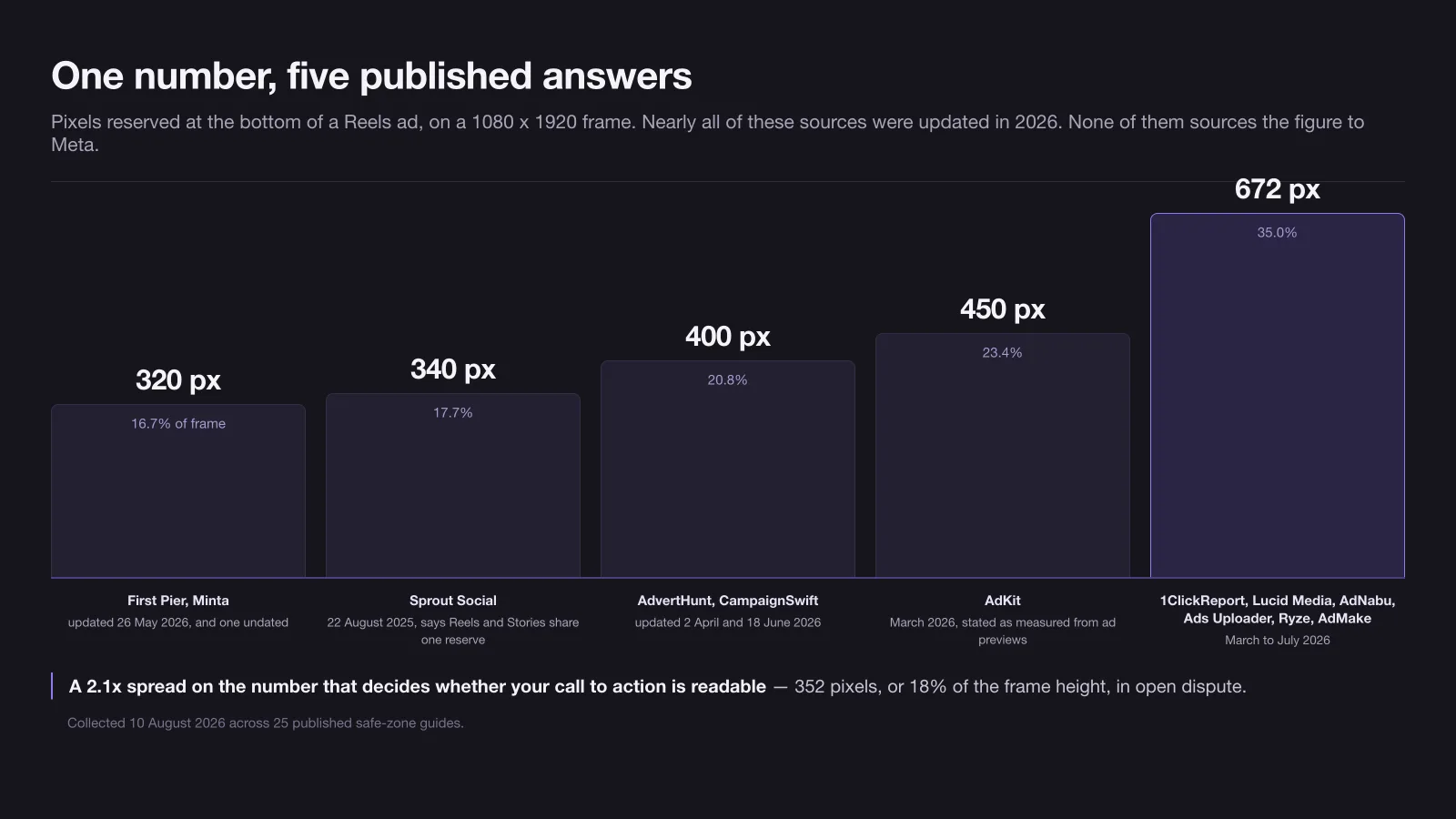
Three things about that table are worth stating plainly.
Not one of the twenty-five sources links a Meta page as the origin of a specific safe-zone figure. Several link Meta’s help centre in general terms; several publish a downloadable overlay template, and none of those templates is Meta-hosted. The percentages most of them quote — 14% top, 20% or 35% bottom, 6% sides — are attributed to Meta by paraphrase only.
Six of them assert that Meta unified the safe zones for all four vertical placements in March 2026. None cites a changelog, a help page or a release note for that date. It may well be true. It is currently folklore.
At least one source contradicts itself inside a single table, listing Facebook Stories at 263 top and 250 bottom, Instagram Stories at 269 and 672, and then a shared safe box for all placements that matches neither row.
The same softness shows up in the placement count. Cropink puts the number of Meta ad placements at 19 as of 12 February 2026. TheOptimizer’s guide of 8 June 2026 opens by claiming “25+ placements” and then enumerates “20+ distinct surfaces” further down the same article. Nobody outside Meta can settle it, so treat any published count as an estimate.
A conservative safe-zone envelope you can design against
You cannot resolve the disagreement from outside Meta. You can render it harmless. Take the most restrictive value published for each edge and a layout that clears it clears every rival figure at once.
These are derived numbers, not Meta’s, and the method needs stating precisely, because two of the values in the table above are not what they look like. The rule is: the largest reserve published for that specific placement, on a 1080 x 1920 canvas, setting aside the sources that collapse Stories and Reels into a single shared figure — which is where the 672 in the Stories row comes from. The 150-pixel side figure is likewise not a general margin: it is the Reels engagement rail, so it applies to the right edge of Reels and nowhere else.
| Edge | Stories | Reels |
|---|---|---|
| Top | 270 px (14.1%) | 270 px (14.1%) |
| Bottom | 380 px (19.8%) | 672 px (35.0%) |
| Left | 65 px (6.0%) | 65 px (6.0%) |
| Right | 65 px (6.0%) | 150 px (13.9%) |
| Safe box | 950 x 1270 px, from y=270 | 865 x 978 px, from x=65, y=270 |
| Share of frame that is safe | 58.2% | 40.8% |
The headline consequence: under this envelope less than half the Reels frame is reliably yours. Not the middle 80%, not the “roughly the centre” that most guides suggest — 40.8%, and it sits above the vertical centre, not on it. A composition centred in the frame puts its focal point inside the caption and audio ticker region.
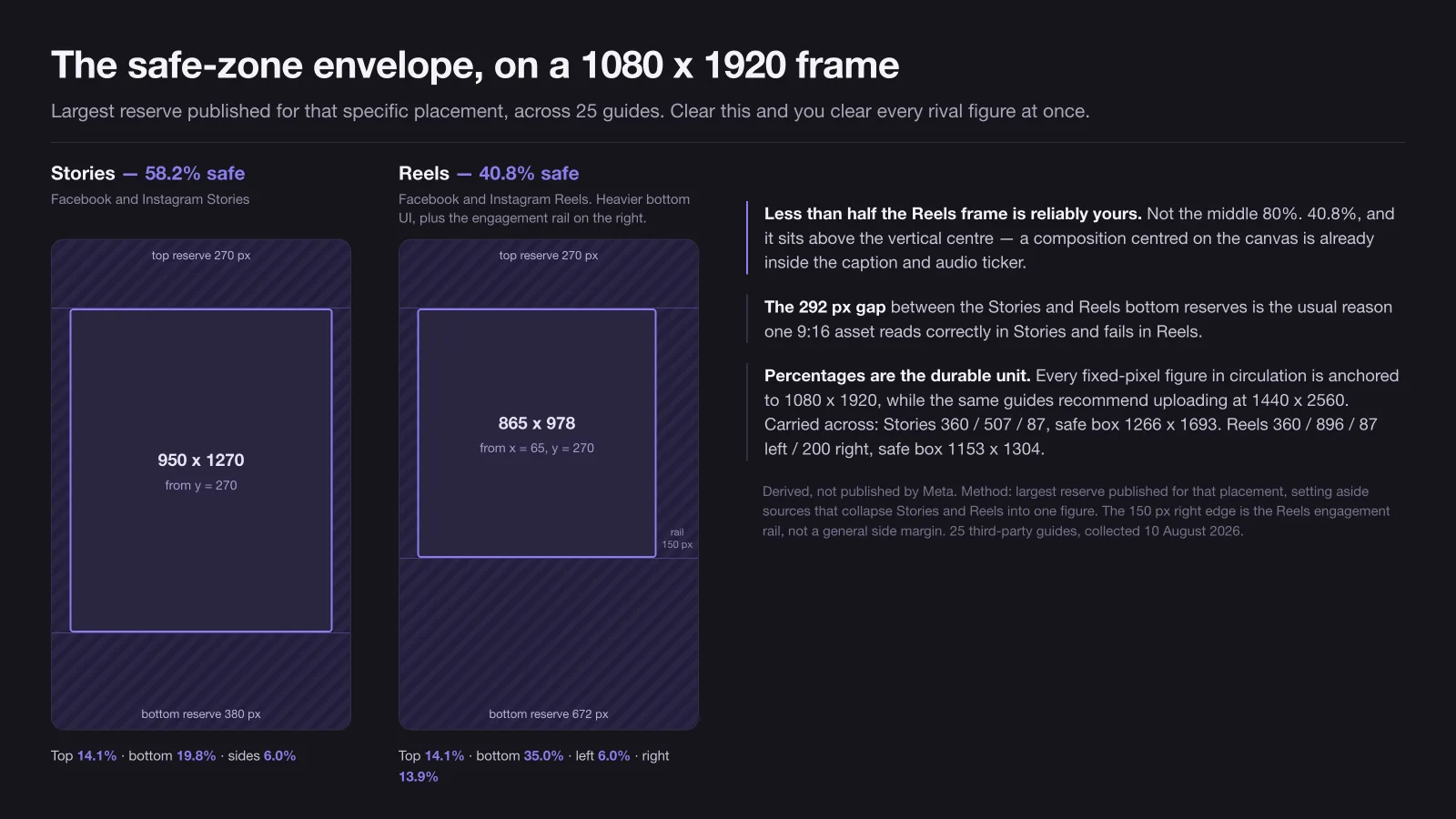
Percentages, not pixels, are the durable unit here, because every fixed-pixel figure in circulation is anchored to a 1080 x 1920 canvas and none of the sources restates them for the 1440 x 2560 upload they simultaneously recommend. Carried across at the same percentages, the envelope becomes: Stories 360 top, 507 bottom, 87 sides, safe box 1266 x 1693; Reels 360 top, 896 bottom, 87 left, 200 right, safe box 1153 x 1304.
The 292-pixel gap between the Stories bottom reserve and the Reels bottom reserve is the single most common reason one 9:16 asset reads correctly in Stories and fails in Reels. If you only ever design one vertical, design it to the Reels envelope and accept that Stories gives you dead space.
What one asset loses when it runs across every placement
Leave every placement switched on, upload one file, and Meta will deliver it everywhere. The ad is approved, it spends, and nothing in the interface tells you which surfaces mangled it.
| Your asset | Feed and profile feed | Stories and Reels | Marketplace | Threads feed | Carousel |
|---|---|---|---|---|---|
| 1:1 square | Native, loses about a fifth of the mobile height a 4:5 would hold | Letterboxed, black bars top and bottom | Native | Native | Native, this is the carousel standard |
| 4:5 portrait | Native, optimal | Letterboxed | Force-cropped to square | Native, the recommended ratio | Cropped to 1:1 |
| 9:16 vertical | Auto-zoomed or cropped | Native, edge to edge | Force-cropped to square | Centre-cropped to 4:5 bounds | Cropped to 1:1 |
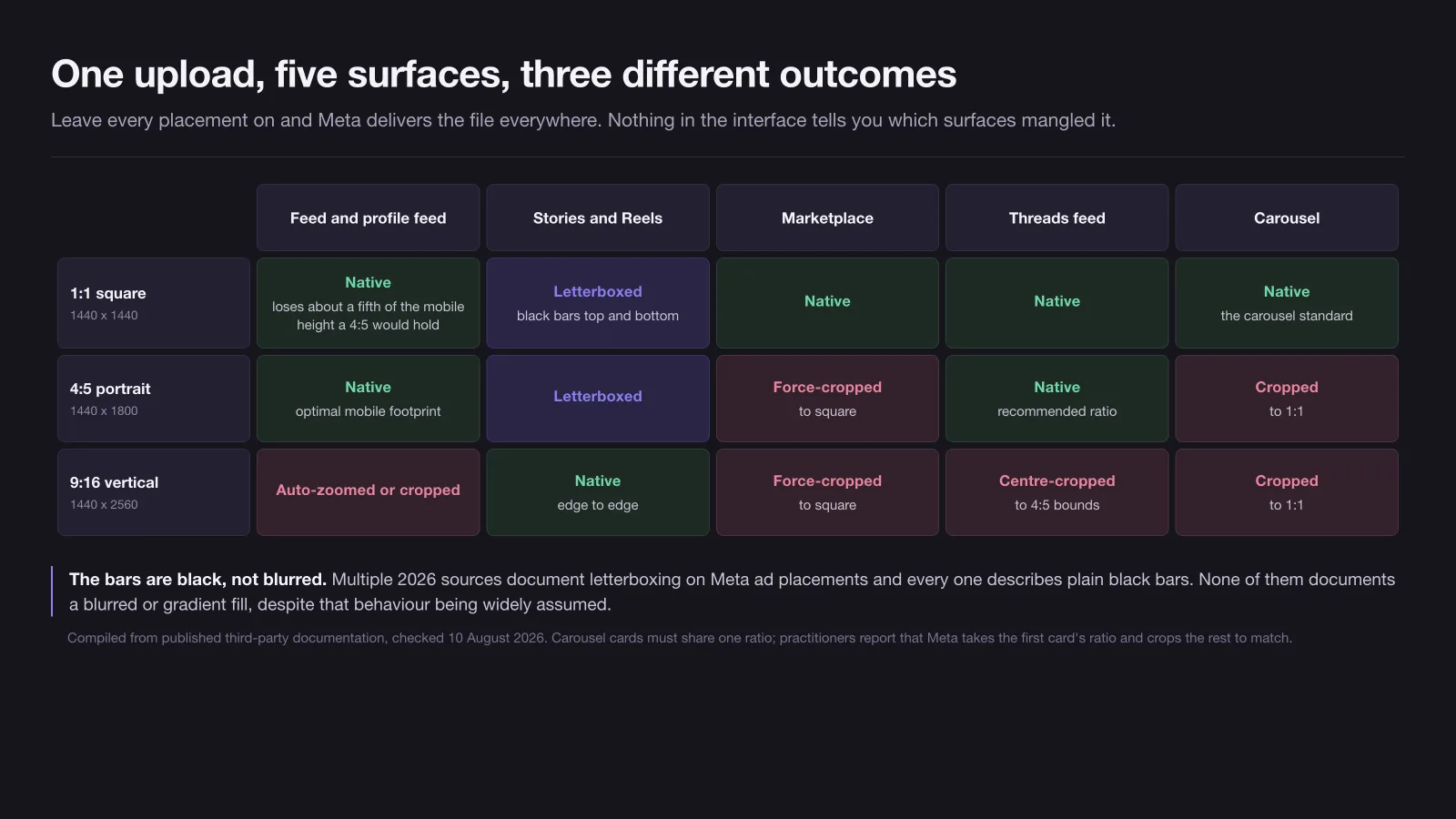
Two details that guides get wrong in opposite directions.
The bars are black. Multiple 2026 sources describe letterboxing on Meta ad placements and every one of them describes plain black bars. None of them documents a blurred or gradient fill on an ad placement, despite that behaviour being widely assumed. If you have seen a blurred backdrop, it was organic Reels or another platform.
Carousel cards must share a ratio. That much is documented. What practitioners report on top of it is that mixed-ratio cards do not each render at their own shape — Meta takes the first card’s ratio and crops the rest to match, so a single 4:5 card slipped into a square carousel silently reframes every card after it.
The fix is placement asset customisation — the “edit per placement” path in Ads Manager — which lets you swap the whole media file, the crop, the video thumbnail, the primary text, the headline and the call-to-action per placement. One constraint is worth knowing before you plan around it: ads created from an existing post ID cannot use it at all, because they inherit the original post’s creative. Set it up at creation, before delivery starts, rather than editing a live ad, since creative edits re-enter the learning phase.
The placement count nobody can verify, and the placements that quietly died
Meta does not publish a single authoritative count, which is why the third-party figures range from 19 to 25 and above. What can be dated is the churn, and cheat sheets are slow to reflect it.
Retired, with dates:
- Instagram Explore feed — removed in Graph and Marketing API v26.0, effective 29 July 2026. Requesting it explicitly now returns an error and delivery redistributes elsewhere.
- Messenger Stories — deprecated in the same 29 July 2026 release. The failure mode here is nastier: the value is silently stripped from ad set create and update calls, so the request still succeeds and nothing appears in the logs.
- Messenger Sponsored Messages — creation removed in Marketing API v20.0, announced 21 May 2024.
- Reels post-loop ads — removed November 2025.
- Flexible ad format — dropped as a standalone option in ad setup from March 2026 and absorbed into Advantage+ creative.
Added: Threads feed went globally available in the week of 26 January 2026 and is switched on by default in both Advantage+ and manual placements. If you have not deselected it since January, you are running there — and anything taller than 4:5 is being centre-cropped to Threads bounds.
Still live, despite frequent claims otherwise: right column, Facebook in-stream video, Messenger inbox and the whole Audience Network including rewarded video.
Advantage+ creative can change the frame after you approve it
Placement geometry is only half the problem. Meta’s creative enhancements can alter the rendered frame itself, and several of the frame-altering ones ship enabled.
The enhancements that change geometry rather than decoration, per Sprinklr’s enumeration updated 7 August 2026, are: visual touch-ups for images, visual touch-ups for videos, expand image, adapt to placement, and flexible media. Adapt to placement re-renders your image at 9:16 for vertical surfaces. Expand image generates new pixels at the edges to fill a ratio you did not supply.
Which of them are on by default is genuinely unsettled — one 2026 source lists nine, another lists seven, and the two lists do not match. What is consistent across sources is that frame-altering enhancements are among the defaults.
The part worth internalising: modification can happen per impression, at delivery, based on what the system predicts will perform for that viewer. There is no preview of the variant a given person saw. Practitioner reports describe brand colours shifted, saturation raised, product photography cropped at the edges as an animation zooms, and approved copy rewritten into variations that were never tested.
Toggles live at the ad level under creative and optimise media, and account-wide defaults under advertising settings in Business Settings. If your brand has a colour specification, turn the visual ones off before you argue about pixel dimensions.
File, codec and duration limits that degrade an upload
Meta re-encodes every upload, unconditionally. That single fact reorders the priorities: your export settings matter, your file size mostly does not.
| Spec | Value | Notes |
|---|---|---|
| Video containers | MP4, MOV | Some sources also list GIF; MP4 and MOV are the only two every source agrees on |
| Video codec | H.264 | Support for H.265/HEVC is claimed, denied and called “causes processing delays” by three different 2026 sources |
| Audio | Stereo AAC, 128 kbps or higher | 256 kbps recommended by one source |
| Frame rate | Fixed, progressive scan, square pixels | 30 fps is the safe figure; whether 60 is accepted is disputed |
| Max file size | 4 GB video, 30 MB image | Universal agreement |
| Image types | JPG, PNG | No source lists WebP among the recommended types, and one notes Meta accepts it without documenting it |
Durations, which are the most placement-specific numbers in the whole spec set:
| Placement | Duration |
|---|---|
| Feed and video feed | 1 second to 241 minutes |
| Stories | 1 second to 2 minutes |
| Reels | 1 second, no maximum stated by the most recent sources; older ones say 90 seconds |
| Ads on Reels, the overlay unit | 4 to 15 seconds |
| In-stream, mobile | 5 seconds to 10 minutes |
| In-stream, desktop | 5 to 15 seconds |
| Marketplace, mobile | 5 seconds to 10 minutes |
| Marketplace, desktop | 5 to 15 seconds |
The in-stream desktop ceiling of 15 seconds against the mobile ceiling of 10 minutes is the trap in that table. One in-stream video ad, delivered across both, is a 40-fold difference in permitted length on the same line item.
On re-encoding, the practitioner consensus is consistent and useful: a well-encoded 200 MB file is indistinguishable from a 3.8 GB one after Meta’s pipeline processes it. Export MP4, H.264, 1440-series resolution, fixed frame rate at 30 fps, progressive, square pixels, AAC at 128 kbps or better, and do not run a compression pass of your own before uploading — you are only stacking a second generation of loss on top of Meta’s. No source publishes a hard bitrate limit; the upload recommendations that exist range from 5 to 30 Mbps at 1080p and contradict each other.
Character limits are truncation points, not rejection rules
Ads Manager will accept a headline far longer than the published limit and the ad will run. What the numbers describe is where the interface cuts the text off, or drops the field entirely.
| Placement | Primary text | Headline | Description |
|---|---|---|---|
| Facebook feed | 125 | 27 | not shown |
| Instagram feed | 125 | 40 | not shown |
| Facebook Stories | 125 | 40 | not shown |
| Facebook Reels | 40 | 55 | not shown |
| Ads on Reels, overlay | 60 | 10 | not shown |
| Marketplace | 125 | 40 | 30 |
| Search results | 125 | 40 | 30 |
| Right column | not shown | 40 | not shown |
| Audience Network | 125 | 25 or 40, sources disagree | 30 |
Facebook Reels at 40 characters of primary text is the binding constraint across any broad placement mix, and a 10-character headline on the Reels overlay unit is tighter than most brand names plus a verb. Write for the shortest slot, not the longest one.
Two corrections to widely circulated numbers. The 63,206-character figure is the organic Facebook post limit and does not apply to ads; 2,200 is the Instagram caption limit and likewise does not. And precise desktop-versus-mobile truncation counts do not exist in any credible source — the sources that address it say truncation varies with device width, font size setting, language, and whether the copy contains emoji or line breaks. Any cheat sheet quoting an exact desktop figure invented it.
The 20% text rule is dead and has been since 7 September 2020, when Meta stated it would no longer penalise ads with higher amounts of text in auctions and delivery. Less text still tends to perform better, which is why the advice persists. It is not a delivery cost. Guides updated in 2026 that still describe four tiers of reach throttling by text density are reprinting a system retired nearly six years ago.
One master export, four crops, and the two files worth keeping
The workflow that survives all of the above is to design once at the tightest envelope and derive everything from it, rather than resizing a finished layout and discovering what the crop ate.
- Build at 1440 x 2560, 9:16. Place every element that must be legible inside the Reels envelope: 360 pixels clear at the top, 896 at the bottom, 87 on the left, 200 on the right. That leaves a 1153 x 1304 working area.
- Keep the focal point above centre. The Reels safe box sits high in the frame. A layout centred on the canvas centre is already inside the reserved zone.
- Derive 1440 x 1800 by cropping the vertical, not by rescaling it. The 4:5 crop takes the middle of your 9:16 composition and inherits its focal point. Re-shooting or re-laying-out for 4:5 is where most of the extra production cost hides. On filmed material this decision moves upstream to the shoot itself, because a vertical cut stops being a crop once the subject sits near the frame edge.
- Derive 1440 x 1440 from the 4:5, same principle, one more centre crop.
- Export text as a separate layer. Every re-cut moves the text block, and flattened text means redoing the layout instead of nudging a group. This is the same reason a 3D pipeline re-renders a new angle while a 2D one redraws the frame — where the reusable layer sits decides what a variant costs.
- Upload the vertical to vertical placements and the crops to the rest, through placement asset customisation, rather than letting one file be letterboxed into four surfaces.
Two files are worth archiving per campaign: the layered 9:16 master, and a flattened 9:16 with the envelope bands drawn on top. The second one settles arguments with whoever asks why the logo cannot sit in the bottom corner.
How to check a spec yourself instead of trusting a cheat sheet
Every number on this page has a date attached because these specs move, and the guides that carry them move slower. Two of the retirements above were still being listed as live placements by guides updated weeks afterwards.
There is exactly one source of truth you can reach without waiting for a publisher: the placement preview in Ads Manager. Build the ad, leave every placement on, and step through the preview dropdown placement by placement before you publish. It renders your actual file against the current interface, which is a stronger check than any published pixel figure, including the envelope on this page. What it will not show you is the per-impression variant an enhancement generates at delivery — for that, the only control is switching the enhancement off.
Meta’s own Ads Guide remains the canonical specification, and it is the page every guide in the top ten is paraphrasing, usually months late and without saying so.
Where none of this is worth your afternoon, that is what an agency is for. Our Facebook Ads team maintains the placement matrix and the master templates so the creative arrives already cut for the surfaces it will run on, which is a different job from designing one image and hoping.
When this page was checked: all specs verified against published sources on 10 August 2026. The safe-zone envelope is derived from twenty-five third-party guides, not published by Meta. Re-verify anything load-bearing before a large production run.
11 / Reader questions
Frequently asked questions
01What size should a Facebook ad be?
Upload 1440 x 1440 pixels for a square feed ad, 1440 x 1800 for a 4:5 feed ad, and 1440 x 2560 for Stories and Reels. The older 1080-pixel versions of those three still run and still look acceptable, but as of mid-2026 they are the floor rather than the recommendation.
02What is the Facebook ad size in pixels for mobile?
1440 x 1800 pixels, a 4:5 portrait, takes the most mobile feed space of any supported feed ratio, and 1440 x 2560 fills the screen edge to edge in Stories and Reels. There is no separate mobile-only spec: Meta serves the same uploaded asset to both, and desktop simply renders it smaller.
03What is the Facebook ad size in cm or inches?
There isn't one, because a pixel has no fixed physical size on screen. A 1080-pixel-wide ad is about 28.6 cm at 96 DPI and about 9.5 cm on a phone at 288 DPI, on the same file. Design in pixels and ignore any guide that hands you a centimetre figure.
04What is the safe zone for Facebook Reels ads?
Published guides do not agree, and none of them sources the figure to Meta. The reserved bottom band is quoted as 320, 340, 400, 450 and 672 pixels on a 1080 x 1920 frame by different sources, nearly all updated in 2026. Designing to the largest of those, plus 270 pixels at the top, clears every figure published for Reels at once.
05Does one image work across all Facebook ad placements?
It runs everywhere, but it does not survive everywhere. A 4:5 feed image is letterboxed with black bars in Stories and Reels and force-cropped to a square in Marketplace, and a 9:16 vertical is centre-cropped in the Threads feed. Nothing warns you: the ad is approved, delivers, and quietly looks wrong on some surfaces.
06What is the maximum file size for a Facebook ad?
30 MB for an image and 4 GB for a video, and every source agrees on both. The practical ceiling is much lower, because Meta re-encodes every upload regardless of what you send, so a carefully exported 200 MB file and a 3.8 GB file arrive at the viewer looking much the same.
07Is the 20% text rule still in effect?
No. Meta retired it on 7 September 2020 with the statement that it would no longer penalise ads with higher amounts of text in auctions and delivery. Less text on an image is still offered as a best practice, but it has not been a delivery or cost factor for nearly six years. Guides describing reach tiers by text density are reprinting a system that no longer exists.