
Published
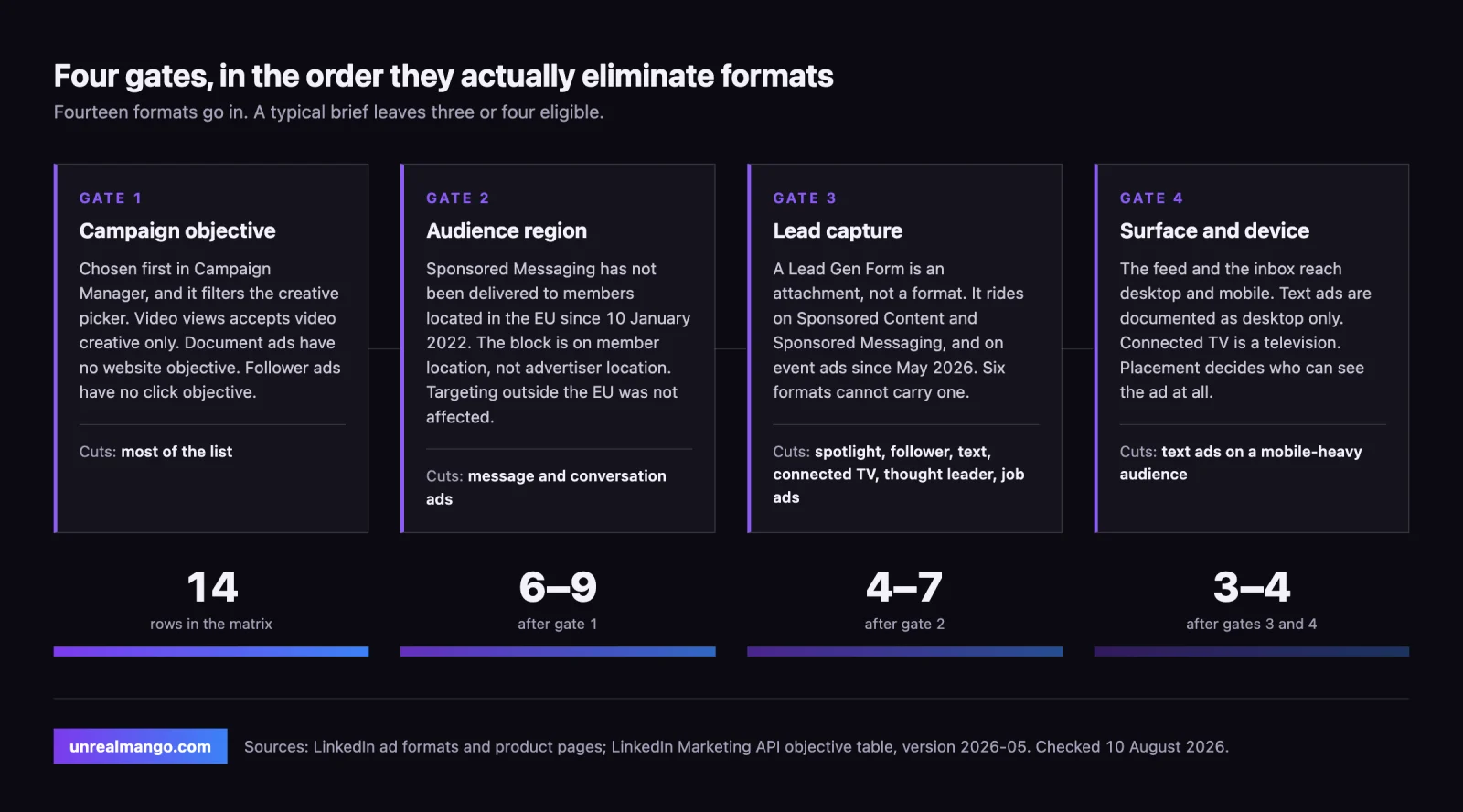
Choosing a LinkedIn ad type is an elimination, not a preference. Your campaign objective removes most formats before you compare any of them, an EU audience removes both inbox formats outright, and needing a lead without a landing page removes six more. Fourteen formats go into the matrix below; a typical brief leaves three or four eligible.
How this was checked. For this query in the United States on 10 August 2026, Google returned an AI Overview, a People Also Ask block, and ten organic results, four of them LinkedIn’s own properties. Every guide in that set enumerates the formats and describes what each looks like. None of them orders the decision by the constraints that actually disqualify a format, and the oldest page still ranking, from May 2021, lists “InMail Ads” and “Premium Display Advertising” — neither of which is a current LinkedIn format name. Search demand for the query itself is 390 a month in the US and down 56% year on year (DataForSEO, checked 10 August 2026). Every rule below carries a date and the LinkedIn surface that states it.
Every LinkedIn ad format in one matrix: objective, lead form, surface, EU reach
Read this table by column, not by row. Find your objective, cross out everything that is blank in it, and the shortlist writes itself.
Objectives are taken from LinkedIn’s Marketing API objective-to-format table, version 2026-05, which is the layer Campaign Manager enforces. Three formats — thought leader, connected TV, and article and newsletter ads — do not appear in that table at all; their objectives come from LinkedIn’s own product pages instead, and those rows are marked with an asterisk.
One note on what “fourteen” means here, because the number moves depending on who is counting. LinkedIn’s ad formats page markets 14 units, but one of them, Lead Gen Forms, is an attachment rather than a format, and one real format, text ads, is missing from that page while remaining documented in the API. Drop the attachment, add text ads back, and you get the 14 rows below.
| Format | Surface | Brand awareness | Website visits | Engagement | Video views | Lead generation | Website conversions | Lead Gen Form | Reaches EU members |
|---|---|---|---|---|---|---|---|---|---|
| Single image | Feed, desktop and mobile | ✅ | ✅ | ✅ | — | ✅ | ✅ | Yes | Yes |
| Video | Feed, desktop and mobile | ✅ | ✅ | ✅ | ✅ | ✅ | ✅ | Yes | Yes |
| Carousel | Feed, desktop and mobile | ✅ | ✅ | ✅ | — | ✅ | ✅ | Yes | Yes |
| Document | Feed, desktop and mobile | ✅ | — | ✅ | — | ✅ | — | Yes | Yes |
| Event | Feed, desktop and mobile | ✅ | ✅ | ✅ | — | ✅ since May 2026 † | — | Yes, since May 2026 † | Yes |
| Thought leader | Feed, desktop and mobile | ✅* | — | ✅* | ✅* | — | — | No | Yes |
| Article and newsletter | Feed, desktop and mobile | ✅* | — | ✅* | — | Article path only* | — | Article path only | Yes |
| Connected TV | Streaming apps on the TV | ✅* | — | — | — | — | — | No | Yes |
| Conversation | LinkedIn inbox | ✅ | ✅ | ✅ | — | ✅ | ✅ | Yes | No |
| Message | LinkedIn inbox | — ‡ | ✅ | — | — | ✅ | ✅ | Yes | No |
| Spotlight | Right rail and dynamic units | ✅ | ✅ | — | — | — | ✅ | No | Yes |
| Follower | Right rail and dynamic units | ✅ | — | ✅ | — | — | — | No | Yes |
| Text | Right rail and homepage banner, desktop only | ✅ | ✅ | — | — | — | ✅ | No | Yes |
| Job ads | Feed, desktop and mobile | — | — | — | — | — | — | No | Yes |
* Sourced from LinkedIn’s product pages rather than the API objective table, which does not list these formats.
† From the 202605 API change log, which added lead generation to event ads. The objective table itself has not been updated to show it.
‡ The brand awareness row of the objective table lists the SPONSORED_INMAILS campaign type under a “Conversation” label, and LinkedIn elsewhere expands that type as covering message ads and conversation ads. This cell is a dash on the strict reading; treat it as unresolved rather than certain.
Two hiring objectives sit outside this grid. Job applicants accepts job ads, single image and spotlight; talent lead accepts single image, carousel, video and spotlight. Both are Talent Solutions campaigns and they are the reason job ads look empty above.
Gate one: your objective removes most formats before you pick one
The objective is chosen first in Campaign Manager, and it is not a label on the campaign — it is a filter on the creative picker. Four consequences are worth memorising, because each one ends an argument.
Video views accepts video creative and nothing else. Not a carousel of stills, not a document with a cover animation. The only latitude you have is whose video it is: a native video ad from the Page, or the video variant of a thought leader ad from a person’s profile. If the KPI is views, the format was all but decided the moment the objective was.
Document ads have no website objective at all. Brand awareness, engagement and lead generation, per LinkedIn’s document ads page and the API table alike. A brief whose success metric is a session on your site cannot use them, no matter how good the whitepaper is.
Follower ads have no click objective. Brand awareness and engagement only. They exist to grow a Page audience, and a campaign measured on traffic will report them as a failure by construction.
Connected TV is brand awareness only, and the creative has to be between 6 and 60 seconds, with LinkedIn’s own specification page recommending exactly 6, 15, 30, 45 or 60 (checked 10 August 2026). LinkedIn sells it three ways: self-serve inside Campaign Manager, as a CTV Select buy, or through a demand-side platform — and the last two both start with “talk to a rep” on LinkedIn’s own page. The claims on that page are worth reading with the source attached: a 24% lift in unique B2B audiences reached beyond the feed and a 30% lower cost per lead for audiences first reached by CTV are both LinkedIn internal data from 2025, and the “2x brand awareness when paired with other LinkedIn formats” figure is credited to Kantar in 2026. None of the three states a sample size.
Gate two: an EU audience takes both inbox formats off the board
This is the single most consequential fact missing from every format guide on page one, and it has been true for four and a half years.
LinkedIn stopped accepting new Sponsored Messaging campaigns targeting EU members on 15 December 2021, and stopped delivering existing ones on 10 January 2022. The trigger was a European Court of Justice ruling of 25 November 2021 holding that advertising delivered natively into an inbox requires direct-marketing consent under the ePrivacy Directive. Microsoft’s Marketing API notice put it plainly at the time: display of message and conversation ads to EU members stopped on that date.
Two things follow that people get wrong in both directions. The restriction is scoped to the EU — the notice says only that targeting members based in the EU stopped and that targeting members outside it was not impacted, so if your audience sits in a European country outside the EU, check the account rather than assuming either way. And the block is on member location, not advertiser location: a US company can run conversation ads, but not to the German half of its list.
For an EU-heavy audience this collapses the bottom of the funnel onto one route. The only native lead capture left is a Lead Gen Form attached to Sponsored Content, because the inbox path that would otherwise carry it is closed.
Gate three: which formats capture a lead without a landing page
LinkedIn lists Lead Gen Forms among the ad formats, which is a category error worth naming: it is not a format, it is an attachment. Nothing renders as “a Lead Gen Form ad”. It rides on a format that already exists, and the useful question is which ones accept the passenger.
Single image, video, carousel and document ads accept it in the feed, and so does the LinkedIn article path — though not the newsletter one, which LinkedIn documents as incompatible with lead generation. Message and conversation ads accept it in the inbox. Event ads accept it as of the May 2026 API version, which added lead generation to the brand awareness, website visits and engagement objectives they already had — a genuinely new capability that most format guides have not caught up with.
Six formats do not accept it, and for different reasons. Spotlight, follower and text ads are display units with no form surface. Connected TV has no click at all. Job ads run on a hiring objective that has no form of this kind. Thought leader ads are the interesting case: the creative is somebody else’s organic post, so there is no advertiser-controlled destination to attach anything to. That constraint, and what it means for governance when the author leaves, is the subject of our separate piece on LinkedIn thought leader ads.
LinkedIn’s own Lead Gen Forms page claims that 90% of pilot customers beat their cost-per-lead goals with lower CPLs than their standard Sponsored Content campaigns. Treat that as directional: the page names no pilot size, no date and no industry mix. The structural argument is stronger than the statistic anyway — a pre-filled form removes the landing page from the path, and every step removed is a step that cannot leak.
What a native form does not remove is the qualification problem. Cheap leads from a pre-filled form are still leads that sales has to sort, which is the failure mode behind most “LinkedIn does not work for us” post-mortems; the difference between a marketing-qualified and a sales-qualified lead is where that argument actually gets settled, and we have written that one up in MQL vs SQL. LinkedIn added an optimisation target for exactly this in the February 2026 API version — bidding toward qualified leads rather than raw form fills — which only pays off if your CRM is feeding the definition back.
Gate four: feed, inbox, right rail and living room are four different surfaces
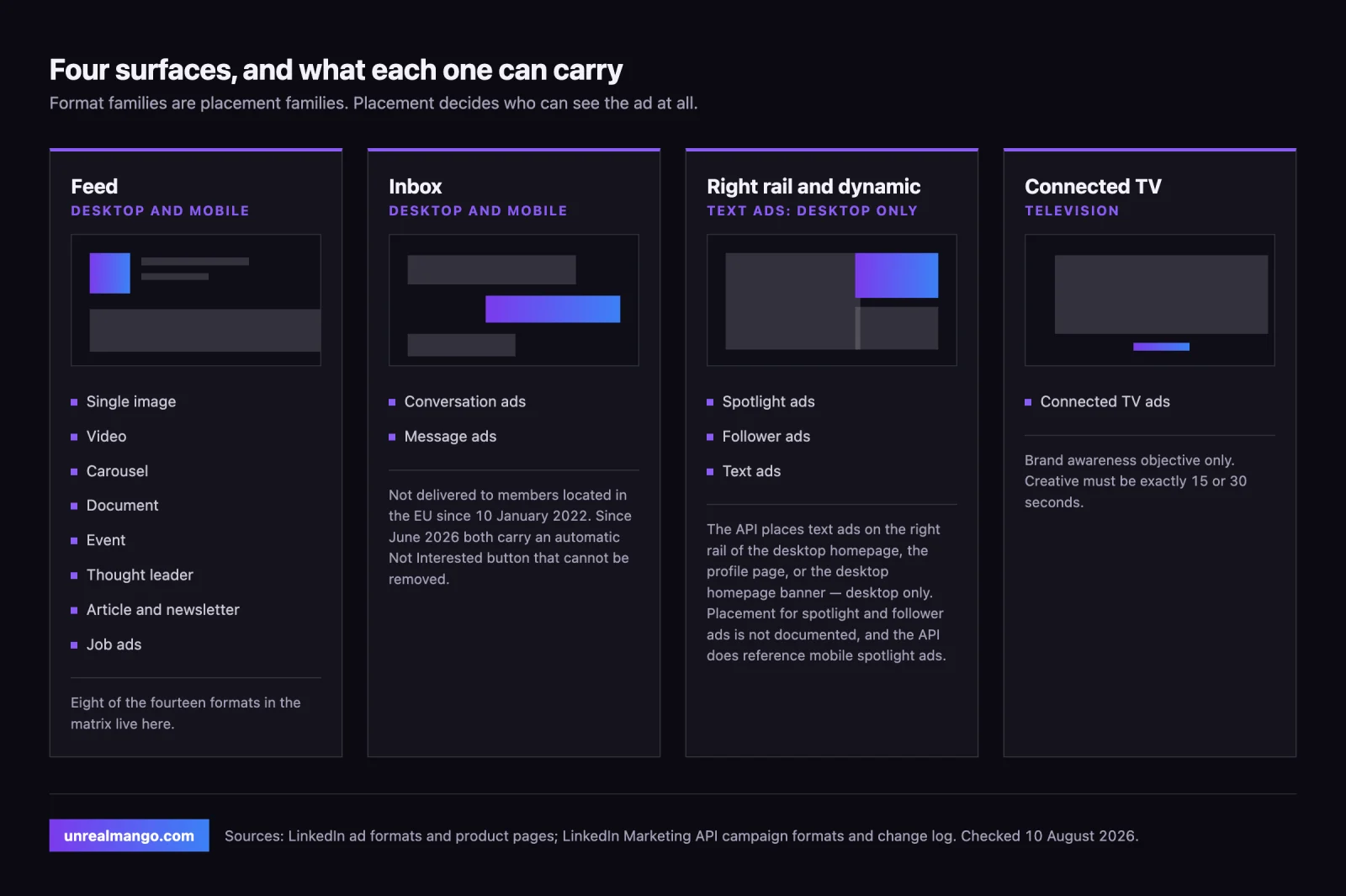
Format families are really placement families, and the placement decides who can even see the ad.
The feed carries eight of the fourteen formats, on desktop and mobile alike. LinkedIn’s API describes standard feed updates as showing in the LinkedIn feed and, historically, off the LinkedIn network as well.
The inbox carries the two Sponsored Messaging formats, on desktop and mobile. As of the June 2026 API version, LinkedIn automatically renders a “Not Interested” call to action on message ads, and on the first message of a conversation ad. Two details make this matter more than it sounds: it was applied to new and existing ads at render time, so campaigns built before June 2026 acquired it retroactively, and it is not exposed in the API, so you cannot remove or restyle it. For conversation ads created in Campaign Manager, the sponsored message contents endpoint now also returns a NOT_INTERESTED reply type. Anyone modelling inbox performance against pre-June 2026 benchmarks is comparing two different ad units.
The right rail carries spotlight, follower and text ads, and only one of the three has its placement documented. The API is explicit for text ads and only text ads: they show on the right rail of the LinkedIn desktop homepage, on the profile page, or on the desktop homepage banner — desktop, full stop. For spotlight and follower ads the API documents no placement at all, and it does reference mobile spotlight ads elsewhere, so treat “dynamic ads are desktop-only” as folklore rather than a rule. Where it is a rule — text ads — it matters: on an audience that browses LinkedIn mostly on a phone, that format’s addressable impressions largely do not exist.
The television is the connected TV surface, bought against brand awareness only.
When document ads beat single image ads, and when they cannot compete at all
This is the most common format argument on LinkedIn, and it is usually argued on taste. It is settled by eligibility.
Document ads cannot compete at all when the objective is website visits or website conversions, because they are not eligible for either. If the brief says “sessions” or “sign-ups on our site”, the comparison never starts.
Document ads win when the asset itself is the offer and the objective is brand awareness, engagement or lead generation. Three structural reasons, none of which requires a vendor benchmark to believe:
- The reader consumes the asset inside the feed. LinkedIn’s wording is that members “read and download documents directly in their newsfeed”. Every hop you remove is a hop that cannot lose people.
- The download can be gated with a Lead Gen Form, so the same unit does awareness and capture without a second campaign.
- You get a measurement no other format produces: what percentage of the document was viewed, plus total downloads. That is per-asset engagement depth, not just a click.
Single image ads win when the destination matters more than the asset — a pricing page, a demo booking, a product tour — or when you need the same creative to serve every objective. Single image is eligible for five of the six marketing objectives in the table above — everything except video views — plus both hiring objectives, which is why it is the default and why it is also the least differentiated thing in the auction.
The trap sits between them. If you want the lead and the site visit from one document campaign, you cannot have both: the form is the destination, so there is no click-through to your site to measure. Pick which one you are paying for.
Why no two sources agree on how many LinkedIn ad types exist
Three LinkedIn-owned surfaces, checked on 10 August 2026, give three different answers.
| Source | What it says |
|---|---|
| LinkedIn ad formats page | 14 named units in four groups |
| LinkedIn self-serve ads page | “Sponsored Content, Message Ads, Dynamic Ads, Text Ads, or a mix of all four” |
| Marketing API overview, version 2026-07 | ten creative types |
The discrepancies are not sloppiness, they are different layers. The self-serve page counts families. The ad formats page counts marketable units, which is why Lead Gen Forms appears there despite not being a format. The API counts creative types you can POST, and its overview is behind: it omits document, event, thought leader and connected TV ads, all four of which are documented elsewhere on LinkedIn’s own properties, including in the objective table on the same API.
There is one omission that runs the other way. Text ads are absent from the ad formats page but present in the self-serve page, in the API overview and in the campaign-formats reference. They are still buyable; they simply stopped being marketed.
Third-party guides inherit the confusion and add to it. Counts on page one for this query range from five to fourteen, and the five-format version is a page from 2021 still naming products LinkedIn has since renamed. Treat any bare number as a claim about which layer the author was reading.
What changed in LinkedIn’s 2026 API that the format guides have not caught up with
Four changes from the 2026 Marketing API versions, each with a consequence for format choice.
| Version | Change | Why it changes a decision |
|---|---|---|
| 202602, February 2026 | MAX_QUALIFIED_LEAD added as an optimisation target for lead generation | Bidding can chase qualified leads rather than form fills, but only if lead quality is fed back |
| 202605, May 2026 | Event ads gained the lead generation objective | Event ads moved from a promotion tool to a capture tool; most guides still list three objectives for them |
| 202606, June 2026 | A “Not Interested” CTA is rendered automatically on message ads and on the first message of conversation ads | Applied to existing ads retroactively, not removable, not exposed in the API — inbox benchmarks from before June 2026 are not comparable |
| 202607, July 2026 | creativeSelection defaults to OPTIMIZED for Sponsored Messaging campaigns created or updated on the lead generation objective without an explicit setting | New inbox creative tests are not even splits unless you set ROUND_ROBIN yourself |
The last one is the quiet trap, and the detail that matters is the word updated. Campaigns created before July 2026 keep ROUND_ROBIN while you leave them alone; the moment you edit one without stating creativeSelection, the split you were relying on for learning becomes a weighted delivery optimised for performance. That is a good default for spend and a bad one for a test.
One more piece of folklore worth retiring, and it did not start with agencies. LinkedIn’s own API documentation announced that message ads were being discontinued starting May 2023, in favour of conversation ads. It did not happen. As of 10 August 2026 message ads are on LinkedIn’s ad formats page, have a live product page of their own, and received the June 2026 CTA change alongside conversation ads. If you are still planning around that sunset, stop.
A format shortlist by funnel stage, from cold audience to in-market
Formats do not map to funnel stages cleanly, but eligibility does. The shortlists below assume the gates above have already been applied.
Cold, no prior contact with you. Single image, video and thought leader ads in the feed; follower ads if the goal is a Page audience rather than a click; connected TV if the budget supports broadcast-quality creative of 6 to 60 seconds and the objective is genuinely awareness. Text ads only if your audience is measurably desktop-heavy.
Warm, already engaged with something of yours. Document ads carrying the asset that earned the engagement; carousel ads for a sequenced argument; event ads for a webinar, now with a form attached; conversation ads outside the EU, where a choose-your-path message can qualify before you ask for anything.
In-market, ready to talk. A Lead Gen Form on single image or video; message ads outside the EU; spotlight ads on a website conversions objective, since the personalised unit works hardest on people who already know the brand. Inside the EU, native lead capture has exactly one route left — a Lead Gen Form on Sponsored Content — and no amount of format shuffling adds a second.
Two things sit outside this ladder deliberately. Specifications — pixel dimensions, aspect ratios, file weights and the character limits where headlines truncate differently on desktop and mobile — are a separate problem from format choice, and mixing them is why most guides read like spec sheets. So is measurement: if the objective is website conversions, the format only decides who arrives, and whether the arrival is recorded at all is a server-side tracking question we covered in the LinkedIn and Meta conversions API.
If you want the shortlist applied to your actual objective, budget and audience geography rather than to a generic funnel, that is the work we do on LinkedIn ads.
10 / Reader questions
Frequently asked questions
01What are the different types of LinkedIn ads?
LinkedIn's ad formats page lists 14 units in four groups: nine under Sponsored Content, eight of them in the feed (single image, video, carousel, event, document, thought leader, article and newsletter, job ads) plus connected TV on television; two under Sponsored Messaging in the inbox (conversation ads and message ads); Lead Gen Forms, which is an attachment rather than a format; and a group named Text and Dynamic Ads that in fact names only spotlight and follower ads. Text ads themselves are a fifteenth format that page omits and the Marketing API still documents.
02What is the best type of LinkedIn ad to use?
There is no single best format, because your campaign objective decides eligibility before preference does. Video views campaigns accept video creative and nothing else. Job applicants campaigns accept job ads, single image and spotlight only. Document ads cannot run a website visits or website conversions campaign at all. Pick the objective first, then choose from what is left.
03Is LinkedIn advertising CPC or CPM?
Both, plus two more. LinkedIn's Marketing API documents four cost types: CPM per thousand impressions, CPC per click, CPV per video view, and cost per send for Sponsored Messaging, which the API defines as CPM multiplied by 1,000. Which of them you can select is constrained by the campaign objective you chose.
04Which LinkedIn ad formats can use a Lead Gen Form?
Lead Gen Forms attach to Sponsored Content and Sponsored Messaging: single image, video, carousel, document and LinkedIn article ads in the feed, message and conversation ads in the inbox, and since the May 2026 API version event ads as well. Six formats cannot carry one: thought leader, connected TV, text, spotlight, follower and job ads. Newsletter ads are excluded too.
05Can you run LinkedIn message ads and conversation ads in Europe?
Not to members located in the EU. LinkedIn stopped accepting new EU-targeted Sponsored Messaging campaigns on 15 December 2021 and stopped delivering existing ones on 10 January 2022, following a European Court of Justice ruling of 25 November 2021 on consent for inbox advertising. Targeting members outside the EU was not affected.
06How many LinkedIn ad formats are there?
The honest answer is that LinkedIn's own surfaces disagree. The ad formats page names 14 units, the self-serve ads page says you can use Sponsored Content, Message Ads, Dynamic Ads, Text Ads or a mix of all four, and the Marketing API overview documents ten creative types while omitting document, event, thought leader and connected TV ads. The count depends on which layer you count.
07What is the difference between document ads and single image ads on LinkedIn?
Eligibility, not style. Document ads run only on brand awareness, engagement and lead generation objectives, so a website visits or website conversions campaign rules them out entirely. In exchange they deliver the asset inside the feed with no landing page, can gate the download behind a Lead Gen Form, and report what percentage of the document was read.