
Published · Updated
LinkedIn Thought Leader Ads let a company pay to distribute a post published from a person’s own profile rather than from the company page. The author must grant permission, the advertiser cannot change a word of the post, and there is no button, headline or lead form to add. What you buy is reach for someone else’s writing.
How this was checked. For this query in the United States on 9 August 2026, Google returned an AI Overview, a video pack, a People Also Ask block, and an organic page where four of the ten results are LinkedIn’s own pages. Every guide in that set explains what the format is. None of them resolves the fact that LinkedIn’s own pages contradict each other on how many objectives the format supports and which post types qualify, and none of them says what happens to a running ad when the person who wrote the post leaves the company. Every rule below carries a date and the page that states it. Where LinkedIn documents nothing, this page says so instead of filling the gap.
The permission flow, from both sides of the request
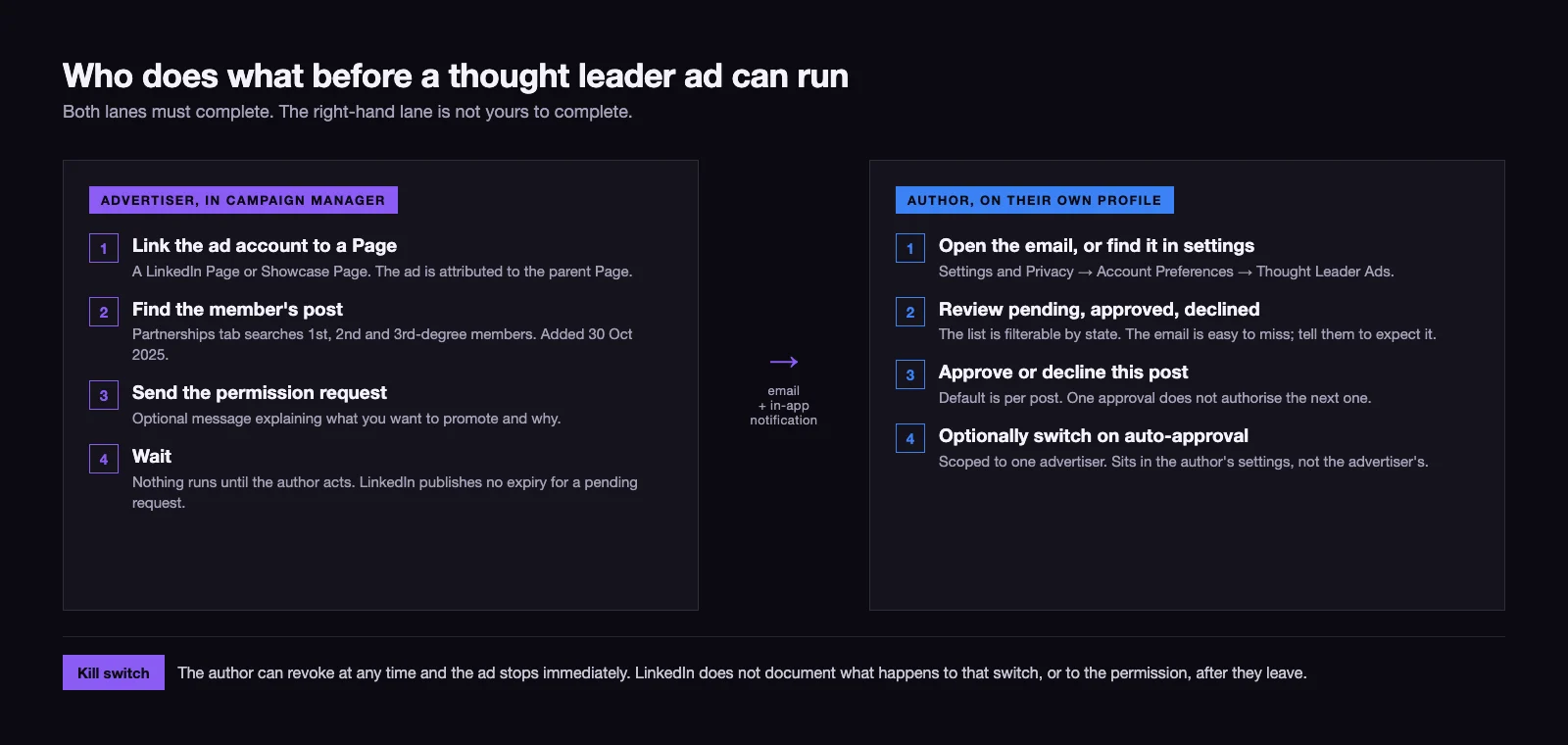
Two people have to act, and only one of them works for you.
On the advertiser side. The ad account must be linked to a LinkedIn Page or Showcase Page, and the ad is always attributed to the parent Page. In Campaign Manager you locate the member’s post in the thought leader ads section of your account assets and send a permission request, with an optional message explaining what you want to promote. Since 30 October 2025 a Partnerships tab searches first, second and third-degree-plus members, filterable by content type, which made finding posts outside your own network materially easier.
On the author’s side. LinkedIn sends the request as an email containing a preview of the post and the approval options, and surfaces it as an in-app notification. Practitioners consistently warn that the email looks innocuous enough to be missed, so it is worth telling the person to expect it. If they miss it anyway, requests are waiting under Settings and Privacy, then Account Preferences, then Thought Leader Ads, where they can be filtered by pending, approved and declined.
On that approval screen there is an auto-approval toggle, and it is the single setting that decides whether this format is a programme or a chore. Off, which is the default, every individual post needs its own request and its own approval. On, that advertiser’s future requests clear without asking again. It is scoped to one advertiser rather than granted globally, and it lives in the author’s settings, not yours, which means you can ask for it but you cannot set it.
| Control | Sits with |
|---|---|
| Which post gets requested | Advertiser |
| Whether it runs at all | Author |
| The wording of the ad | Author only |
| Auto-approval for future requests | Author |
| Budget, targeting, schedule, bid | Advertiser |
| Stopping a live ad immediately | Either |
That last row is the one to internalise. The author holds a kill switch you cannot override, and nothing LinkedIn publishes says that switch, or the permission behind it, ends when they stop being your colleague.
Sponsorable and not sponsorable: the post types, with dates
LinkedIn’s specifications page is precise about refusals and incomplete about permissions, which is why guides disagree. It describes only the single-image and video creative, so several formats LinkedIn documents elsewhere are missing from it entirely. The table below merges both.
| Post type | Status | Since | Stated where |
|---|---|---|---|
| Single image | Sponsorable | at launch | Thought Leader Ads specifications |
| Native video | Sponsorable | at launch | Thought Leader Ads specifications |
| Text only, no media | Sponsorable | in use by April 2024 | absent from the specs page; consistent across practitioner accounts |
| Post containing a third-party link | Sponsorable, link stays clickable | at launch | specs page, on author-placed URLs |
| LinkedIn article | Sponsorable | discoverable in Campaign Manager from 30 Oct 2025 | LinkedIn’s Article and Newsletter Ads page; the date from trade press |
| Newsletter issue | Sponsorable | 30 Oct 2025 | LinkedIn’s Article and Newsletter Ads page; the date from trade press |
| Post linking to a LinkedIn Event page | Sponsorable | 15 Aug 2025 | trade press reporting LinkedIn’s announcement |
| Multiple images in one post | Refused | — | specs page, verbatim |
| Document post, which is how a LinkedIn carousel is published | Refused | — | specs page, verbatim on “a document” |
| Poll | Refused | — | specs page, verbatim |
| Repost of another person’s post | Refused | — | LinkedIn’s ads API returns a reshare-cannot-be-sponsored error |
| Celebratory “celebrate an occasion” post | Refused | — | practitioner reports only, not in LinkedIn’s documentation |
The refusals are the reliable half of that table, and they are stated by LinkedIn in one sentence: it is not possible to promote a thought leader’s post that includes multiple images, polls or a document. If a guide tells you documents or carousels can run as thought leader ads, it is contradicting LinkedIn’s own page, and some current guides do exactly that.
One scoping note, because the neighbouring questions get mixed in here: this is about which organic posts qualify for sponsorship. Image dimensions and character limits, and the full catalogue of LinkedIn ad formats and when to choose each, are separate subjects with their own answers.
What you cannot add to a thought leader ad, and why it changes the brief
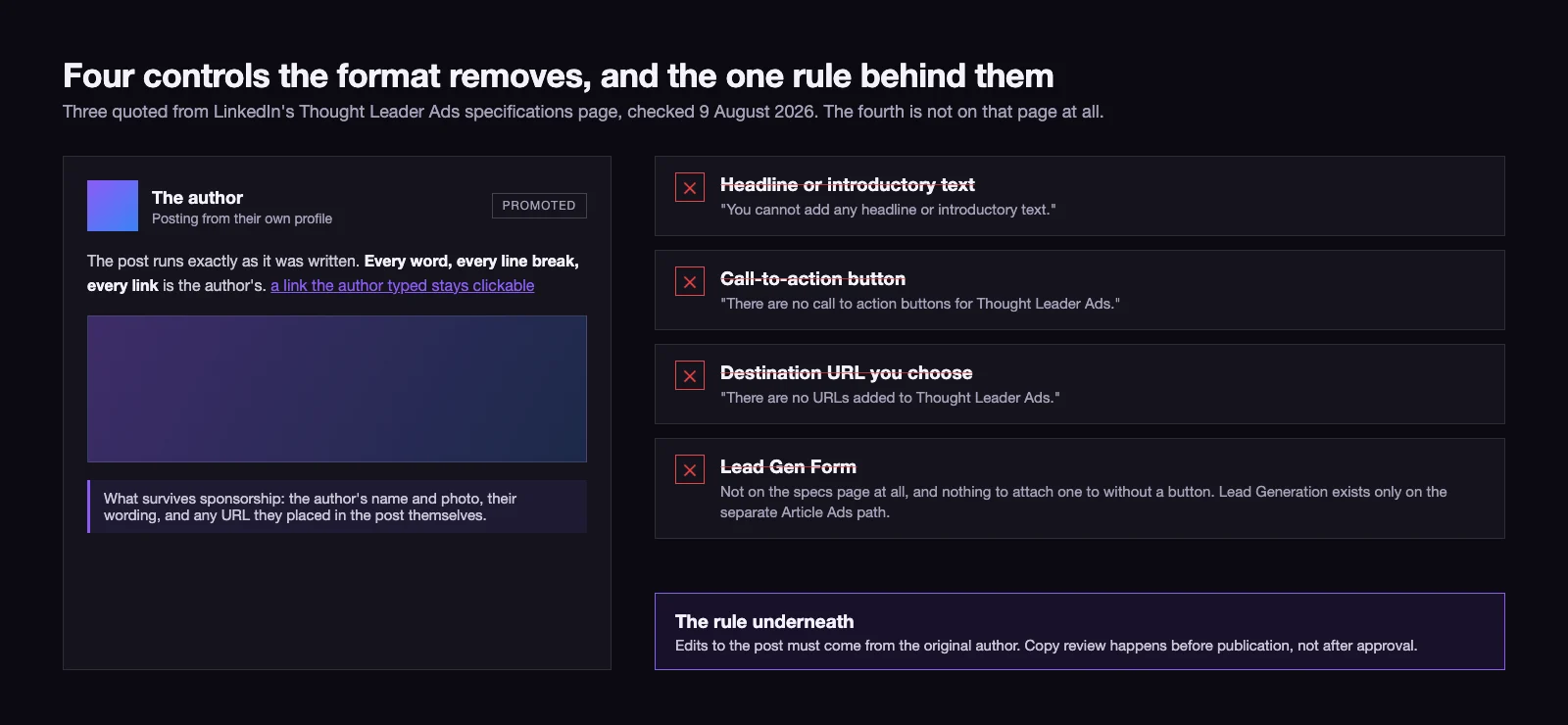
Four controls that exist on every other LinkedIn format are absent here, and LinkedIn states three of them in plain language on the specifications page.
- A headline or introductory text. “You cannot add any headline or introductory text.” The post opens with whatever the author wrote.
- A call-to-action button. “There are no call to action buttons for Thought Leader Ads.” No Learn More, no Register, no Download.
- A destination URL you choose. “There are no URLs added to Thought Leader Ads.” A link the author typed into the post stays hyperlinked when it is sponsored, and that is the only route off the post.
- A Lead Gen Form. LinkedIn’s specs page does not mention lead forms at all, but with no call-to-action button there is nothing to attach one to, and no source shows one running. The exception sits on a different path: LinkedIn documents a Lead Generation objective for Article Ads, and states it is not compatible with Newsletter Ads.
Behind those four sits a rule rather than a missing feature: edits to the post must come from the original author. Your copy review therefore happens before the post is published, not after it is approved, and a typo in a live ad is a message to a colleague rather than a change you can make.
The practical consequence is a briefing change. If the campaign has to capture something, the link and the reason to click it must be written into the organic post before it is published, by the person publishing it. A thought leader ad added on top of a post that ends with a rhetorical question will earn engagement and route it nowhere.
Objectives: three that work, and two LinkedIn pages that disagree
| Objective | Available for thought leader ads | Note |
|---|---|---|
| Brand Awareness | Yes | Listed on both of LinkedIn’s product pages |
| Engagement | Yes | Listed on both; the usual default for the format |
| Video Views | Yes, for video posts | Listed on LinkedIn’s marketing solutions page only |
| Website Visits | No | Not listed on either LinkedIn product page |
| Lead Generation | Only on the Article Ads path | Documented for Article Ads, explicitly not for Newsletter Ads |
Checked on 9 August 2026, LinkedIn’s advertising page for the format still lists Brand Awareness and Engagement only, while its marketing solutions page for the same format lists Video Views as well. Two pages, one product, different answers, and LinkedIn has not reconciled them. Treat Video Views as available for video posts, since a page LinkedIn publishes says so and nothing contradicts it, but when you quote an objective rule to a client, quote the page you actually opened and note the date. This is a format whose documentation has been trailing its releases since 2024.
Click-through rate against a company page ad: LinkedIn says 2x, two vendor datasets say four to six
| Source | Window | Sample | Thought leader ads | Company-page single image |
|---|---|---|---|---|
| LinkedIn, via trade press | reported 30 Oct 2025 | not published | “2x higher click-through rates” compared to other single-image ads with similar objectives | baseline |
| ZenABM | published 23 Jan 2026 | 119 ads, over $300,000 spend | 2.68% median CTR, $2.29 median CPC | 0.42% CTR, $13.23 CPC |
| Fibbler | data window Apr–Jun 2026 | 379 advertisers running the format | 2.79% CTR, 3.07% engagement rate, $3.24 per engagement | 0.61% CTR, 0.80% engagement, $10.49 per engagement, from 958 advertisers |
| Ampy | published 13 Feb 2026 | 22 campaigns | 5.62% CTR | not published |
The qualifier that belongs with those numbers. Only two of those rows publish a baseline to divide by: ZenABM’s works out at 6.4 times the single-image click-through rate, Fibbler’s at 4.6 times. Ampy’s 5.62% is a click-through rate with no comparison figure at all, so it is a data point, not a multiple. Both of the computable multiples come from vendors that sell thought leader ad tooling or services, and each measures its own customer base: advertisers who had already decided the format was worth running and had a person willing to write. LinkedIn’s own published claim, the only one from the platform itself, is 2x, and it comes with no sample size. Treat 2x as the floor and 4.6x to 6.4x as what self-selected operators with a real author have reported, not as a forecast for a founder who posts twice a quarter.
Cost works the way it does everywhere else on LinkedIn: there is no separate pricing tier, the format bids in the same auction on the same daily or lifetime budget, and reported starting budgets cluster at $1,500 to $2,000 a month. Fibbler’s 2026 data puts median monthly spend on the format at roughly $1,800, about a quarter of those advertisers’ total LinkedIn budgets. If you are comparing that against paid search before choosing where the next increment goes, the arithmetic that decides it is the same three-number breakdown described in what Google Ads actually costs: what you bid, what you get for it, and what the bill does when neither is watched.
One structural point the CTR tables tend to obscure. Because the advertiser sets no destination URL, a share of what counts as a click here is an in-feed action rather than a site visit: a “see more” expand, a name tapped, a profile opened. A landing-page visit happens only if the author put a link in the post. The landing-page clicks that do occur are cheap — ZenABM puts them at $3.06 each, 77% below single image — but there are fewer routes to one, so a high click-through rate against a company page ad is real without being the same event.
What LinkedIn does not document about this format
| Question | Documented answer |
|---|---|
| Does a pending permission request expire, and after how many days | None published |
| What status a creative moves to when permission is revoked | None published |
| Whether the advertiser is notified that permission was revoked | None published |
| What happens to a running ad if the author edits or deletes the post | None published |
| Whether the advertiser can moderate comments on the sponsored post | None published |
| What happens when the author stops working for the company | None published |
Two of those deserve a working assumption rather than a shrug. The sponsored post is still the member’s post, so we plan on the basis that comment moderation sits with them and not with the advertiser, and we plan on the basis that a permission outlives employment until somebody revokes it. Both are assumptions, and both are flagged as such to clients, because LinkedIn has committed to neither.
Six gaps is not an argument against the format. It is the reason the next section is a checklist rather than a setting. You cannot write policy around behaviour a platform has not committed to, so you write it around the manual controls you do have: a register, a pause button and a conversation before the person walks out.
The offboarding checklist for a post that is still running
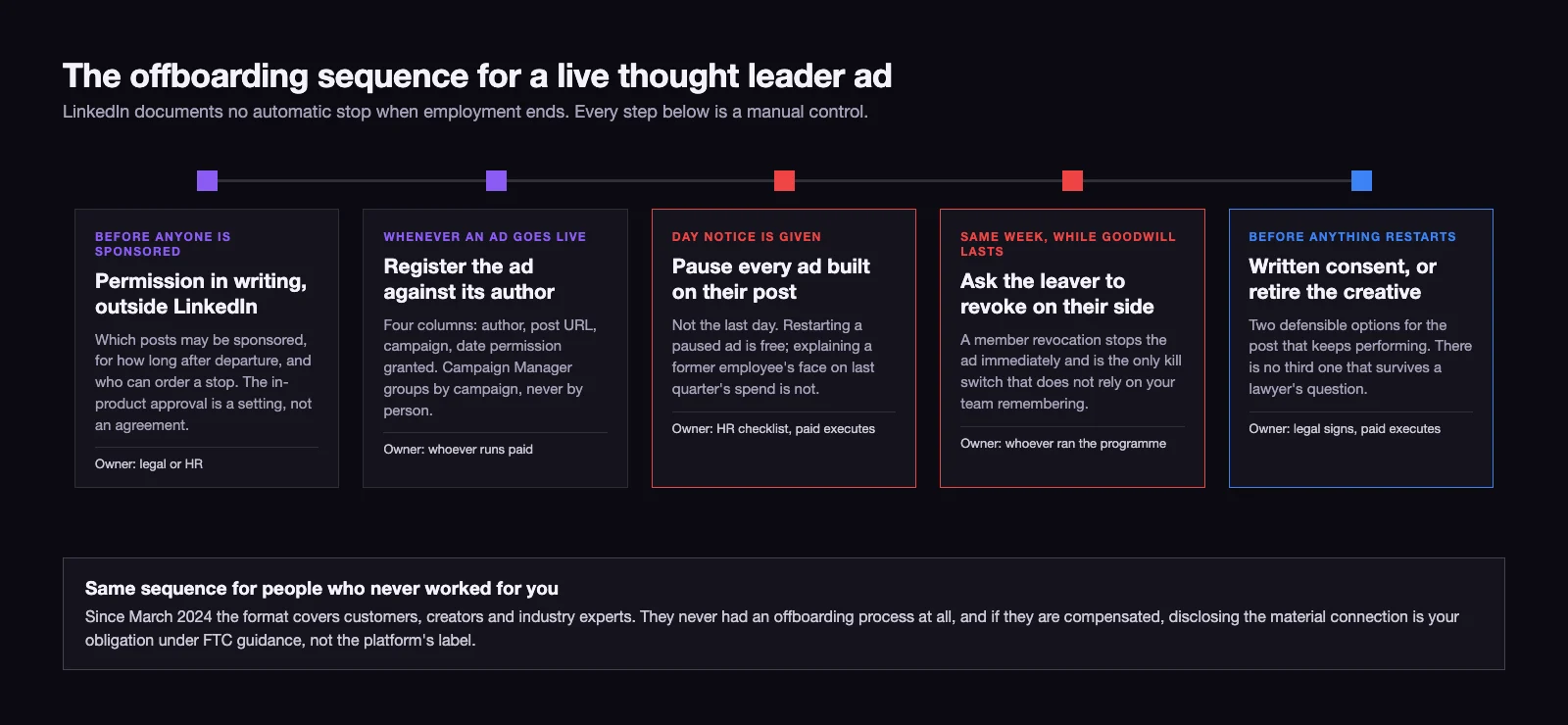
Assume nothing stops by itself. Nothing in LinkedIn’s documentation ties a permission to employment status, and the practitioner sources split: one says permission lasts until the employee revokes it or leaves, while a compliance-focused guide from April 2026 prescribes auditing active ads when employees depart, which is a control nobody writes for something the platform handles automatically. Plan for the permission to outlive the exit interview.
- Get the permission in writing outside LinkedIn, before anyone is sponsored. The in-product approval is a product setting, not an agreement. One paragraph in the employment or contractor terms covering which posts may be sponsored, how long sponsorship may continue after the person leaves, and who can order a stop. Owner: legal or HR. Timing: once at programme launch, then in the template.
- Keep a register of live thought leader ads by author. Campaign Manager organises by campaign, not by person, so nobody can answer “what of mine is still running” from the interface quickly. Four columns are enough: author, post URL, campaign, date permission was granted. Owner: whoever runs paid. Timing: updated whenever an ad goes live.
- Put “check the thought leader ads register” on the offboarding checklist, next to the laptop and the SSO revoke. Owner: HR. Timing: the day notice is given, not the last day.
- Pause first, decide later. Restarting a paused ad costs nothing. Explaining why a former employee’s face was still selling on your budget last quarter costs considerably more.
- Ask the leaver to revoke on their side. A member can revoke at any time and the ad stops immediately, and that is the only kill switch that does not depend on your team remembering. Ask while the goodwill is still there.
- Decide the rule for the post that keeps performing. Sooner or later the best creative in the account will belong to someone who left. There are two defensible options, written consent to keep running it or retirement, and no third one that survives a lawyer’s question.
- Apply all of the above to people who were never employees. Since March 2024 the format has covered customers, creators and industry experts, not just staff, and those people never had an offboarding process at all. If the person is compensated, disclosure of the material connection is your obligation under FTC guidance; a platform label and a LinkedIn profile showing employment are not a substitute for it.
Fitting the format into a funnel that has no form on it
By construction this is a top and middle of funnel instrument. No button, no form, no URL of yours: whatever needs capturing needs a different campaign running alongside. The pairing that works is a thought leader ad carrying reach and engagement into a target account list, a conventional sponsored content or lead generation campaign doing the capture, and retargeting built on the people who engaged with the post.
Judging it by lead count alone will make it look broken, because the format is optimised for a stage that produces very few of them. Before comparing the two, it is worth agreeing what actually counts as a qualified lead, which is the entire subject of where the line between an MQL and an SQL sits. A format that fills the top of the funnel and a format that closes the bottom cannot be scored on the same metric, and a founder whose posts are the creative will notice quickly if they are.
If this is turning into a standing programme rather than an experiment, the parts that break are rarely the ad settings. They are the author pipeline, the register, and who is allowed to say stop. That is the work behind our LinkedIn advertising engagements, and it is why the checklist above exists before the campaign does.
09 / Reader questions
Frequently asked questions
01What are LinkedIn Thought Leader Ads?
Thought Leader Ads are paid distribution for a post that was published from a person's own LinkedIn profile rather than from a company page. The company pays; the post stays the member's, carries their name and photo, and is marked as promoted. The author must grant permission before it can run.
02How do you set up a LinkedIn thought leader ad?
In Campaign Manager, pick a Brand Awareness, Engagement or, for a video post, Video Views campaign, find the member's post under the thought leader ads section, and send a permission request. The author approves it from the email LinkedIn sends or from Settings and Privacy, Account Preferences, Thought Leader Ads. Only then can you use the post as creative.
03What kinds of posts can be used as thought leader ads?
Posts with a single image, native video posts and text-only posts, plus LinkedIn articles, newsletter issues and posts linking to a LinkedIn Event. LinkedIn's specifications page states that posts with multiple images, polls or documents cannot be promoted, and the ads API rejects reposts of someone else's content.
04Can you add a lead gen form to a thought leader ad?
No. A standard thought leader ad has no call-to-action button, no advertiser-set destination URL and no Lead Gen Form. The only clickable link is one the author typed into the post themselves. LinkedIn documents a Lead Generation objective on the separate Article Ads path, and explicitly not for Newsletter Ads.
05How much do LinkedIn thought leader ads cost?
There is no separate price tier: thought leader ads run in the same auction as every other LinkedIn format, on the same daily or lifetime budget. Reported starting budgets cluster at $1,500 to $2,000 a month, and one 2026 dataset puts median monthly spend on the format at about $1,800, roughly a quarter of those advertisers' LinkedIn budgets.
06Can an employee revoke permission for a thought leader ad?
Yes, at any time, from their own LinkedIn settings, and the ad stops immediately. That switch belongs to the author, not to the advertiser, which is why the author's cooperation is worth keeping. If it was the only ad in the campaign, the campaign stops with it.
07What happens to a thought leader ad when the employee leaves the company?
LinkedIn does not document this anywhere, and practitioner accounts contradict each other on whether permission ends with employment. Treat it as persisting until someone revokes it: pause the ads the day notice is given, ask the leaver to revoke on their side, and keep a register of which live ads belong to which author.