
Published
The Meta Conversions API sends conversion events from your server to Meta instead of from the visitor’s browser. It exists because browser events get blocked, delayed and stripped of identity. It runs alongside the Meta Pixel rather than replacing it, and the two copies of each event are reconciled by a shared event ID.
How this was checked. For this query in the United States on 10 August 2026, Google returned an AI Overview, a People Also Ask block, a video pack, a discussions module and a perspectives carousel, leaving only five organic results. Two of those five are Meta’s own documentation, one is a Meta Blueprint course, one is a Reddit thread and one is a Zapier automation post. Every one of them explains what the API is. None of them resolves what Meta actually says about which identifiers count for most, none of them quotes the combinations Meta rejects as insufficient, and none of them covers the one-click setup Meta shipped in April 2026. Every claim below carries the page that states it and the date it was verified. Where Meta’s own pages contradict each other, this page says so rather than picking the tidier version.
What the Conversions API sends that the pixel cannot
The Meta Pixel is a JavaScript tag. It fires in the visitor’s browser, reads two first-party cookies it set itself, and posts the event to Meta from that browser. Every one of those steps is somebody else’s territory: the browser vendor’s, the ad blocker’s, the network’s.
The Conversions API is an HTTP POST from your infrastructure to Meta’s endpoint. The request format is stable across all three of the things people confuse: it is the same endpoint whether the event came from a web page, a CRM stage change, or a till in a physical shop. The action_source field is what tells them apart.
Three categories of data reach Meta only this way:
- Events with no browser session at all. A lead that converts to a qualified opportunity three weeks later, a subscription renewal processed by a billing job, a refund. Nothing is open in a browser when these happen.
- Events the browser saw but could not report. The page unloaded before the tag fired, the request was blocked, the visitor left on a flaky mobile connection.
- Identity the browser never had. A hashed email you hold in your customer record but that was never typed into the page the pixel was on.
The last one matters more than the first two, and the rest of this page is largely about why.
How much browser data actually goes missing, and who is counting
There is no independent, methodologically transparent, public measurement of what share of Meta Pixel events fail to arrive. That sentence is the most useful thing on this page, because roughly every article on this topic opens with a confident percentage, and every vendor quoting a single hero number sells the remedy for it.
What can be sourced honestly falls into three separate mechanisms that get carelessly added together.
Ad and content blocking. The eyeo 2026 Ad-Blocking Report puts global ad-blocking penetration at 30.0% in Q4 2025, down from 30.5% a year earlier, across roughly 1.1 billion users. Note the interest: eyeo owns Adblock Plus, and a large number is its core market argument. DataReportal’s survey leg, measured by asking people rather than measuring traffic, lands close by at 29.5% globally and 32.5% in the United States. Both figures describe blocker usage, not Meta pixel loss. Only a subset of blockers target connect.facebook.net, and only a subset of those users appear in any given audience.
The nearest thing to a direct measurement is Simo Ahava’s bait-file test on his own site, which found roughly 7% of page loads with Google Tag Manager blocked, 10% with Google Analytics blocked, and 18% with a decoy ad script blocked. He published it as a proof of concept with no sample size and no confidence intervals, in 2021, on a site read by analytics developers. That audience blocks at rates a consumer shop will never see. It is a ceiling, not a benchmark.
Safari’s Intelligent Tracking Prevention. This is the mechanism most commonly described wrongly, and it is worth separating the three rules people blur together. ITP caps every persistent cookie set through document.cookie at a seven-day expiry — unconditionally, with no engagement test, so a returning weekly customer does not keep theirs. It caps that at 24 hours when the visitor arrives on a link-decorated navigation from a domain WebKit has classified. And, as a separate mechanism, it purges all script-writable storage after seven days of Safari use without interaction on the site. _fbp and _fbc are exactly the kind of cookie the first rule catches. What ITP does not usually do is stop the pixel firing. So the event still arrives — it arrives with weaker identity and a broken long attribution window. Safari held 16.47% of global browsing in July 2026. Conflating degraded identity with missing events is the single most common error in vendor content on this topic.
Everything else. Consent-mode suppression, page abandonment before the tag executes, network failures, and single-page apps that never fire the route change.
A defensible working range for a consumer web property is that 10% to 30% of browser-side events are lost, sitting near the low end for mainstream mobile audiences on Chrome and near the high end for desktop-heavy, technical or Safari-heavy ones. Anyone giving you a tighter number without a published method is guessing, and probably selling.
Meta’s own numbers are worth quoting precisely because of what they are not. Meta states that advertisers with a Conversions API setup for web events “saw an average 17.8% lower cost per result compared to those without Conversions API.” That is Meta’s wording, published April 2026, with no footnote, no population, no date range and no methodology anywhere on the page. It is almost certainly an observational comparison of advertisers who adopted server-side tracking against those who did not — and advertisers who implement server-side tracking are, as a class, larger and better at measurement to begin with. Use the figure as Meta’s claim, not as a forecast for your account. The same caution applies to the older 13% CPA improvement figure still sitting on Meta Blueprint from 2022.
The one operational target Meta does publish is concrete and useful: aim for a 75% event coverage ratio of Conversions API events to Meta Pixel events. That is a number you can measure on your own dataset today.
Event Match Quality: a 0 to 10 score with no published pass mark
Event Match Quality is Meta’s estimate of how well the customer information attached to a server event will match to a Meta account. Four facts about it are documented and routinely misreported:
- The scale is 0 to 10, not 1 to 10. Meta’s wording is “a score from 0 to 10.” Sources saying 1 to 10 are wrong.
- It is calculated on a rolling 48 hours of data. Send events irregularly and the score goes stale.
- It covers website events only — server events with
action_sourceset towebsite. Offline and CRM events do not get a score. - It applies to all standard and custom web events, not just Purchase.
Meta also states plainly that the score reflects two things at once: the quality of the customer information you send and the percentage of event instances that actually matched to Meta accounts. A score can therefore fall because your data got worse, or because your audience did.
Meta publishes no bands. No good, no needs-improvement, no poor, no colour thresholds, no minimum. I checked the help centre, the developer documentation and Blueprint. The figures everyone repeats — 6 as a floor, 8 or higher as the working target for Purchase, 3 to 5 as normal for upper-funnel events — come from practitioners, not from Meta. They are reasonable working conventions and this page will not pretend otherwise, but presenting them as Meta’s requirement is a fabrication that has been copied between blogs until it reads like policy.
The practical consequence: your own trend is the metric, not the absolute number. A dataset that moves from 4.1 to 6.8 after a change tells you something. A dataset sitting at 6.2 tells you almost nothing on its own, because the achievable ceiling depends on whether your customers hand you an email address before they convert.
Meta ranks the parameters High, Medium and Low, and phone is not High
Here is where almost every guide on this topic, and most agency advice, gets it wrong.
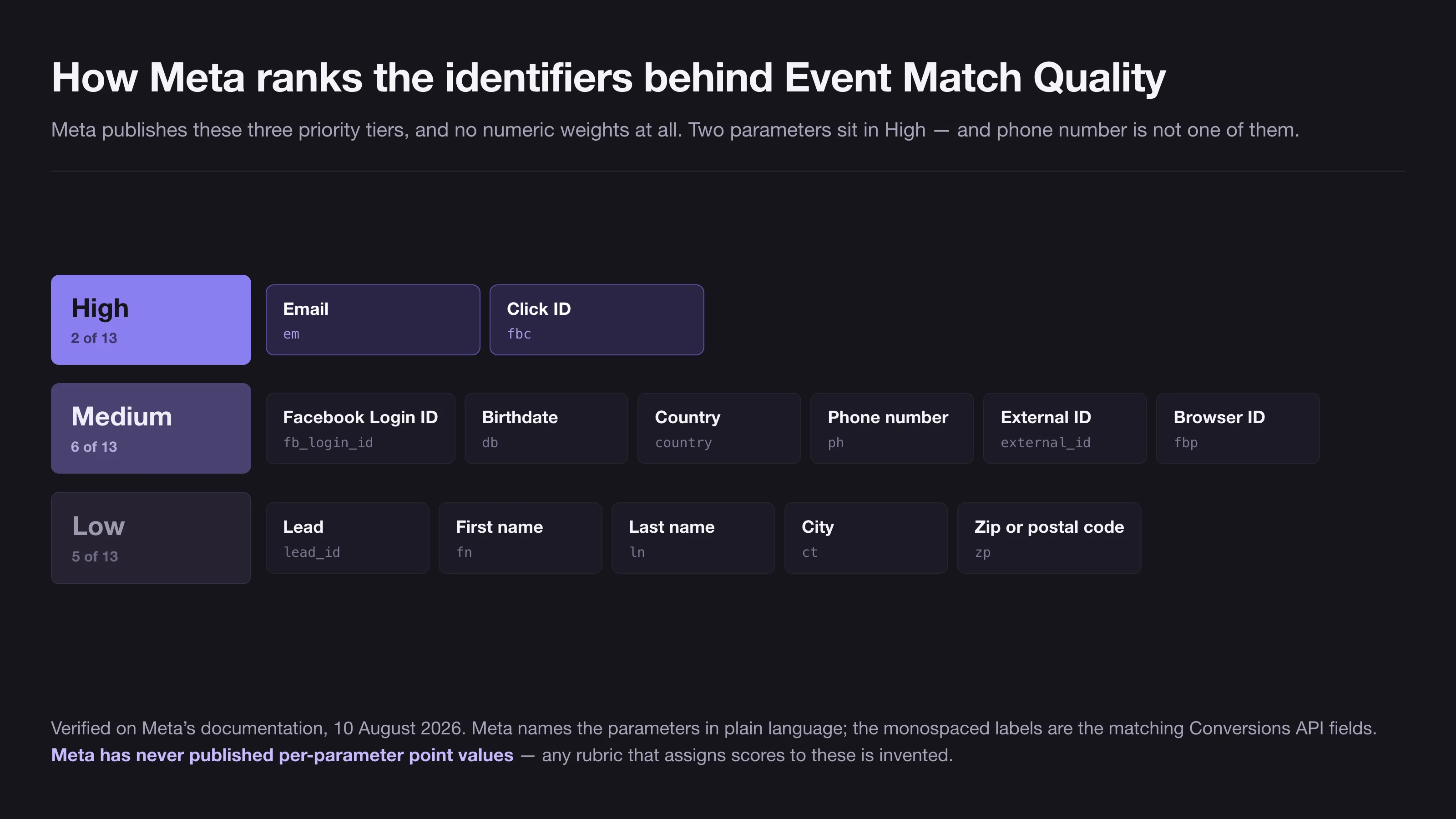
Meta does publish a prioritisation of the customer information parameters. It is not a numeric weighting — Meta has never published per-parameter point values, coefficients or percentage contributions, and any article giving you a rubric of “email is worth 3.2 points” invented it. What Meta publishes is a three-tier priority table, and the tiers are not what the received wisdom says they are.
| Parameter (Meta’s label) | API field | Meta’s priority |
|---|---|---|
em | High | |
| Click ID | fbc | High |
| Facebook Login ID | fb_login_id | Medium |
| Birthdate | db | Medium |
| Country | country | Medium |
| Phone number | ph | Medium |
| External ID | external_id | Medium |
| Browser ID | fbp | Medium |
| Lead | lead_id | Low |
| First name | fn | Low |
| Last name | ln | Low |
| City | ct | Low |
| Zip or postal code | zp | Low |
Meta’s table names the parameters in plain language; the API field names in the middle column are the corresponding fields from the Conversions API parameter reference.
Three readings that follow, and that you will not find in the top ten results for this query:
Only two parameters are High, and one of them is the click ID. fbc — the value derived from the fbclid on the landing URL — sits level with email. This is the parameter most likely to be silently missing in a server-side setup, because capturing it requires the server to have seen the original landing URL or the _fbc cookie, and plenty of integrations never wire that up. If you are going to fix one thing, fix this before you go hunting for more email addresses.
Phone is Medium, not High. The near-universal claim that “email and phone are the strongest identifiers” contradicts Meta’s own help centre, which ranks phone alongside browser ID, external ID, country and birthdate. Phone is useful. It is not in the top tier.
Names and addresses are explicitly Low. First name, last name, city and postcode sit at the bottom. Integrations that proudly forward a full billing address while dropping the click ID are optimising the wrong end of the table.
One honest caveat, because it matters for anyone acting on this: Meta’s two properties disagree. The developer best-practices page names em, client_ip_address, fn, ln and ph as examples of “high-quality customer information parameters” — putting first and last name in a category the help centre ranks Low, and naming client_ip_address, which does not appear in the priority table at all. Gender and state are also absent from the table. The priority table is the more specific and more recent-looking artefact and is the better guide, but do not present either page as the last word.
The identifier combinations Meta treats as not enough
Buried in Meta’s best-practices documentation is a list almost nobody quotes: combinations of customer information that render an event invalid, because on their own they cannot identify anybody.
An event that contains only one of these combinations, or a subset of one, will not be processed:
ct+country+st+zp+ge+client_user_agent— a full postal address, plus gender, plus the user agentdb+client_user_agent— date of birth and user agentfn+ge— first name and genderln+ge— last name and gender
The first row is the instructive one. A complete postal address with gender and a user agent string feels like a lot of data. Meta treats it as nothing. Read alongside the priority table, the message is consistent: Meta matches on strong single identifiers, not on accumulated demographic detail. Sending more Low-tier fields does not add up to a High-tier one.
The formatting rules for the fields you do send are strict and unforgiving, because a wrongly normalised value hashes to a string that matches nothing and fails silently. Email is trimmed and lowercased before hashing. Phone strips symbols, letters and leading zeros and must include a country code. City is lowercase with no punctuation, no special characters and no spaces. State uses the two-character code in lowercase. Postcodes use the first five digits only in the United States. Country uses the lowercase ISO 3166-1 alpha-2 code. All of those are hashed with SHA-256. fbc, fbp, client_ip_address and client_user_agent are sent raw and must never be hashed — hashing them is a common and completely silent failure.
Meta now ships an official library that handles the fiddly half of this: capi-param-builder, which generates and enriches fbc, fbp, event_source_url, referrer_url and client_ip_address, and performs normalisation and hashing for supported languages. It ships for PHP, Java, Node.js, Python, Ruby and browser JavaScript, and it was integrated into the Business SDK with Graph API v26.0 in July 2026. If you are writing normalisation logic by hand in 2026, stop.
Getting per-parameter numbers for your own dataset
Since Meta publishes no universal weights, the question “what would email actually be worth to me” has exactly one legitimate answer, and it is not a blog post’s table. It is the Dataset Quality API.
Query it against your own dataset and it returns three things worth having:
event_match_quality.composite_score— the same EMQ number as the Events Manager column, but programmatically, so you can trend itmatch_key_feedback— a per-parameter breakdown with acoverage.percentagefor each identifier, which tells you what share of your events actually carry itpotential_aly_acr_increase— a per-parameter estimate of the uplift you could expect if you started sending that identifier, computed against a cohort of similar advertisers
That third object is the closest Meta ever comes to a per-parameter number, and it comes with three warnings that have to travel with it. It measures median increase in additional conversions reported, not EMQ points. The values in Meta’s documentation — such as the frequently misquoted email and IP address figures for Purchase events — are documentation examples, computed for a sample dataset, not universal constants. And Meta discloses no cohort definition, sample size or time window for what counts as a “similar advertiser.”
Used properly, this inverts the whole question. You do not need a published rubric of parameter weights, because Meta will compute the estimate for your own account against your own cohort. The coverage percentages alone usually make the answer obvious within a minute: the parameter to fix is the High-tier one sitting at 12% coverage, not the Low-tier one you could push from 80% to 95%.
Deduplication runs on event_id, and it breaks quietly
Running the pixel and the Conversions API together means Meta receives two copies of the same purchase. Deduplication is what stops it counting two.
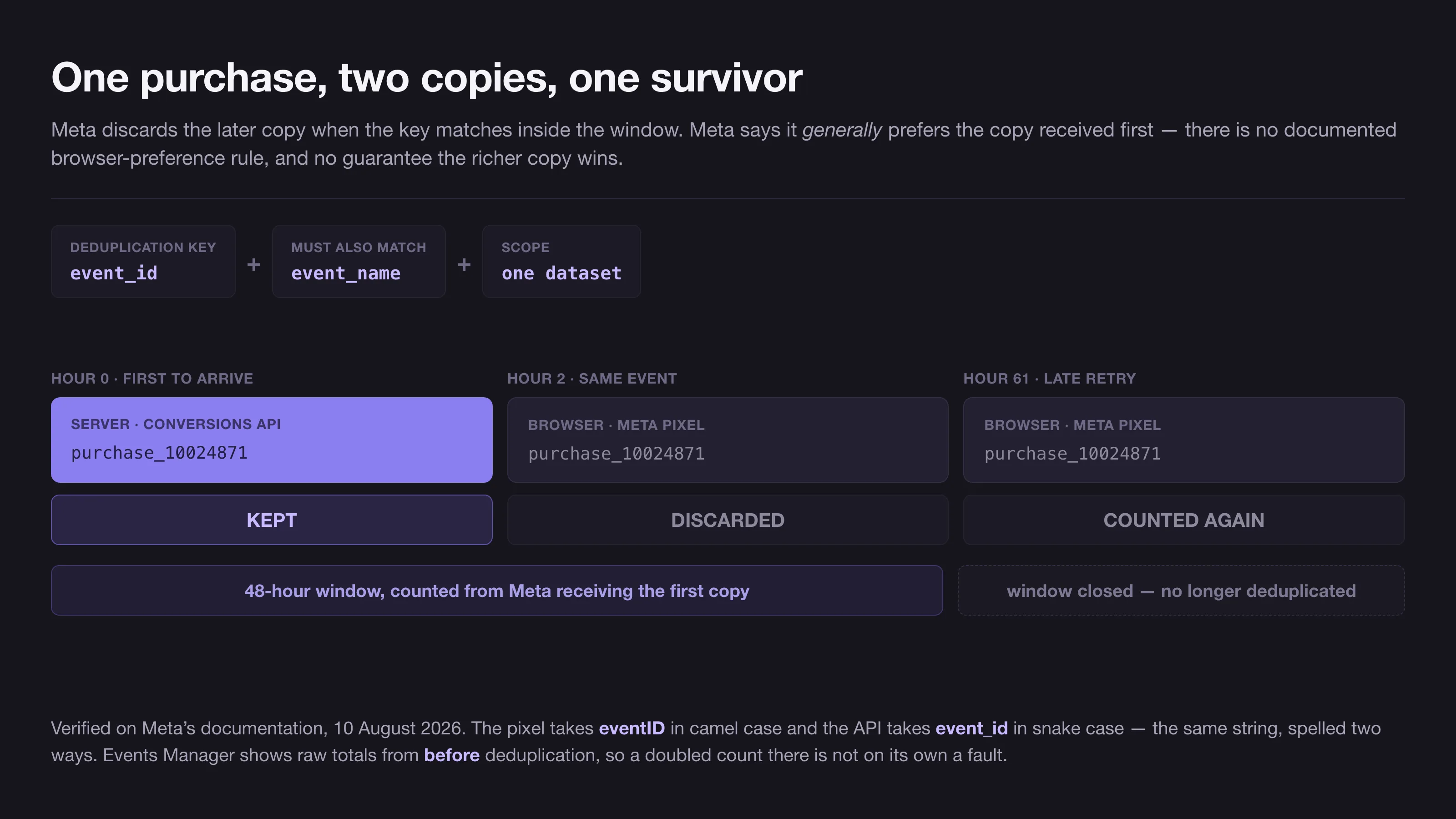
The rule. Meta discards the later event when it sees the same event_id and the same event_name arriving at the same dataset within 48 hours of the first one. Four details in that sentence do work:
- The match is on both fields. Matching IDs with mismatched event names do not deduplicate.
- The window is 48 hours from Meta’s receipt of the first copy, not from
event_time. - The scope is one dataset. Two datasets receiving the same
event_iddo not deduplicate against each other. - The copy that arrives first is kept, regardless of source. There is no browser-preference rule. Meta hedges this with “if server and browser events do not differ meaningfully in their content, we generally prefer the event that is received first” — and never defines what differing meaningfully means, so do not build a design that depends on the richer copy winning.
There is a secondary method: event_name plus fbp and/or external_id, applied consistently on both sides. Treat it as a safety net, never as the primary design. It only works browser-first — a server event is never discarded if no matching browser event arrived in the previous 48 hours, even if an identical browser event shows up afterwards. And Meta’s own pages disagree on it: the deduplication page says fbp and/or external_id, while the best-practices page says a combination of both. That contradiction was live on both pages on 10 August 2026.
Generating the ID. Meta documents that the ID can be any unique string, gives order numbers and transaction IDs as examples, and — verified on both the deduplication page and the server event parameter reference — states no character limit and no charset restriction. It must be unique per event instance, not per user or per session: if PageView and ViewContent both fire on a product page, each needs its own.
The failure that actually happens in production is generating the ID independently on each side. Two random UUIDs will never match. Derive both from something already unique to the event:
// Server-rendered order confirmation page
event_id = "purchase_" + order.id           // e.g. "purchase_10024871"

fbq('track', 'Purchase',
    { value: 129.00, currency: 'USD' },
    { eventID: "purchase_10024871" }        // third argument, camelCase eventID
);

// Your server, same order
POST https://graph.facebook.com/v26.0/<DATASET_ID>/events?access_token=<TOKEN>
{
  "data": [{
    "event_name": "Purchase",               // must equal the pixel's 'Purchase'
    "event_id":   "purchase_10024871",      // must equal eventID, byte for byte
    "event_time": 1787491200,               // Unix SECONDS, no more than 7 days old
    "action_source": "website",
    "event_source_url": "https://example.com/checkout/thank-you",
    "user_data": {
      "em":  ["<sha256 of the trimmed, lowercased email>"],
      "fbc": "fb.1.1787490000000.IwAR2xyz",   // raw; creationTime in MILLISECONDS
      "fbp": "fb.1.1787489000000.1234567890", // raw; creationTime in MILLISECONDS
      "client_ip_address": "203.0.113.9",
      "client_user_agent": "Mozilla/5.0 ..."
    },
    "custom_data": { "value": 129.00, "currency": "USD" }
  }]
}
Two traps are visible in that block. The pixel takes eventID in camelCase while the API takes event_id in snake case — the same string, spelled two ways. And event_time is in seconds while the creation-time component inside fbc and fbp is in milliseconds, which is why the timestamps in those two cookie values are three digits longer than the one above them. Get that wrong and you build a click ID that matches nothing, silently, on the parameter Meta ranks joint-highest.
Deriving the ID from order.id means the two sides compute the identical string with no shared state, and a repeat customer’s second order gets its own ID and is correctly counted twice.
The seven-day wall. event_time can be at most seven days in the past. If any event in a request breaks that, Meta returns an error for the entire request and processes none of the events in it — a batch job replaying a backlog can therefore lose good events alongside the stale one.
Here Meta’s documentation is genuinely unreconciled, and it is worth knowing before you plan an offline upload. The seven-day rule is stated unconditionally. The offline events page separately says physical store transactions “should be uploaded within 62 days of the conversion,” and the same page states that “the maximum deduplication window is 7 days” — against the 48 hours documented for pixel-and-server deduplication on the web. Both pages were live and mutually inconsistent on 10 August 2026. Do not read the 62 days as an exemption from the seven-day error: test with a small batch of genuinely old transactions before you schedule a nightly job that depends on it. Meta’s own recommendation, whatever the ceiling, is to send everything within an hour of the event where you can.
Diagnosing it. Here is the trap that sends people chasing bugs that do not exist: the event counts in Events Manager are raw totals, before processing and deduplication. Seeing roughly double your true order count in Events Manager is not by itself evidence of anything. Check Ads Manager reporting, which is post-deduplication. Inside Events Manager, the Test Events tool distinguishes browser from server in its “Received From” column and will say that server events were deduplicated when things are healthy, and the Diagnostics tab raises “Event Missing Some Deduplication Parameters”, which almost always means a missing event_id.
Five ways to ship the Conversions API, and how to choose
The choice is not really about the API. It is about who owns the thing at three in the morning eighteen months from now.
| Path | Who builds it | What Meta charges | What it can send | Who maintains it |
|---|---|---|---|---|
| One-click setup in Events Manager | Nobody — a toggle | Nothing | Only the web events the pixel already saw | Meta |
| Partner integration (Shopify, WooCommerce, a CDP) | The platform vendor | Nothing | The platform’s backend events, richer than the pixel | The vendor |
| Conversions API Gateway | You deploy Meta’s software to your own cloud | Nothing; you pay the cloud bill | Web events, relayed server-side | You own the infrastructure |
| Server-side Google Tag Manager | You, or a hosting vendor | Nothing | Anything you can model in a container, across several ad platforms at once | You or the host |
| Direct integration | Your developers | Nothing | Everything: web, app, CRM stages, offline sales | You |
Read that table top to bottom as increasing capability and increasing ownership, and pick the highest row that actually covers your events.
The one-click option is new, and it changes the default answer for small accounts. Meta announced it on 15 April 2026 and rolled it out from late April. It appears in Events Manager as a “Connect Data” flow with a “Connect Now” button, and it creates a Meta-hosted server-side connection that mirrors your pixel’s web events with deduplication handled for you. Meta’s help centre calls it the “Meta-enabled Conversions API”; that name does not appear in the developer documentation, so expect to meet it in the interface rather than in the API reference.
Two sober notes on it. First, the most credible reading available is Jon Loomer’s, who described it as “essentially the API Gateway Demo, but without an expiration on the free offer” — this is a repackaging, not a new architecture. Second, and decisively: it relays only what the browser pixel already saw. If the pixel was blocked, there is nothing to relay. It closes the reporting gap and adds server-side reliability at the transport layer; it does not close the identity gap, because it has no access to data the browser never had. For a shop whose main problem is lost identity on Safari, that distinction is the whole game.
The Gateway is alive, contrary to a persistent rumour. Meta’s documentation still lists it as an active product with no deprecation notice as of 10 August 2026, running on AWS EKS, AWS ECS Express and GCP, with a separate AWS App Runner guide. Meta’s wording on cost is unambiguous: “the only cost of the Conversions API Gateway is the associated cloud resource or partner fees.” Practitioners report real-world cloud bills in the tens of dollars a month. It suits a team that wants server-side reliability without writing integration code but does have someone who can look after a cloud deployment.
Server-side GTM is officially supported, and mostly not by Meta. Meta maintains a first-party tag template for it and links to its own help article for setup, and it is listed among the partner integrations. But the repository has around a dozen commits, no published releases, and a note that the Conversions API client is in beta. In practice most server-side GTM deployments run through third-party hosts or self-hosted cloud. This is the right row if you are sending events to more than one ad platform, because you model the event once and fan it out — which is exactly the case the cross-platform section below makes.
Direct integration is the only row that reaches your CRM. If the conversion you actually care about is “became a qualified opportunity” rather than “clicked submit,” none of the rows above it can send that event, because the event does not happen in a browser. That is also the point where server-side tracking stops being a measurement chore and becomes the thing your paid media optimisation is actually built on: the platform learns from the outcome you sell, not the form fill you tolerate.
One thing the table deliberately does not have is a price column for the middle rows. Partner platforms and container hosts price by volume, region and plan, and any figure printed here would be wrong within a quarter. Get quotes on your own event volume.
LinkedIn and TikTok built the same thing with different constants
This is the part that rarely appears in one place. LinkedIn’s Conversions API and TikTok’s Events API 2.0 are not analogous to Meta’s — they are architecturally the same object. All three pair a browser tag with a server API sending the same event, reconciled by an advertiser-generated event ID. Nobody invented a different primitive.
Learn the pattern once and it ports. What does not port is a small set of constants, and every one of them fails silently.
| Meta Conversions API | LinkedIn Conversions API | TikTok Events API 2.0 | |
|---|---|---|---|
| Deduplication key | event_id + event_name | eventId | event_id + event |
| Deduplication window | 48 hours from first receipt | Not documented | 48 hours; cross-source “after 5 minutes and within 48 hours” |
| Which copy survives | Whichever arrives first | The Insight Tag copy, always | Whichever arrives first |
| Same-source duplicates | Not covered | Not documented | Deduplicated |
| Maximum event age | 7 days | 90 days | Not documented |
| Timestamp unit | Unix seconds | Epoch milliseconds | Unix seconds |
| Email handling | SHA-256, trimmed and lowercased | SHA-256, trimmed and lowercased, hex, 64 chars | SHA-256, lowercased |
| Click ID, sent raw | fbc | li_fat_id | ttclid |
| Match quality score | Event Match Quality, 0–10 | Signal quality, High or Low, per conversion rule | Event Match Quality, a weighted average of match key coverage |
| Authentication | Access token | OAuth 2.0 three-legged, plus a monthly version header | Static access token from Ads Manager |
Four of those rows will actually cost you data.
LinkedIn always keeps the browser copy. Not the first to arrive — the Insight Tag copy, deterministically, discarding the Conversions API one. If you built a rich server-side payload for LinkedIn on the assumption that the better copy wins, LinkedIn has been throwing it away. LinkedIn also requires a separate conversion rule per data source, which has no Meta equivalent and which people routinely skip, breaking deduplication entirely. LinkedIn’s own healthy-state signal is useful and unusual: if deduplication is working, the Insight Tag rule should show the higher count.
Seven days against ninety. This single constant tells you what each platform is architecturally for. A CRM backfill of thirty-day-old B2B conversions works on LinkedIn and is rejected outright by Meta. If your sales cycle is measured in weeks, Meta’s window is a design constraint you have to build around — usually by sending an earlier proxy event at the moment it happens rather than the real outcome when it lands. That constraint is one of the reasons B2B formats like LinkedIn Thought Leader Ads get measured on engagement long before anything reaches a CRM.
Milliseconds against seconds. LinkedIn is the odd one out: it takes epoch milliseconds where both Meta and TikTok take Unix seconds. An off-by-one-thousand error either fails validation or, worse, passes and lands the event at a nonsensical time. Meta is internally inconsistent on this too — event_time is in seconds while the creation-time component inside fbc and fbp is in milliseconds.
TikTok has a five-minute floor. TikTok documents cross-source deduplication as happening “after 5 minutes and within a 48-hour window.” What it does not explain anywhere public is what happens to a cross-source duplicate arriving in under five minutes — which is the normal case for a well-built real-time server integration. That is an open question in TikTok’s documentation, not something to design around confidently. TikTok is also the only one of the three that deduplicates same-source duplicates, and it describes merging and enriching the surviving event rather than simply dropping the loser.
Two smaller divergences worth knowing. LinkedIn is the only one with B2B-native identifiers — company name, job title, and a Lead Gen Form URN. It is also the only one without a numeric match-quality score, though it is not blind: Campaign Manager shows a Signal quality rating of High or Low against each conversion rule, and LinkedIn documents identity match rate and attribution match rate as separate metrics. That is the same discipline as Event Match Quality, at much coarser resolution — you can tell a healthy rule from a broken one, but you cannot watch a score move two tenths after a fix. TikTok has the lowest setup friction of the three: a static access token pasted from Ads Manager, no OAuth flow, no scopes, no version header.
Keeping the setup alive across Graph API versions
Server-side tracking is not a project that finishes. Meta ships a new Graph API version roughly every four to six months — v24.0 in October 2025, v25.0 in February 2026, and v26.0 on 29 July 2026, which is current as of this writing. Meta’s versioning policy guarantees each version at least two years from release, so nothing breaks overnight, but pinned versions do eventually stop answering.
Three habits keep a setup from rotting:
- Pin the version explicitly in your endpoint and put its expiry in a calendar. An unpinned integration inherits whatever Meta defaults to when your version expires, which is a change you did not test.
- Watch the coverage ratio, not just the score. Meta’s published 75% target for Conversions API events against pixel events is the number that catches a broken integration within a day. EMQ moves slowly and can look fine while half your events have stopped arriving.
- Re-verify the parameter list after each version. v26.0 did not change any Conversions API endpoints, but it did fold the parameter builder into the Business SDK. The changes that matter to this API tend to arrive as tooling and quality features rather than breaking schema changes, which makes them easy to miss.
One structural note on Meta’s documentation, because it affects how much any guide including this one can promise: Meta’s Conversions API pages carry no last-updated dates. There is no changelog for the parameter tables and no version stamp on the deduplication rules. The strongest honest claim anyone can make is that a given statement was present on Meta’s documentation on a given day. For everything above, that day is 10 August 2026.
There is a related terminology drift worth naming. Meta has been migrating Events Manager from “pixel” to “dataset” — the dataset ID is the same number the pixel ID used to be, with the pixel now living inside the dataset. But Meta’s own pages have not finished the migration: the Conversions API overview uses “dataset ID” while the get-started page still says “you must obtain a Pixel ID.” Headlines announcing a “Meta Pixel deprecation” are not supported by anything Meta has published. The Meta Pixel is still the name of the browser-side collector, and it is still doing half the work — which, given that everything above depends on two copies of each event arriving, is exactly as it should be.
If you are also working on the creative side of the same campaigns, the placement specifications and safe zones live in their own guide on Facebook ad sizes; nothing here touches format or creative. And if the reason you are reading this is that reported conversions stopped matching reality, the budget arithmetic that sits on top of those numbers is worked through in how much Google Ads cost.
11 / Reader questions
Frequently asked questions
01What is the Meta Conversions API?
The Meta Conversions API is a server-to-server connection that sends conversion events from your own server, CRM or platform directly to Meta, instead of relying on the visitor's browser to send them. It runs alongside the Meta Pixel rather than replacing it, and the two copies of the same event are reconciled by a shared event ID.
02Is the Meta Conversions API free?
Meta charges nothing for the Conversions API itself, for the Conversions API Gateway software, or for the one-click setup inside Events Manager. What can cost money is the path you choose to run it: cloud hosting for a self-deployed Gateway, a subscription to a partner platform, a server-side tag container, or your own developer time.
03What is a good Event Match Quality score?
Meta scores Event Match Quality from 0 to 10 but publishes no pass mark, no bands and no recommended minimum anywhere in its documentation. The widely repeated targets of 6 as a floor and 8 as a goal for Purchase events are practitioner convention, not Meta policy. Treat your own trend over time as the signal.
04What is the difference between the Meta Pixel and the Conversions API?
The pixel runs in the visitor's browser and can be blocked, delayed or stripped of cookie identity. The Conversions API runs on your server, where none of that applies, and can carry data the browser never had, such as CRM stages and offline purchases. Meta's guidance is to run both and deduplicate, not to pick one.
05How does Meta deduplicate pixel and server events?
Meta discards the later copy when it sees the same event_id and event_name arriving at the same dataset within 48 hours of the first one. Meta says it generally prefers the copy received first, with no browser-preference rule. A secondary method matches on event_name plus fbp and/or external_id — Meta's own pages disagree on whether both are needed — and works browser-first only.
06How old can an event be when you send it to the Conversions API?
Seven days. Meta's documentation states that if any event_time in a request is more than seven days in the past, it returns an error for the entire request and processes no events in it. Meta's offline events page separately says physical store transactions should be uploaded within 62 days, and never reconciles the two figures — do not assume the longer one exempts you.
07Do LinkedIn and TikTok have a Conversions API?
Yes, and both are built on the same primitive: a browser tag plus a server API sending the same event, reconciled by an advertiser-generated event ID. LinkedIn calls it the Conversions API, TikTok calls it Events API 2.0. The mental model transfers directly; the constants, the timestamp units and the deduplication rules do not.