Published
Server-side tracking moves the collection point for analytics and ad events from the visitor’s browser to a server you control. The browser sends one request to an endpoint on your own domain; that server forwards the event to each vendor over server-to-server APIs. It changes the transport and the cookie. It does not change what you are allowed to collect.
How this was checked. For this query in the United States on 18 August 2026, Google returned an AI Overview, a People Also Ask block and a video pack above the organic results. Of the eight organic results, six belong to companies that sell either a tracking product or a consent product: Stape, Matomo, Piwik PRO, Osano, Iubenda and CM.com. The remaining two are Google’s own developer documentation and a Reddit thread. Every one of them explains the concept. None of them prices it — and Google’s own AI Overview closes by offering to tell the reader about “cost and hosting requirements,” which is a fair summary of what the page it summarised did not contain. Every figure below is attributed to the page that publishes it, checked on 18 August 2026.
What physically changes when the event leaves from your server
Three things move, and one thing does not.
What does not move: the browser still sees the event. This is the detail most explanations skip, and it decides what server-side tracking can possibly fix. For a web page, something in the browser still has to notice that a purchase happened and report it. Google’s own description of server-side tagging is precise about this: the server container “doesn’t run in the user’s browser or on their phone. Instead, it runs on a server that you control,” and it receives data through clients, which Google calls “adapters between the software running on a user’s device and your server container.” An adapter needs something on the device to adapt. If the collector never runs, the server receives nothing to forward.
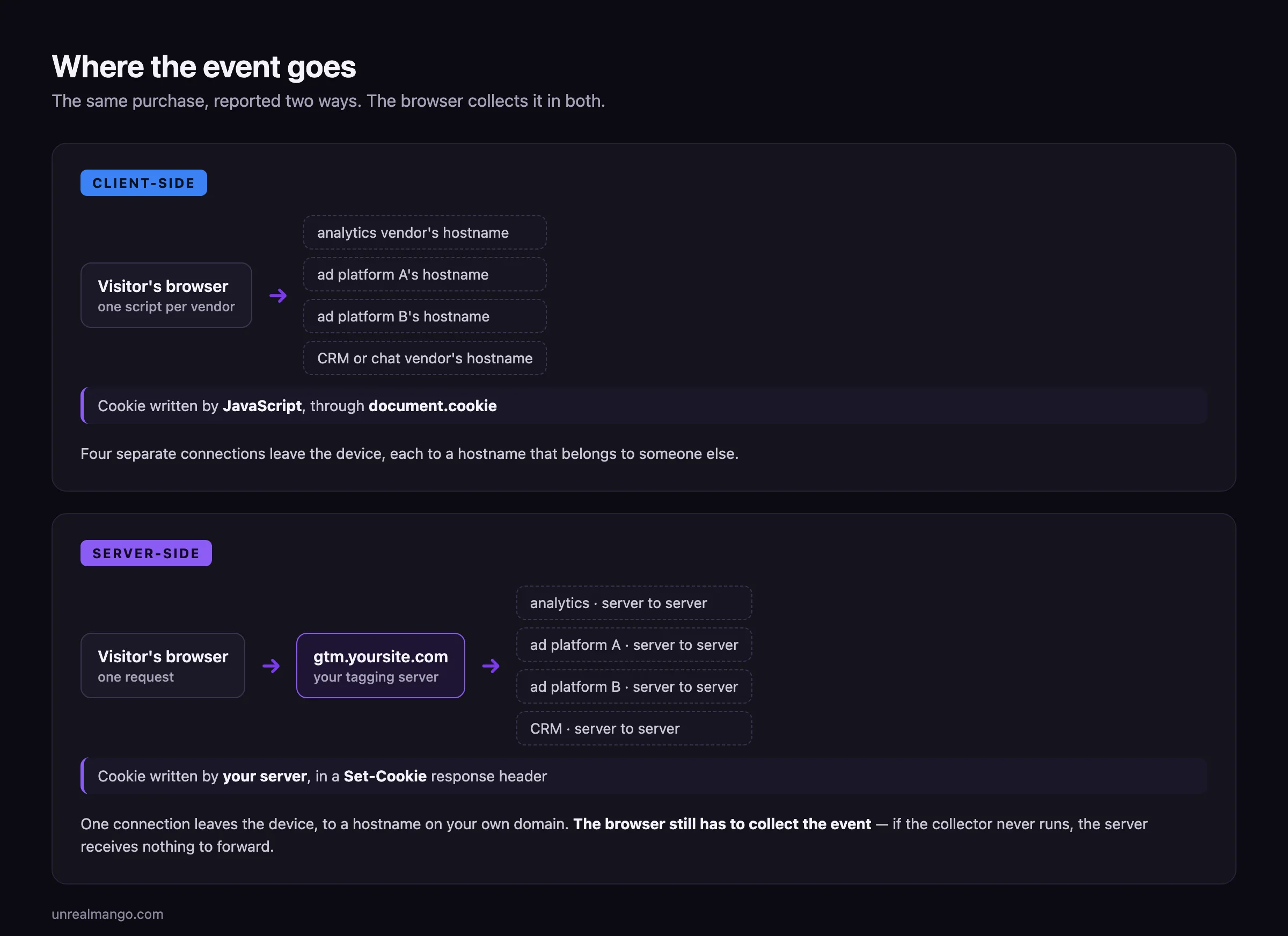
What moves, first: the destination of the outbound request. Client-side, the page opens a connection to each vendor’s own hostname, once per tag. Server-side, it opens one connection to a hostname on your domain. Google’s manual setup guide is explicit about where that hostname should live: host the tagging server “in the same origin (best practice) or as a subdomain of your current website.”
Second: the fan-out. Sending the same purchase to analytics, two ad platforms and a CRM is four requests from four scripts in the browser, or one request to your server and four server-to-server calls the visitor’s device never makes. That is the page-weight argument, and it is the least interesting one.
Third, and this is the part worth the money: who writes the cookie. Client-side, the identifier cookie is written by JavaScript through document.cookie. Server-side, it can be written by your server in a Set-Cookie response header. Those two are treated differently by Safari, which is the reason the architecture usually gets bought — and the difference is narrower than the sales pitch, in a way the next section takes apart.
Safari caps server-set cookies too, and your DNS record decides it
The claim you will read everywhere is that Safari’s seven-day cookie cap applies to cookies written by JavaScript, so a cookie written by your server escapes it and lives for months. That base rule is real — it arrived with Intelligent Tracking Prevention 2.1 in February 2019, and a second WebKit change in September 2019 added a separate purge of script-writeable storage. The claim built on top of it is true conditionally, and almost nobody publishes the condition.
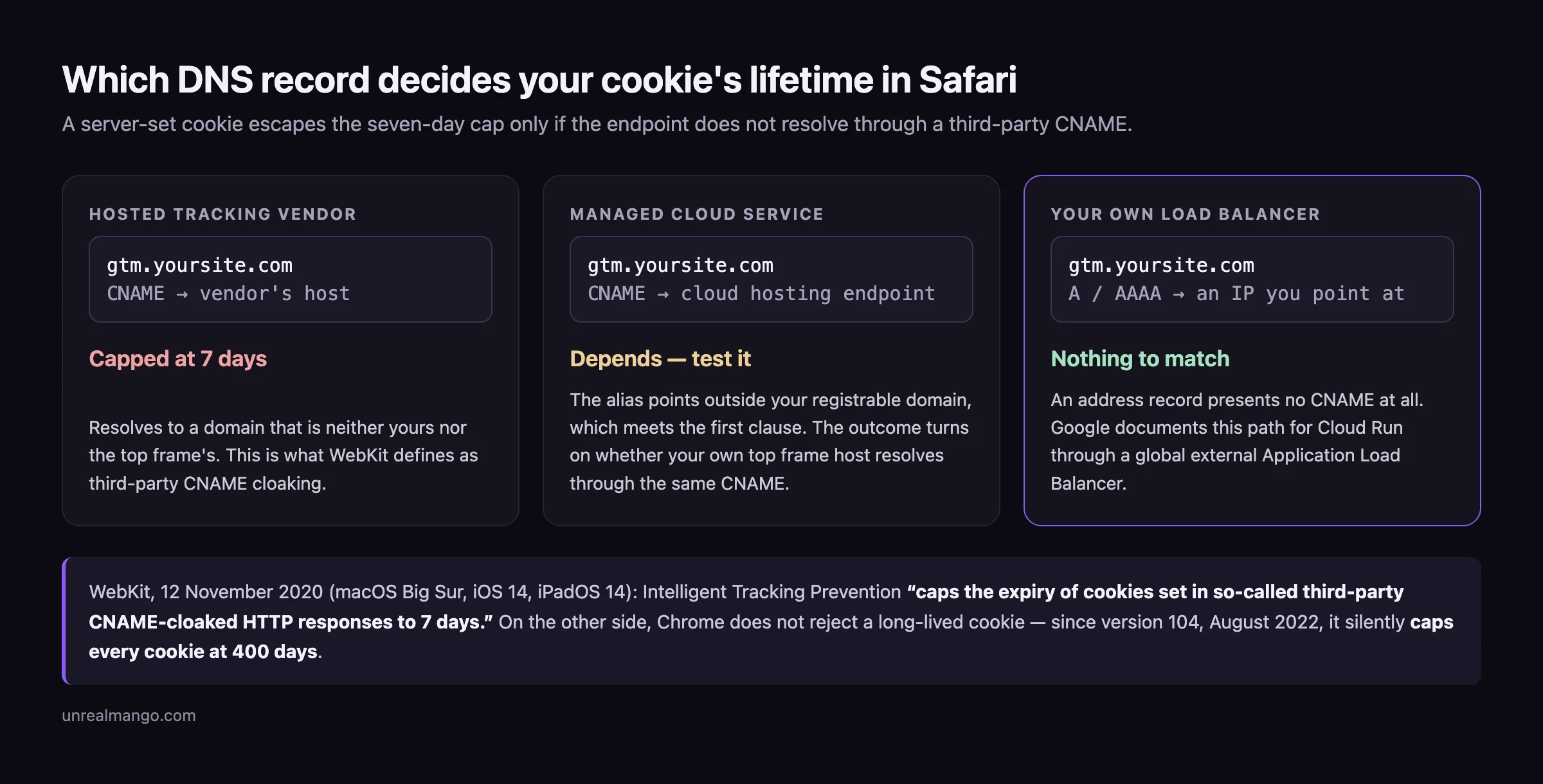
The condition is in WebKit’s announcement of 12 November 2020. Safari 14 shipped that release across Big Sur, Catalina and Mojave, but WebKit states that on macOS this particular enhancement “is specific to Big Sur”; on mobile it arrived with iOS 14 and iPadOS 14. In WebKit’s words, Intelligent Tracking Prevention “now caps the expiry of cookies set in so-called third-party CNAME-cloaked HTTP responses to 7 days.” The seven-day cap follows the cookie into the Set-Cookie header when the request qualifies as CNAME-cloaked.
WebKit’s definition of qualifying is a single sentence, and it is a DNS test rather than a behavioural one: “Third-party CNAME cloaking is defined as a first-party subresource that resolves through a CNAME that differs from the first-party domain and differs from the top frame host’s CNAME, if one exists.” Both halves of that sentence do work. In WebKit’s own table, a page on www.blog.example loading a subresource that resolves to other.blog.example is first-party cloaking and gets no cap, while the same subresource resolving to tracker.example is third-party cloaking and gets the seven days. The trailing clause is the one people miss: if your top frame host is itself already behind a CNAME, a subresource resolving through the same alias is not treated as third-party at all.
Read that against how tagging servers are actually deployed and the consequence is uncomfortable:
| How the endpoint resolves | Typical setup | Safari’s treatment of the server-set cookie |
|---|---|---|
| CNAME to a managed tracking vendor’s host | A hosted tagging-server provider | Third-party CNAME cloaking; capped at 7 days |
| CNAME to a cloud platform’s hosting endpoint | A container mapped straight to a managed service subdomain | First clause of the test is met; the outcome depends on whether your own top frame host resolves through the same CNAME. Test it |
| Address record to an IP you point at | A load balancer in front of your own container | No CNAME is presented, so the rule has nothing to match |
The third row is the one Google actually supports for production. Its Cloud Run documentation offers two ways to put your own hostname in front of a container, and only one of them is fit for this job. Domain mapping — where you “select the type returned in the DNS record in the previous step: A, or AAAA, or CNAME” — carries a warning that it is “in the preview launch stage,” that “due to latency issues, they are not production-ready,” and that “this option is not recommended for production services.” It also returns a CNAME for a subdomain, which is the topology Google’s own tagging guide recommends. The supported alternative is the one that produces an address record: “you add a global external Application Load Balancer in front of your Cloud Run service and configure a custom domain at the load balancer level.”
Two honest limits on all of this. WebKit publishes no list of what it has classified, so this is a rule you have to test against your own deployment rather than assume. And the ceiling on the other side is not infinite either: since Chrome 104 in August 2022, Chrome has capped cookie lifetime rather than rejecting long ones — “cookies that request an expiration date further out than 400 days aren’t rejected; their expiration date is set to 400 days instead,” a number Chrome chose because it is “a bit over 13 months,” so that sites visited about once a year keep their cookies. Just over a year at the very best, and only if your DNS is right.
What the move fixes, mechanism by mechanism
| Problem | Fixed? | The actual mechanism |
|---|---|---|
| Requests to vendor hostnames blocked before they leave | Partly | The outbound request goes to your own hostname, which is not on the third-party blocklists that name vendor domains |
| Attribution window collapsing after seven days in Safari | Yes, conditionally | The identifier arrives in a Set-Cookie header rather than through document.cookie — provided the endpoint does not resolve through a third-party CNAME |
| Weak identity reaching ad platforms | Yes | The server can attach what the page never held: a hashed email from your order record, the click ID, the IP and user agent, in one payload |
| Conversions that happen after the browser has gone | Yes | A refund, a renewal, a deal that closes in the CRM two months later has no browser session at all, and only a server can report it |
| Page weight from tag scripts | Yes, marginally | Several vendor scripts collapse into one request; measurable, rarely decisive |
The second row is the one that pays. A business-to-business enquiry that arrives three weeks after the ad click is not an edge case, it is routine. Under a seven-day cookie the click is forgotten by then and the enquiry is recorded as direct, so the campaign that produced it is judged to have produced nothing — and, worse, the platform’s bidding algorithm learns from that judgement and bids down the campaign that actually worked.
The third row is where the platform-specific detail lives, and it is genuinely deep: which identifiers each platform ranks highest, how the two copies of one event get reconciled, and what a real setup costs to own. On Meta’s side that is all worked through in the guide to the Meta Conversions API, including the only defensible answer to “how much browser data actually goes missing” and why every confident percentage on that question is either sourced from someone selling the remedy or not sourced at all.
Four things it does not fix, starting with consent
It does not put you outside the consent rules. Server-side tracking is a transport decision, and the rules attach to a moment that transport does not move: the moment information is stored on or read from the visitor’s device. The EDPB’s Guidelines 2/2023 on the technical scope of Article 5(3) of the ePrivacy Directive, adopted in version 2.0 on 7 October 2024, are the reference here, and two points in them matter. The guidelines list five covered use cases — URL and pixel tracking, local processing, tracking based on IP only, intermittent and mediated Internet of Things reporting, and unique identifiers — which is a set chosen precisely because none of them is a cookie. And on who performs the operation, the wording is that “the storage and access do not need to occur within the same communication and do not need to be performed by the same party.” Routing the same identifier through your own server changes neither the storage nor the access. Your banner stays, and your server has to honour what the banner returns.
It does not make you unblockable. It moves you off the lists that name vendor domains, which is most of the benefit, and then the race continues. uBlock Origin resolves CNAME records on Firefox for exactly this reason, describing the capability as the “ability to uncloak 3rd-party servers disguised as 1st-party through CNAME record,” and citing alongside it an August 2020 analysis of CNAME-cloaking-based tracking on the web. It is a Firefox capability, not a Chromium one, so the exposure is proportional to how much of your audience uses Firefox — but the endpoint paths that ship by default with every tagging container are identical across every site that runs one, and filter lists read paths as easily as hostnames.
It does not follow anyone between devices. A cookie set on a phone and a cookie set on a laptop are two different visitors, and no amount of server-side anything joins them. That is solved by a login or by stitching on an email address inside your CRM, and it is solved in the same way whether your tags run in a browser or on a server.
It does not improve a number that was measuring the wrong thing. If the event you count as a conversion is a form submission and half of those submissions are unqualified, server-side tracking delivers a more reliable count of a number you should not be optimising against. This is the failure that survives every technical fix, and it is the subject of the last section.
Google publishes the price per instance, and never the total
The AI Overview for this query offers to explain cost and hosting requirements. Google’s own documentation answers it — per instance, with the configuration rules on a second page, and never as a total. It sends you to the pricing calculator instead.
From the Cloud Run setup guide: “In this Cloud Run configuration, each server costs approximately $45 /month (USD).” The same page defines the unit — “each server is a Cloud Run instance with 1 vCPU and 0.5GB memory using the CPU always allocated pricing model” — and adds the availability rule: “We recommend running a minimum of 2 instances to reduce the risk of data loss in case of a server outage.” Its deployment example ships with --min-instances 2 and --max-instances 10, of which Google says: “we expect that autoscaling 2-10 servers will handle 35-350 requests per second, though the performance will vary with the number of tags, and what those tags do.”
The manual setup guide adds the constraint that decides the count. The preview server is provisioned separately from the tagging cluster, and the instruction is unambiguous — “you must deploy exactly 1 preview server. Do not configure autoscaling beyond 1 instance.” It also caps the useful size of each box: servers “should have at most 1 vCPU. Additional vCPUs are not utilized and affect autoscaling negatively,” so there is no cheaper configuration hiding behind a bigger machine.
Put Google’s own numbers together and the minimum production shape is two tagging instances plus one preview server. Three instances at roughly $45 each is about $135 a month, or a little over $1,600 a year — and that is the floor, not the bill. Two qualifiers travel with it. Google publishes the $45 for an always-allocated tagging instance and never states the preview server’s cost separately, so the third instance is an assumption of parity rather than a published figure. And $135 is the price at --min-instances 2; a site that actually reaches the top of Google’s own quoted throughput range is running up to ten tagging instances, which is roughly three and a half times more on that tier alone. Everything above sits before implementation, before the monitoring that tells you when it stops, and before a managed vendor if you would rather not own a cloud deployment — and hosted providers price by request volume and quote individually, so there is no honest single figure to print for them.
The cost that does not appear on either page is the one that actually bites. A tagging server is a production system with your revenue reporting behind it. When it stops, nothing on your website breaks and nothing pages you — the numbers just quietly go flat, and you find out on the following Monday.
The spend below which owning a tagging server does not pay
Work it as arithmetic rather than as a feeling. Server-side tracking has a fixed annual cost and produces a percentage improvement in the efficiency of a variable budget, so the break-even is set by the size of that budget.
At Google’s floor of about $135 a month, the monthly ad spend you need before the hosting pays for itself is:
| If server-side improves paid efficiency by | Break-even monthly ad spend |
|---|---|
| 2% | about $6,750 |
| 5% | about $2,700 |
| 10% | about $1,350 |
Those figures are deliberately generous, because they count hosting at the minimum configuration and nothing else. Add a developer’s implementation time, a few hours a month of maintenance, and the autoscaling headroom a busy site actually uses, and every row moves up by a multiple rather than a margin. The other qualifier that belongs with the table: the efficiency-gain column is an assumption you supply, not a measured constant, and the honest way to hold it is as a range you test rather than a number you were sold.
Read against that arithmetic, some businesses should not do this at all:
- Spend under a few thousand a month with a short buying cycle. The recoverable loss is smaller than the fixed cost, and the same effort spent on the offer would return more.
- Audiences that are overwhelmingly Chrome on Android. The cookie mechanism you are paying to escape is Safari’s. The less Safari in your traffic, the less there is to fix.
- A single conversion event that happens in the same session as the click. If nothing needs to survive for three weeks, a long-lived identifier is buying you very little.
- Nobody who can own it. A tagging server with no owner degrades into a silent single point of failure for every number your marketing decisions rest on.
Businesses that clearly should: long sales cycles where the conversion that matters happens weeks after the click, audiences your own analytics show to be Safari-heavy, and anyone whose real conversion lives in a CRM rather than on a thank-you page.
The pipe is the smaller half of the problem
Server-side tracking fixes the pipe. In a business with a sales cycle measured in months, the pipe is rarely the expensive breakage — what counts as success is.
The chain that changes the outcome runs past the website entirely. The ad click carries an identifier. The enquiry writes that identifier into the CRM alongside the contact. Two months later the deal closes at a real amount, and that amount goes back to the ad platform as an offline conversion attached to the original identifier. At that point the bidding algorithm is optimising towards revenue instead of towards form submissions, which is a different objective and usually a different set of winning campaigns. Without that last step, all the server-side work has bought you is a more accurate count of enquiries, half of which you did not want.
That is also why server-side tracking belongs in the budget conversation: a more truthful conversion number usually moves the paid media plan before it moves the reporting — a campaign that looked flat and was quietly producing revenue does not need better dashboards, it needs more money. The arithmetic for what that costs per click and per lead is worked through separately in the guide to how much Google Ads cost.
One last piece of housekeeping, because the term collides. Server-side rendering is an unrelated thing: it is about where a page’s HTML is built, and it affects how search engines see your content, not how your analytics events travel. The two share three words and nothing else. And if the reason you are reading this is that your reported numbers stopped matching reality, check the cheaper explanations first — a benchmark that never applied to your audience is a more common cause of a number that looks wrong than a broken pipe, which is the same trap set out in the piece on what a good email open rate actually is.
08 / Reader questions
Frequently asked questions
01Is server-side tracking legal?
Yes, and it changes nothing about your consent obligations. Server-side tracking is a transport choice, not a legal one. In the EU, the EDPB's Guidelines 2/2023 on the technical scope of Article 5(3) of the ePrivacy Directive, adopted in version 2.0 on 7 October 2024, state that storage and access need not be performed by the same party, and list IP-only tracking and URL and pixel tracking among the covered techniques.
02What is the difference between client-side and server-side tracking?
In client-side tracking the visitor's browser sends the event directly to each vendor: one request to Google, one to Meta, one to every other tag. In server-side tracking the browser sends one request to an endpoint on your own domain, and that server forwards the event to each vendor over server-to-server APIs. The browser still collects the event in both cases.
03Can you give an example of server-side tracking?
A visitor completes a checkout. Instead of the page firing separate requests to an analytics endpoint and an ad platform, it posts the purchase once to a tagging server on a subdomain of your site. That server enriches the event with the hashed email from your order record, then sends it onward to analytics, to your ad platforms and to your CRM as separate server-to-server calls.
04Is server-side tagging the same as server-side tracking?
Nearly, and the difference is worth one sentence. Server-side tagging is the narrower term: it names the architecture where tags run in a container on a server instead of in the browser. Server-side tracking is the broader outcome that architecture is bought for, and it also covers server-to-server integrations that use no tag container at all.
05How much does server-side tracking cost?
Google's own Cloud Run guide puts a tagging server at about $45 a month per instance, and the minimum production shape is two tagging instances plus exactly one preview server. That is a floor of roughly $135 a month, before autoscaling, implementation, monitoring or a managed vendor — Google itself publishes no total and points you at its pricing calculator. Hosted providers quote by request volume.
06Does server-side tracking stop ad blockers?
Partly, and it is a race rather than a fix. Requests to a first-party endpoint on your own domain are not on the third-party blocklists that catch vendor domains. But uBlock Origin resolves CNAME records on Firefox specifically to unmask third-party servers disguised as first-party, and default endpoint paths are recognisable to filter lists.
07Do you still need a cookie banner with server-side tracking?
Yes, wherever you needed one before. Moving the collection point does not remove the moment when information is stored on or read from the visitor's device, which is the moment the rules attach to. Consent signals are still gathered in the browser and then honoured by the server, which means your banner stays and your server has to respect it.